Our Top Picks
 Best Overall for RangeVeken 55 Inch Large Electric Standing Desk55×23.6 Inch23.64 x 55.12 x 28.3 Inches42.1 poundsCheck on Amazon
A good height for a standing desk is the one that puts the desktop at your elbow height, so your forearms sit roughly level with the floor while you type. For most adults that works out to about 38 to 48 inches measured from the floor to the top surface, which is why the adjustment range of the desk matters more than its headline size. The Vari ComfortEdge (25 to 50.5 inches) has the widest verified range in this guide and is our top pick for households where people of different heights share one desk, while the FlexiSpot E6 MAX is the runner-up for anyone who needs a very high ceiling and a heavy load rating.
This guide is built around one idea that most product roundups skip: work out your own numbers first, then match them to a desk. Below you will find a quick elbow-height calculation, a chart by body height, and six desks whose published height ranges cover different parts of that chart. Everything here is research-based. We did not personally use these desks; specs come from maker pages and listing details, and anything we could not confirm is marked “not listed”.

ErGear 48 X 24 Inch Height Adjustable Electric Standing Desk, Black | Stand Up office Desk, Home Office Computer Desk with 4 Memory Presets, Stable Steel Frame, 176 lbs Capacity, Easy Assembly
Chosen because it specifies Black and Stand Up office Desk.
View on AmazonVeken 55 Inch Large Electric Standing Desk, Gaming Table, White | Height Adjustable Sit Stand Up Computer Tables for Home Office, Study , Writing, Suit students, employees and group work
Chosen because it specifies Gaming Table and White.
View on Amazon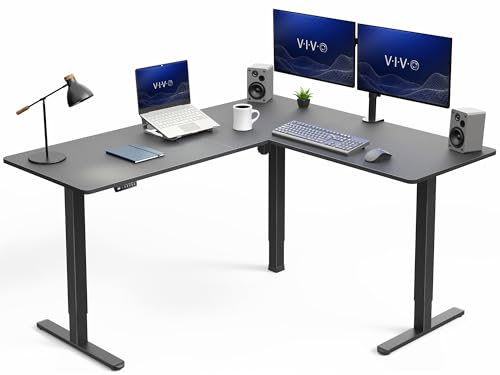
VIVO Electric Corner Standing Desk, L-Shaped, 63" x 55" Black Top | Holds 225 lbs, 3 Leg, Single Motor, 4 Memory Presets, Reversible, Height Adjustable, Black Frame, DESK-E3CTB
Chosen because it specifies L-Shaped and 63" x 55" Black Top.
View on Amazon
FEZIBO Standing Desk 48 × 24 Inch Electric Height Adjustable, Maple | Sit and Stand Up Adjustable Desk, Home Office Computer Desk with 3 Customizable Memory Presets
Chosen because it specifies Maple and Sit and Stand Up Adjustable Desk.
View on AmazonTop Picks at a Glance
- Best Overall for Range: Vari ComfortEdge Electric Standing Desk
- Best for Very Tall Users: FlexiSpot E6 MAX
- Best for Short Users: UPLIFT V3 (lowest minimum height in this group)
- Best Large Desktop: Mount-It 72 inch Dual Motor Standing Desk
- Best Value: FlexiSpot EN1 One-Piece Standing Desk
- Best Budget: FEZIBO 48 x 24 Electric Standing Desk
Standing Desk Height Chart: Find Your Number First
Ergonomic guidance commonly suggests that your elbows rest near a 90 degree angle with your wrists fairly neutral. Two rules of thumb get you close: standing elbow height is roughly 63 percent of your body height, and a comfortable seated desk height is roughly 41 percent. These are estimates, not medical measurements, and shoes, chair and keyboard thickness all shift the result by an inch or two. The easy real-world method is to stand barefoot with your upper arms relaxed, bend your elbows to 90 degrees, and have someone measure from the floor to the underside of your forearm.
| Your height | Approx. standing desktop height | Approx. sitting desktop height | What the desk must cover |
|---|---|---|---|
| 5 ft 0 in (60 in) | 38 in | 25 in | Minimum height of 25 in or lower |
| 5 ft 4 in (64 in) | 40 in | 26 in | About 26 to 41 in |
| 5 ft 8 in (68 in) | 43 in | 28 in | About 28 to 44 in |
| 6 ft 0 in (72 in) | 45 in | 30 in | About 30 to 46 in |
| 6 ft 4 in (76 in) | 48 in | 31 in | About 31 to 49 in |
| 6 ft 7 in (79 in) | 50 in | 32 in | About 32 to 51 in, very few desks reach this |
Two details trip people up. First, the published range of a desk is sometimes quoted for the frame alone, and the desktop thickness (usually about 0.7 to 1.25 inches) adds to both ends. Second, the numbers above are for the desktop surface, while your keyboard sits on top of it, so many people land one inch below their raw elbow figure. Keep a margin of at least one inch at both ends of the range so you are never working at the very edge of the motor travel.
Comparison Table
| Product | Best for | Key specs | Watch for | Price tier |
|---|---|---|---|---|
| Vari ComfortEdge | Widest range, shared desks | 25 to 50.5 in, dual motors, 4 presets | Load rating drops on larger tops | Premium |
| FlexiSpot E6 MAX | Tall users, heavy gear | About 24.4 to 50.0 in on listings, 352 lb frame rating | Check the exact variant range | Mid-range to Premium |
| UPLIFT V3 (2-leg) | Short and average users | 21.6 to 47.7 in frame, 355 lb lift | Not for people over about 6 ft 3 in | Premium |
| Mount-It 72 in Dual Motor | Wide multi-screen setups | 29.3 to 48.2 in, 220 lb, 72 x 29.5 in top | Minimum height is high for short users | Mid-range |
| FlexiSpot EN1 | Value for average heights | 28.1 to 45.7 in, 176 lb, 4 presets | Tops out below 46 in | Budget to Mid-range |
| FEZIBO 48 x 24 | Small rooms, lowest cost | About 28.3 to 46.5 in, 176 lb, 3 presets | Specs vary by model | Budget |
1. Vari ComfortEdge: Best Overall for Range
- Height range: 25 to 50.5 inches on every size, per the maker
- Dual motors, three-stage legs, four programmable presets
- 1.25 inch thick laminate desktop with a sloped front edge
- Sizes include 40 x 26, 48 x 30, 54 x 26, 60 x 30 and 72 x 30
- Load rating about 220 lb on small tops, 180 to 200 lb on the largest, so check the size you pick
Best for: Couples, roommates or families sharing one desk, and anyone between 5 ft and 6 ft 5 in. Skip if: you want to spend as little as possible or plan to load the desk with several heavy monitors and a PC tower.
The reason this desk tops a height-focused list is simple arithmetic. A minimum of 25 inches suits a person who is about 5 ft tall sitting down, and a maximum of 50.5 inches clears the 6 ft 4 in standing figure from the chart with room to spare. Very few complete desks span both ends, which is what makes it practical for a shared home office where one person is 5 ft 2 in and another is 6 ft 3 in.
The sloped front edge is a comfort detail rather than a height feature, but it matters once you have found your number: a contoured edge puts less pressure on the underside of your wrists when the desk is set at the right level. The trade-off is price and capacity. The load rating falls as the top gets bigger, so a 72 inch version suits a laptop and two lighter monitors better than a heavy workstation.
Pros: widest verified range, four presets, thick top, long warranty for the original buyer per the maker. Cons: premium price, lower load rating on large tops, sizes are on the smaller side for creative workstations.
2. FlexiSpot E6 MAX: Best for Very Tall Users
- Height range: about 24.4 to 50.0 inches on listings (confirm per variant)
- Dual motor, three-stage lifting system, presets and anti-collision
- Heavy-duty frame rating of 352 lb on listings
- Sold in 48 x 30, 55 x 28, 60 x 30, 71 x 30 and 72 x 30 sizes and several tops
- Bamboo, solid wood and seamless laminate top options
Best for: People around 6 ft 2 in to 6 ft 6 in, and anyone with heavy monitors. Skip if: you need a very low minimum, because 24.4 inches is fine for most but not for a seated user under about 5 ft 1 in.
The E6 MAX is the clearest alternative to the Vari when the maximum height is the deciding number. A 50 inch ceiling lets a 6 ft 5 in user stand with their elbows at the right level even after adding a mat. The 352 lb frame rating also leaves headroom for a dual monitor arm, a PC and accessories, which matters because lifting capacity quoted for the frame is not the same as what the desktop itself can hold.
One practical warning: FlexiSpot sells several E6 versions, and the older E6 is listed at about 23.6 to 48.8 inches with a 220 lb rating. The MAX is the wider-range model, so make sure the variant you add to the cart says MAX.
Pros: 50 inch ceiling, strong load rating, many top and size options. Cons: variant naming is confusing, ships in more than one box, assembly takes longer than a one-piece desk.
3. UPLIFT V3: Best for Short and Average Users
- C-frame height range 21.6 to 47.7 inches (23.8 to 49.9 with foot spacers), per UPLIFT
- 2-leg frame lifts 355 lb; the 4-leg version is rated at 535 lb
- Four-leg and two-leg versions, laminate and bamboo tops, many sizes
- Advanced keypad with memory presets
- Long warranty advertised by the maker
Best for: People from about 4 ft 11 in to 6 ft 2 in, including kids and teens doing homework at a desk that has to grow with them. Skip if: you are over about 6 ft 3 in, because the standard 47.7 inch ceiling is a real limit.
The low end of the range is the story here. A frame that can drop to 21.6 inches fits a seated user who is 4 ft 10 in or someone who prefers a recliner-style posture with the keyboard on a lap-level surface. It is the only desk in this guide that clearly serves short users, and it also covers the average-height user comfortably.
The higher price reflects customization and a frame that lifts 355 lb, so it makes more sense if you will keep the desk for years than if you are furnishing a temporary space.
Pros: lowest minimum height, very high lift rating, many top options. Cons: expensive once you add a top and accessories, maximum height is a limit for tall people.
4. Mount-It 72 Inch Dual Motor Standing Desk: Best Large Desktop
- Height range: 29.3 to 48.2 inches
- 72 x 29.5 x 1 inch MDF top, 220 lb total capacity
- Two motors, two-stage legs, three presets and anti-collision
- Noise below 50 dB and 1 inch per second speed, per the maker
- Limited lifetime warranty advertised
Best for: Average to tall users who want a wide work surface for two or three monitors. Skip if: you are under about 5 ft 3 in, since 29.3 inches is a high minimum.
The numbers explain who this desk suits: with a 48.2 inch top it reaches the standing height of someone who is about 6 ft 4 in, and the minimum of 29.3 inches matches the sitting height of someone around 5 ft 11 in. That makes it a better fit for taller members of the household than for short ones. At 72 inches wide it also takes up serious floor space, so measure the wall length and the swing of the door before ordering.
Pros: large surface, solid range at the top end, anti-collision, long warranty. Cons: high minimum height, heavy box to move, MDF top can chip at the corners over time.
5. FlexiSpot EN1: Best Value for Average Heights
- Height range: 28.1 to 45.7 inches (top thickness extra), per the current manual
- Capacity 176 lb on current listings (older listings say 154 lb)
- One-piece desktop, 4 memory presets
- Sizes include 40 x 24, 48 x 24, 48 x 30 and 55 x 28
- Noise rated below 50 dB
Best for: People between about 5 ft 3 in and 5 ft 11 in who want a simple, well-known brand. Skip if: you are taller than about 6 ft, because a top that reaches roughly 46 to 47 inches leaves your wrists slightly bent upward.
The EN1 is a good illustration of why you should do the chart exercise. Its range is perfect for a 5 ft 8 in person (needs about 28 to 43 inches) and borderline for a 6 ft 1 in person (needs about 30 to 46 inches). Because the one-piece top has no seam, it is also easy to wipe and tidy.
Pros: well-known brand, seamless top, four presets, widely available sizes. Cons: narrower range, capacity drops if you hang items on the hooks, lighter frame than the dual-motor models.
6. FEZIBO 48 x 24 Electric Standing Desk: Best Budget
- Height range about 28.3 to 46.5 inches on the maple model (varies by FEZIBO version)
- Capacity 176 lb on most 48 x 24 versions
- 3 memory presets and anti-collision sensing on most versions
- Compact 48 x 24 inch top
Best for: A bedroom corner, dorm, or a second desk for a laptop and one monitor. Skip if: you need a deep surface or any significant weight capacity.
FEZIBO lists several 48 x 24 models with slightly different ranges, from 27.3 to 45.5 inches on the keyboard-tray model to 28.3 to 46.5 inches on the maple model, so read the specific listing. For a person up to about 5 ft 10 in this is more than enough, and the low cost is the main reason to choose it.
Pros: low cost, compact footprint, presets included. Cons: limited range at the top, shallow desktop, lighter frame.
Also Consider
- Autonomous Desk 5 (48 x 24): single motor, 29.4 to 47.5 inches with the top, 176 lb, three presets and a cable tray per retailer spec sheets; a good small-room alternative to the FEZIBO.
- ErGear 55 x 28 Electric Standing Desk: 28.35 to 46.46 inches and 176 lb on the standard model, with a deeper top than the 48 inch desks.
- VASAGLE 63 x 28 Electric Standing Desk: about 28.3 to 46.1 inches and 154 lb, with a sedentary reminder feature; check the listing for the exact range.
- DeskShow 60 x 30: the listing states 27.7 to 45.5 inches and 250 lb with three presets, which is generous for a desk at this tier.
How We Chose
This guide is research-based. We did not personally use these desks. We started with models that are currently sold in the product store this site uses, then checked manufacturer pages and retailer spec sheets for height range, capacity and warranty, and read independent write-ups from publications that cover standing desks. Where sources disagreed (for example the EN1 capacity of 154 versus 176 lb, or the exact E6 MAX minimum), we say so instead of picking one. A desk made the list only if we could state its adjustment range from at least one maker or retailer spec sheet, because range is the point of this guide. Prices are shown as tiers only, since street prices move often.
Buying Guide: Choosing a Standing Desk Height Range
Step 1: Measure instead of guessing
Stand barefoot, bend your elbows to 90 degrees, and measure from the floor to the underside of your forearms. Repeat sitting in your actual chair with your feet flat on the floor. Add or subtract an inch if your keyboard is thicker than about an inch. These two numbers, standing and sitting, are the range you need, and it is better to write them on a sticky note before shopping.
Step 2: Check range with top thickness
Some makers quote the frame only. A one inch top adds about an inch at both ends. If your standing number is 47 inches and the frame tops out at 47.5 with a 1 inch top, you are covered, but if the frame tops out at 46.5 without a top, you are at the limit. Prefer desks where the stated range includes the top or where the margin is at least one inch.
Step 3: Match motors and stages to your height
Single-motor desks with two-stage legs usually top out around 45 to 47 inches. Dual-motor, three-stage frames reach 48 to 50.5 inches and also tend to be more stable at full height. If you are over 6 ft 2 in, plan on a three-stage frame.
Step 4: Count weight, not just size
Add up the weight of the monitors, arm, laptop and any storage you hang on the desk. A typical home office with two monitors, a dock and speakers runs 40 to 70 lb. Capacity ratings above 176 lb give a comfortable margin, and a quoted capacity of 154 lb is still fine for a laptop-only desk.
Step 5: Plan for the room
A 60 inch desk needs about 5 feet of clear wall plus a 3 foot gap to move your chair. Remember that a standing desk in the up position needs overhead clearance, especially under a sloped ceiling or shelves; a tall user at 48 inches of desktop height plus a monitor arm may hit a low shelf.
Common Mistakes
- Choosing a desk for the maximum height only; the minimum matters for sitting comfort.
- Forgetting that a chair with higher armrests needs a higher sitting setting.
- Ignoring the weight of monitor arms and speakers, which count against the capacity.
- Buying a long desk without checking that the box fits through your doorway; many 60 to 72 inch tops ship in boxes longer than five feet and weigh around 90 to 140 lb.
Decision Matrix: Your Situation to a Desk
| Your situation | Height numbers to look for | Best match | Why |
|---|---|---|---|
| Two adults, 5 ft 2 in and 6 ft 3 in, one desk | Minimum 26 in or lower, maximum 49 in or higher | Vari ComfortEdge | 25 to 50.5 in covers both without swapping parts |
| Single user over 6 ft 3 in | Maximum 49 in or higher | FlexiSpot E6 MAX | About 50 in ceiling on listings and a 352 lb frame rating |
| Teen or adult under 5 ft 2 in | Minimum 25 in or lower | UPLIFT V3 | 21.6 in minimum on the C-frame |
| Three monitors on a wide desk, user 5 ft 10 in to 6 ft 4 in | Width 70 in or more, range 29 to 48 in | Mount-It 72 in | 72 in top and a 29.3 to 48.2 in range |
| One laptop in a bedroom, user under 5 ft 10 in | Range 28 to 45 in | FlexiSpot EN1 or FEZIBO 48 x 24 | Lowest cost that still has presets |
The matrix is deliberately simple: if the situation you recognise matches two rows, treat the narrower height requirement as the tie-breaker. A desk that is slightly oversized in width is easy to live with; a desk that cannot reach your elbow height is the one thing you cannot fix later, short of buying a separate frame or adding a keyboard tray.
Worked example: choosing for a 6 ft 1 in user
A 6 ft 1 in (73 in) user multiplies by 0.63 to get a standing elbow height of about 46 inches and by 0.41 to get a seated desktop height of about 30 inches. The desk needs to cover roughly 30 to 46 inches with the top installed. The FlexiSpot EN1 (28.1 to 45.7 inches plus the top thickness) technically gets there, but the user would be at the very end of the travel when standing, with no spare range if they wear thicker shoes. The Mount-It 72 inch (29.3 to 48.2 inches) leaves more than two inches of margin, and the E6 MAX or Vari ComfortEdge leave more than four. That margin is what you are paying for in the higher price tier.
Frequently Asked Questions
What is the ideal height for a standing desk?
The ideal height is your elbow height, usually 38 to 48 inches depending on your height. Measure standing barefoot with a 90 degree elbow bend and set the desktop so your forearms are roughly level.
What height should my standing desk be if I am 5 ft 10 in?
Plan on about 44 inches standing and about 29 inches sitting. A desk that adjusts from 28 to 46 inches covers you comfortably.
Is a standing desk range of 28 to 46 inches enough?
It is enough for most people up to about 6 ft. If you are taller, choose a range that reaches at least 48 inches, such as the FlexiSpot E6 MAX or Vari ComfortEdge.
Should I stand at my elbow height or slightly lower?
Many people find a desktop one inch below their elbow height more comfortable, because the keyboard adds thickness. Adjust in small steps until your shoulders are relaxed and wrists are fairly straight.
How long should I stand each day?
There is no single right number. Many ergonomics sources suggest alternating and changing position every 30 to 60 minutes, and a doctor or physical therapist can advise if you have a health condition or pain.
Do I need a taller desk if I wear thick shoes or use an anti-fatigue mat?
Yes, a mat or shoes with a thick sole adds height to your elbow level. Add that thickness, usually half an inch to one inch, to your standing number.
Can children use a standing desk?
A low-minimum desk such as the UPLIFT V3 can serve teens and shorter adults. For young children, check the maker guidance and seat them with feet supported.
Which One Should You Buy?
If you share a desk or want the safest range, pick the Vari ComfortEdge. If you are very tall or load the desk heavily, pick the FlexiSpot E6 MAX. If you are short, a teenager or work from a low chair, pick the UPLIFT V3. If you need a wide surface and are average to tall, pick the Mount-It 72 inch. If you are average height and want value, choose the FlexiSpot EN1, and if you only need a small, low-cost setup, choose the FEZIBO 48 x 24. Whatever you pick, compare your chart numbers with the exact variant listing before you order.
Sources
- UPLIFT Desk V3 frame specification sheet
- Vari electric standing desk product pages (ComfortEdge)
- FlexiSpot E6 and E6 MAX product listings and EN1 user manual
- Mount-It manufacturer page for the 72 inch dual motor standing desk
- FEZIBO and ErGear manufacturer product pages
- Autonomous Desk 5 retailer specification sheet
Last updated: October 2026