Key takeaways
- A balance board adds gentle movement while you stand, which is a different job from the cushioning an anti-fatigue mat provides. A good standing desk wobble board publishes a weight capacity that comfortably holds you, since the board supports your…
A balance board adds gentle movement while you stand, which is a different job from the cushioning an anti-fatigue mat provides. A good standing desk wobble board publishes a weight capacity that comfortably holds you, since the board supports your full weight in motion, so the rating is the first spec to check.
As an Amazon Associate we earn from qualifying purchases.
By KK Home Furnishings Editorial Team
How to Choose a Standing Desk Wobble Board
A balance board is judged on how much it safely holds and how it moves, not on vague wellness claims. The criteria below start with weight capacity and the kind of motion each board offers, then cover size and desk fit, and what a wobble board actually does, which is add movement rather than cushion or fix posture.
Weight Capacity Comes First
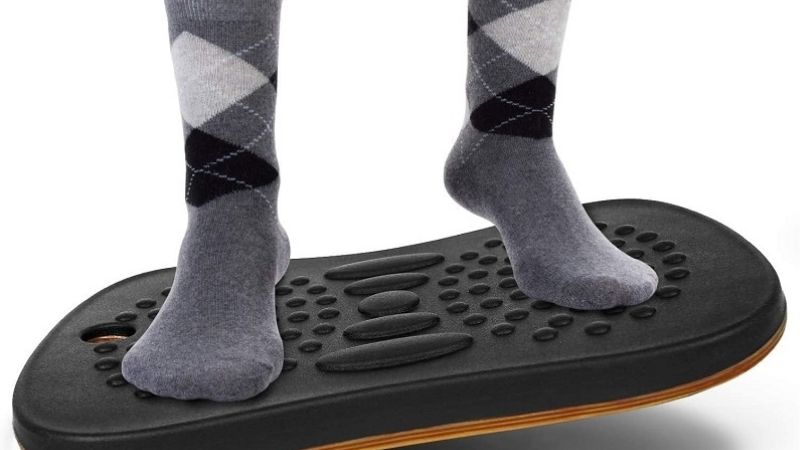
Because the board carries your full weight while you shift and balance, the capacity rating is the first safety check. These range from 250 pounds on the UPLIFT Motion-X to 350 on the UPLIFT Fit and FluidStance Level, and 450 or more on the FluidStance Original, so pick one rated comfortably above your weight with margin to spare.
Leave headroom rather than matching the rating exactly, since balancing adds dynamic load beyond standing still. A board rated near your weight can feel less stable and wears faster, so the heavier-rated FluidStance Original suits larger users or anyone who wants extra margin, while the 250-pound Motion-X fits lighter users within its limit.
Treat the capacity as a ceiling to stay under, not a target. Overloading a balance board stresses the base and the pivot, which is where these accessories fail, so a comfortable margin keeps the board stable in motion and extends its life, especially if you use it for hours rather than a few minutes at a time.
Motion Type and Range
Boards differ in how they move, and the motion suits different users. The FluidStance Original and Level offer 360-degree movement for free, continuous shifting, while the UPLIFT Fit uses a controlled 5-to-8-degree tilt and the Motion-X combines tilt, swivel, and rock, so match the motion to how active you want to be while standing.
A wider, free range like 360 degrees encourages constant micro-movement but takes more getting used to, while a limited tilt feels more controlled and predictable for a beginner. If you are new to a balance board, a smaller tilt range is easier to stand on through a work call, whereas a 360-degree board rewards more practice.
Consider how the motion fits your tasks. Free movement suits reading or thinking, while a controlled tilt suits typing, where too much motion is distracting. Many users find subtle movement comfortable over a long stand, but how much motion helps is individual, so choose the range you will actually use rather than the most dramatic one.
Size, Height and Desk Fit
Footprint and height affect both comfort and your desk setup. These boards measure roughly 19.7 to 27 inches long and about 2.3 to 2.5 inches tall, so a larger board gives more room to shift your stance while a taller one raises your standing height, which can throw off a desk you already set to your elbows.
Add the board’s height to your standing position and re-check your desk. A 2.5-inch board effectively makes you taller at the desk, so you may need to raise the surface slightly to keep your forearms level, which matters on a sit-stand desk where correct height is the point of standing in the first place.
Confirm the top surface grips your shoes and the base grips the floor, since a board that slips is a hazard. A non-slip deck and feet matter more on a hard floor than on carpet, so check the surface against where you will use it, and give yourself clear space around the desk in case you step off quickly.
What a Wobble Board Is and Isn’t
A wobble board is a movement accessory, not an anti-fatigue mat. A mat cushions your feet and joints by providing a soft surface, while a balance board adds motion to engage your legs and core, so the two solve different problems; if your goal is cushioning for long standing, a mat is the right tool, not a board.
Be wary of health promises, since the evidence is limited. A balance board does not cure posture or guarantee a set calorie burn, so treat such claims with caution; many users simply find that subtle movement makes standing more comfortable and less static. If you have a medical condition, check with a doctor before relying on one.
Set realistic expectations and build up gradually. Start with short sessions and a controlled motion, increasing as your balance improves, and alternate between the board, a mat, and sitting rather than standing on a board all day. Used that way it is a useful way to add movement, not a fix for discomfort or a substitute for cushioning.
Top Picks
Each pick leads with the two things that define a standing desk wobble board, a weight capacity you can trust and the kind of motion it offers, plus the trade-off worth knowing. Only two brands publish full specs here, so treat this as a narrow, well-documented set rather than a survey of the whole market.
| Product | Best For | Key Spec | Watch Out For |
|---|---|---|---|
| FluidStance Original | Best overall | 450+ lb; 360° motion; 26.5×12.2 in | Priciest; free motion takes practice |
| FluidStance Level | Best value | 350 lb; 360° motion; 2.375 in tall | Free 360° motion is less controlled |
| UPLIFT Fit | Best for controlled tilt | 350 lb; 5–8° tilt; 19.7×13.8 in | Limited tilt feels tame to some users |
| UPLIFT Motion-X | Best for varied motion | 250 lb; tilt/swivel/rock; 27×12.5 in | Lowest capacity of the four |
FluidStance Original: Best Overall
The FluidStance Original takes the top slot, rated at 450 pounds or more with 360-degree motion on a 26.5-by-12.2-inch deck about 2.5 inches tall. It suits users who want the most capacity and the freest movement. It sits in the premium tier, so confirm the current price before ordering this one.
Its advantage is the high capacity and continuous 360-degree motion, which gives the most margin and the most freedom to shift while standing. Add its 2.5-inch height to your standing position and re-check your desk so your forearms stay level, and confirm the deck grips your shoes, since free motion rewards a secure footing.
The honest caveat is price and learning curve: it is the most expensive here, and the free 360-degree motion takes practice before it feels natural through a work call. Start with short sessions, build up gradually, and remember it adds movement rather than cushioning, so pair it with a mat or sitting rather than standing on it all day.
FluidStance Level: Best Value
The FluidStance Level is the value pick, rated at 350 pounds with 360-degree motion on a 26.5-by-12.2-inch deck about 2.375 inches tall, the lowest profile here. It suits users who want free movement at a friendlier price. It sits in the mid tier, so verify today’s price before choosing it over the Original.
Its strength is the same continuous 360-degree motion as the Original with a slightly lower deck, which raises your standing height a touch less. Add its height to your stance and adjust your desk, confirm the non-slip surface suits your floor, and keep clear space around it, since free motion means you may step off to reset occasionally.
The caveat is that 360-degree motion is less controlled than a fixed tilt, so it takes practice and can distract during focused typing. Its 350-pound rating suits most users with margin, but larger users wanting extra headroom should consider the Original, and everyone should build up session length rather than standing on it for hours at once.
UPLIFT Fit: Best for Controlled Tilt
The UPLIFT Fit is the pick for predictable movement, rated at 350 pounds with a controlled 5-to-8-degree tilt on a compact 19.7-by-13.8-inch deck about 2.4 inches tall. It suits beginners and anyone who types while standing. It sits in the mid tier, so confirm the live price before ordering it.
Its advantage is a controlled tilt that feels stable and easy to stand on through a work call, making it the most beginner-friendly option. The compact footprint fits a smaller space, so confirm it suits your stance, add its height to your standing position, and re-check your desk height so your forearms remain level while you work.
The caveat is that the limited 5-to-8-degree range feels tame to users who want more active movement, who may prefer a 360-degree board. For typing and steady focus, that control is a feature rather than a drawback, so match it to how active you want to be, and remember it adds motion, not the cushioning of a mat.
UPLIFT Motion-X: Best for Varied Motion
The UPLIFT Motion-X rounds out the picks for mixed movement, combining tilt, swivel, and rock on a 27-by-12.5-inch deck about 2.3 inches tall, rated at 250 pounds. It suits lighter users who want varied motion in one board. It sits in the mid tier, so confirm the current price before choosing it.
Its advantage is the variety of motions in a single board, letting you tilt, swivel, and rock to keep standing dynamic. The long deck gives room to shift your stance, so confirm it fits your space, add its height to your standing position, and adjust your desk, since even a low board changes the height your forearms rest at.
The honest caveat is capacity: at 250 pounds it has the lowest rating here, so confirm it suits your weight with margin, since balancing adds load beyond standing still. Heavier users should choose a higher-rated board, and as with any balance board, build up session length and pair it with a mat or sitting rather than overusing it.
Frequently Asked Questions
Shoppers new to balance boards ask the same questions about what they do and how to size them. Each answer below opens with the short version, then the detail that changes it, so you can match a standing desk wobble board to your weight and your tasks rather than to a wellness claim the board cannot actually guarantee.
Is a wobble board the same as an anti-fatigue mat?
No, they do different jobs. An anti-fatigue mat cushions your feet and joints with a soft surface, while a wobble board adds motion to engage your legs and core. If your goal is comfort during long standing, a mat is the right tool; if it is movement, a board is, so the two are complements rather than substitutes.
The deciding factor is what bothers you when you stand. Sore feet and joints point to cushioning, which a board does not provide and can even make more tiring, while stiffness from standing still points to movement, which a mat does not add. Many people use both, switching between them through the day as needed.
If you can only choose one, match it to your main issue, and consider alternating in any case. Standing on a board all day is as static in its own way as standing still, so pairing a board with a mat and regular sitting gives you cushioning, movement, and rest rather than relying on a single surface for everything.
Does a wobble board improve posture or burn calories?
There is no guarantee of either, so treat such claims with caution. A balance board adds gentle movement that many users find makes standing more comfortable and less static, but it does not cure posture or ensure a specific calorie burn. The honest benefit is movement you might otherwise skip, not a measured health outcome.
What a board can do is encourage small, frequent shifts in stance, which some people find keeps them more engaged than standing rigidly. How much that helps is individual and modest, so judge a board by whether it makes standing more pleasant for you rather than by a posture or calorie promise on the packaging.
If you have back pain, joint issues, or another medical condition, check with a doctor before relying on a balance board, since movement that suits one person may not suit another. Used sensibly, in short, building sessions alongside sitting and a mat, it is a reasonable way to add motion, not a treatment for a health problem.
What weight capacity do I need?
One comfortably above your weight, with margin, since balancing adds load beyond standing still. These range from 250 to 450-plus pounds, so pick a rating with headroom rather than one that just meets your weight, as a board near its limit feels less stable and wears faster at the base and pivot where these accessories fail.
Account for dynamic load, not just body weight. Shifting and balancing put more stress on the board than standing on a fixed surface, so a margin above your weight keeps it steady in motion and extends its life, especially if you use it for hours rather than minutes. Larger users should favor the higher-rated boards here.
Treat the rating as a safety ceiling to stay under. If you are near the limit of a given board, step up to a higher-rated one such as the FluidStance Original rather than pushing a lower rating, since the capacity is there to keep the board stable and safe while you move, not a number to test against.
Will a wobble board change my desk height?
Yes, slightly. These boards stand about 2.3 to 2.5 inches tall, so they raise your standing height by that amount, which can throw off a sit-stand desk you set to your elbows. After adding a board, re-check your desk height so your forearms stay level, since correct height is the whole point of standing to work.
The adjustment is small but real. On a desk set precisely to your standing elbow height, a 2.5-inch board means you may need to raise the surface by roughly the same amount to keep your posture right. If several people share the desk, note that the board affects each person’s ideal height differently based on their stance.
Factor the board’s height into your setup from the start. Set your desk with the board in place rather than adjusting afterward, confirm your monitor is still at eye level, and keep the board’s non-slip surface and the floor grip in good condition, since a board that shifts underfoot undoes the careful height you just set.
Final Thoughts
The right standing desk wobble board is the one whose capacity clears your weight with margin and whose motion suits your tasks, controlled tilt for typing or free movement for thinking. Before ordering, add the board’s height to your standing position and re-check your desk, and remember it adds movement rather than the cushioning a mat provides.