Key takeaways
- Buying a frame on its own lets you fit a top you already love, but the number that matters is how much the motors lift, not what the frame holds while parked. A good 4 leg standing desk frame publishes…
Buying a frame on its own lets you fit a top you already love, but the number that matters is how much the motors lift, not what the frame holds while parked. A good 4 leg standing desk frame publishes a lifting capacity and the top sizes it accepts, so your desktop, monitors, and gear rise together.
As an Amazon Associate we earn from qualifying purchases.
By KK Home Furnishings Editorial Team
How to Choose a 4 Leg Standing Desk Frame
A frame is judged on what it raises and what it fits, so the criteria below start with lifting capacity versus static load, then cover height range, desktop compatibility, and the stability details that decide whether a four-leg design actually stays steady at full standing height over years of daily use.
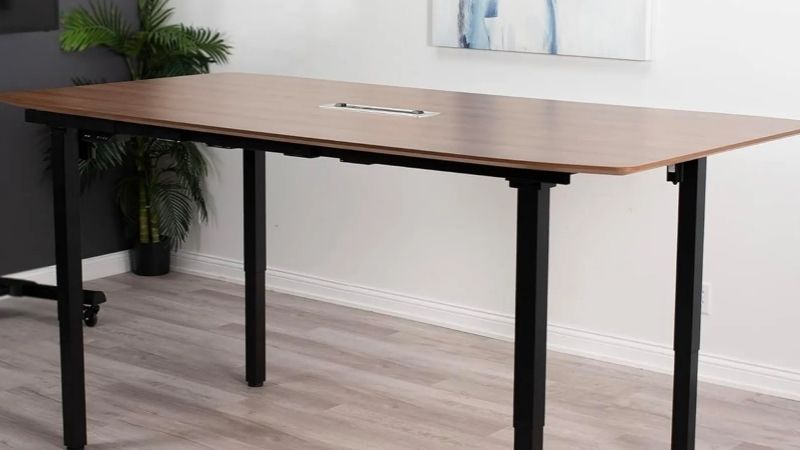
Lifting Capacity, Not Static Load
Two different numbers appear on frame listings, and only one matters for a motorized lift. Lifting capacity is what the motors raise; static load is only what the frame holds while parked. UPLIFT lists 535 pounds lifting and DeskHaus lists 600, while FlexiSpot’s E7Q quotes a 660-pound figure that is a maximum static load, not a lifting rating.
Count your real load against the lifting number. A solid-wood top alone can weigh 50 to 80 pounds, and monitors, an arm, and accessories add more, so a heavy setup eats into a 535-pound rating faster than you expect. Add it up and leave margin rather than running the motors near their published ceiling every day.
Because a static figure and a lifting figure are measured differently, do not rank one against the other. A 660-pound static load does not mean a frame lifts more than a 600-pound lifting rating, so compare lifting numbers with lifting numbers and treat any static-only figure as a separate spec you confirm before trusting it.
Height Range and Your Fit
A frame only helps if it reaches your seated and standing heights, so check the travel range. These span roughly 22.5 to 51 inches, with the UPLIFT at 22.6 to 48.7 inches and DeskHaus models reaching higher in their taller configurations. The figure that matters is whether the low end meets your seated elbow height with a top on.
Remember the desktop adds to the height, so the frame’s lowest setting rises once a top sits on it. Measure your seated elbow height and your standing elbow height, then confirm the frame’s range, plus your top’s thickness, covers both. A taller user needs a higher ceiling; a shorter user needs a genuinely low floor.
The DeskHaus Peak Pro ships in low and high configurations with different ranges, so do not merge the two into one span. Pick the configuration that matches your body, since the low version tops out sooner and the high version starts higher, and buying the wrong one leaves you hunched or perched at the extremes.
Desktop Compatibility
Because you supply the top, the frame must fit it, and frame width is not the same as desktop width. The DeskHaus Apex Pro accepts tops from 43 to 80 inches, and the FlexiSpot E7Q lists a desktop depth of about 30 to 35.4 inches, so confirm your intended top falls inside the frame’s stated size window before buying either.
Check the mounting pattern and that the crossbar adjusts to your top’s length. An adjustable-width frame fits a range of tops, but a top shorter or longer than the range leaves the feet poorly supported or the hardware unreachable. Measure the top you own or plan to buy, including its thickness, against the frame’s specs.
A heavier or longer top changes the math on both capacity and stability. A wide, thick hardwood top looks great but adds weight against the lifting rating and leverage against the legs, so pair an ambitious top with a frame rated well above your total load rather than one that only just covers it on paper.
Stability, Wobble and Warranty
Four legs can add support, but leg count alone does not settle wobble. Side-to-side sway at standing height comes from tube thickness, the crossbar, foot design, and how high the desk is raised, so a four-leg frame is not automatically steadier than a sturdy two-leg one. Judge stability by the build, not just the number of legs.
Sway grows with extension, so a frame that feels solid when low can shimmy at full standing height, especially under a heavy top. Look for thick columns and a rigid crossbar, and if you type hard or use a treadmill, favor the frame with the most robust geometry rather than the one with the highest capacity figure alone.
On a powered frame the electronics fail before the steel, so read the warranty. The motor, control box, and handset are the usual failure points and are often covered for a shorter term than the frame itself. Confirm the maker sells those parts separately, since a dead control box should not retire an otherwise solid frame.
Top Picks
Each pick leads with the two specs that define a 4 leg standing desk frame, lifting capacity and the top it accepts, plus the trade-off worth knowing. Three publish a true lifting rating you can rank directly; the FlexiSpot lists a static figure instead, so it is judged on its desktop fit rather than on lifting.
| Product | Best For | Key Spec | Watch Out For |
|---|---|---|---|
| DeskHaus Apex Pro | Best overall | 600 lb lifting; 43–80 in tops | Frame only; supply your own top |
| DeskHaus Peak Pro | Best for tall users | 600 lb lifting; up to ~51 in (high config) | Low and high are separate ranges |
| UPLIFT V3 4-Leg | Best value | 535 lb lifting; 22.6–48.7 in | Heavy tops cut into the 535-lb margin |
| FlexiSpot E7Q | Best for a set desktop depth | 660 lb static; 30–35.4 in depth | Figure is static load, not lifting |
DeskHaus Apex Pro: Best Overall
The DeskHaus Apex Pro takes the top slot on the specs that define a frame: a 600-pound lifting capacity and acceptance of tops from 43 to 80 inches, with a 22.5-to-48.5-inch range. It suits most setups, including heavier ones. It sits in the premium tier, so confirm the current price before ordering.
Its advantage is headroom on both counts, a strong lifting rating with room to spare under a heavy top, and a wide window of compatible desktop sizes. Measure your intended top, including thickness, against the range, and plan for a two-person assembly, since a capable frame and a large top are awkward to handle alone.
The honest caveat is that it is a frame only, so budget and source a suitable top separately, and confirm the mounting pattern fits it. The electronics are the likely failure point over time, so check the warranty terms on the motor and control box and whether DeskHaus sells those parts on their own for a later repair.
DeskHaus Peak Pro: Best for Tall Users
The DeskHaus Peak Pro shares the 600-pound lifting capacity but reaches higher, with its high configuration running to about 51 inches. It suits taller users who need a genuinely high standing position. It sits in the premium tier, so verify today’s price, and choose the configuration that matches your height before ordering.
Its advantage is reach: the high-configuration range brings the surface up to where a tall user can stand with level forearms, which many frames cannot manage once a top is added. Measure your standing elbow height and add your top’s thickness, then confirm the high version’s top end clears it with a little margin.
The caveat is configurations: the Peak Pro ships in low and high versions with different ranges, so do not merge the two into one span when comparing. Pick the one that fits your body, since the low version tops out sooner; as with any powered frame, weigh the separate warranty on the motor and control box.
UPLIFT V3 4-Leg: Best Value
The UPLIFT V3 4-Leg is the value pick, pairing a 535-pound lifting capacity with a 22.6-to-48.7-inch range in a widely supported platform. It suits a standard home or office setup with a moderate top. It sits in the mid-to-premium tier, so confirm the current price and factor in the top you will add.
Its strength is a low starting height that suits shorter sitters and a capacity that handles typical loads with margin. Measure your seated elbow height against the low end with your top on, and confirm your desktop size works with the frame, since the lifting rating assumes the top is part of the load it raises.
The trade-off is that a very heavy hardwood top cuts into the 535-pound margin faster than the 600-pound DeskHaus frames, so an ambitious top pairs better with a higher-rated frame. Keep the setup within the rating, and check the warranty and parts availability on the motor and control box before relying on it for years.
FlexiSpot E7Q: Best for a Set Desktop Depth
The FlexiSpot E7Q lists a 660-pound maximum static load, a 25.8-to-51.6-inch range, and a desktop depth of about 30 to 35.4 inches, giving a clear fit window for a deep top. It suits buyers who want a defined desktop depth. It sits in the mid-to-premium tier, so confirm the live price first.
Its advantage is the published desktop depth, which takes the guesswork out of matching a deep top, plus a tall range for standing. Measure your top’s depth against the 30-to-35.4-inch window, and confirm the mounting pattern fits, since a frame’s depth window is as important as its width when you supply your own surface.
The honest caveat is the headline number: 660 pounds is a maximum static load, not a lifting capacity, so it cannot be ranked against the lifting figures of the other frames. Judge it on the desktop fit and range rather than that static number, and confirm the actual lifting rating with the maker before loading it heavily.
Frequently Asked Questions
Buyers sourcing a frame alone ask the same questions about capacity, tops, and stability. Each answer below opens with the direct version, then the condition that changes it, so you can match a 4 leg standing desk frame to your top and your height rather than to a number that looks impressive out of context.
Is static load the same as lifting capacity?
No, and the difference matters. Lifting capacity is what the motors raise; static load is only what the frame supports while parked and not moving. A frame can hold far more statically than it can lift, so a big static figure does not mean the motors will raise a heavy top and gear without strain.
Use the lifting number to size your setup, since that is what the frame does every time you stand. If a listing quotes only a static maximum, treat it as a separate spec and ask the maker for the lifting rating before loading the desk, because running the motors near a static-only figure can overwork them.
When comparing frames, line up lifting with lifting. A 600-pound lifting rating beats a 535-pound one for a heavy top, but a 660-pound static figure tells you nothing about how the two compare on lifting, so do not let the largest number win if it is measured on a different basis than the rest.
Do these frames come with a desktop?
Usually not; a frame is sold on its own so you can fit a top you choose. That flexibility is the point, letting you pick a size, material, and finish, but it means budgeting and sourcing the desktop separately and confirming it falls within the frame’s accepted size range before you order either piece.
The deciding detail is compatibility: frame width is not desktop width, and each frame accepts a window of top sizes, like the DeskHaus Apex Pro’s 43-to-80-inch range. Measure the top you own or plan to buy, including its thickness and depth, against the frame’s stated limits so the feet sit properly and the hardware reaches.
Remember the top counts against the lifting capacity, since the motors raise it along with everything on it. A heavy hardwood top is beautiful but eats margin, so pair an ambitious surface with a frame rated well above your total load rather than one that only just covers the top plus your monitors on paper.
How tall should a standing desk frame go?
High enough that you can stand with forearms level once your top is on, which depends on your height. Measure your standing elbow height, add your desktop’s thickness, and confirm the frame’s top end clears it with a little margin. A tall user often needs a high-configuration frame to avoid a hunched standing posture.
The low end matters just as much for sitting. Your seated elbow height, plus the top’s thickness, should fall within the frame’s range, or you cannot sit correctly even at the lowest setting. A frame with a genuinely low floor suits shorter sitters, while a high ceiling suits taller users who stand.
If several people share the desk, prioritize a wide range and enough memory presets so each person’s height is one button away. Confirm the chosen configuration, since models like the Peak Pro ship in low and high versions, and the wrong one leaves part of your household at the wrong height all day.
Does a four-leg frame wobble less?
Not automatically. Leg count is one factor, but side-to-side sway at standing height comes mainly from tube thickness, the crossbar, foot design, and how high the desk is raised. A well-built two-leg frame can be steadier than a flimsy four-leg one, so judge stability by the whole build rather than the number of legs.
Sway grows with extension, so test or research how a frame behaves at full standing height under a realistic top, not just when it is low. Thick columns and a rigid crossbar do more for steadiness than an extra pair of legs, especially if you type hard, lean on the desk, or use a treadmill beneath it.
A heavier top can actually help by lowering the center of wobble, but it also loads the motors and legs, so balance the two. If stability is your priority, favor the frame with the most robust geometry within your capacity needs rather than assuming four legs settle the question on their own here.
Final Thoughts
The right 4 leg standing desk frame is the one whose lifting capacity, not a static figure, clears your top plus your gear and whose range fits your height. Before ordering, weigh your desktop and confirm it falls inside the frame’s size window, since a frame and top that only just match on paper rarely feel solid when fully raised.