Key takeaways
- Start cheap. When a standing desk won’t go up, check the outlet and every cable, clear anything blocking travel, take weight off, let an overheated motor sit, and only then run the reset your own controller specifies. A failed motor…
Start cheap. When a standing desk won’t go up, check the outlet and every cable, clear anything blocking travel, take weight off, let an overheated motor sit, and only then run the reset your own controller specifies. A failed motor is the last conclusion on the list, not the first one to reach for.
As an Amazon Associate we earn from qualifying purchases.
By KK Home Furnishings Editorial Team
Why Your Standing Desk Won’t Go Up
Lifting columns stop for several unrelated reasons, and the cheap ones are far more common in practice than the expensive one. Work power, obstruction, load and thermal protection in that order, because every step you skip is a part you might end up replacing without ever needing to replace it.
Check Power and Cable Connections First
Try a different outlet before anything else, then unplug and reseat every connector at the control box and at each lifting leg in turn. Vari maps several of its codes to exactly this area, with E06 pointing at a connection fault and E07 and E08 at height or cable problems between the two lifting columns.
Cables work loose during a house move or when a desk is rolled across carpet on castors, and a half-seated plug behaves on the keypad exactly like a failed motor. Look along the whole run for pinching under a castor or a pedestal foot, and stop immediately if any cable feels hot to the touch or smells scorched.
Rule Out an Obstruction or Anti-Collision Trigger
If the desk moves a short distance and then reverses itself, that is characteristic of an anti-collision response rather than a failure. UPLIFT describes exactly that behaviour in its troubleshooting guidance, and the fix is to find whatever the desktop or a leg is meeting partway through its travel.
Check above, below and to both sides: a windowsill, a drawer unit, a bookshelf, a tensioned monitor cable or even a chair arm will all produce it. Clear the whole travel path before running any reset, because a reset performed against an obstruction simply repeats the same stall and teaches you nothing new.
Remove Excess Weight Before Resetting
Vari assigns code E03 to an overload condition, and the instruction is to take weight off and then reset. FlexiSpot’s E2LB-V2 and E2LW-V2 manual treats a desk that runs slowly, drifts down on its own or resets repeatedly as a prompt to check the load against that model’s 220-pound capacity.
Count everything that rises with the top: monitors and arms, a tower, a dock, a laptop, speakers, and any shelf unit bolted to the desktop itself. Those ratings are model-specific, so a 220-pound figure quoted for one controller tells you nothing at all about what a different maker’s columns are built to lift.
Let an Overheated Motor Cool Down
Vari triggers code H01 when the desk runs continuously for more than two minutes, and asks for a 20-minute cooldown before trying again. FlexiSpot’s E2 V2 manual specifies at least 18 minutes of idle time after E01 or E02, which is a similar interval arrived at by a different system under different conditions.
Those two numbers sit close together and are not interchangeable between brands, so use the one in your own manual. Repeated short cycles while setting the preset heights on a new desk are the usual cause, and a thermal cutout is the protection doing its job rather than a component failing.
How to Reset a Standing Desk Step by Step
Reset procedures are not shared between brands at all. Three major makers use three different key combinations and hold times, so a sequence found on a forum for one controller will do nothing on another. Match the steps below to the brand printed on your own keypad, and ignore the rest of them entirely.
| Symptom | Sign Alongside | Likely Cause | First Action |
|---|---|---|---|
| No movement after a power interruption | Display shows an error or nothing at all | Lost calibration between the columns | Run the reset procedure for your own controller |
| Desk starts then reverses | A short run in the opposite direction | Anti-collision triggered by an obstruction | Clear above, below and both sides, then reset |
| Vari code E03 | Desk is heavily loaded | Overload protection | Remove weight from the top, then reset |
| Vari H01 or FlexiSpot E01 and E02 | Desk has been cycled repeatedly | Thermal protection | Wait 20 minutes on Vari, at least 18 on FlexiSpot |
Reset an UPLIFT Desk
Hold the DOWN button for roughly 10 seconds, keeping it pressed until the display shows the reset indicator rather than a height. Releasing early leaves the controller in its normal state, which is why this step so often gets reported as not working when it was in fact simply cut short.
Press and hold DOWN again, and the desk should lower slightly, rise slightly and stop on its own. That short sequence is the lifting columns re-synchronising their positions with each other, and the desk should take commands normally once it settles rather than needing a second attempt.
Reset a Vari Electric Standing Desk
Hold the DOWN button for about 5 seconds, until the display flashes its reset prompt rather than showing a height figure. Vari uses a shorter hold than UPLIFT does, which is the detail that catches out owners who have had a different desk before and reach for a ten-second count purely out of habit.
Keep holding from there until the desk travels all the way down to its lowest position, lifts a fraction and then shows a height reading on the display again. If the desk reaches the bottom and no height reading appears at all, the procedure has not completed and it needs running again from the very start.
Reset a FlexiSpot E2 V2 Controller
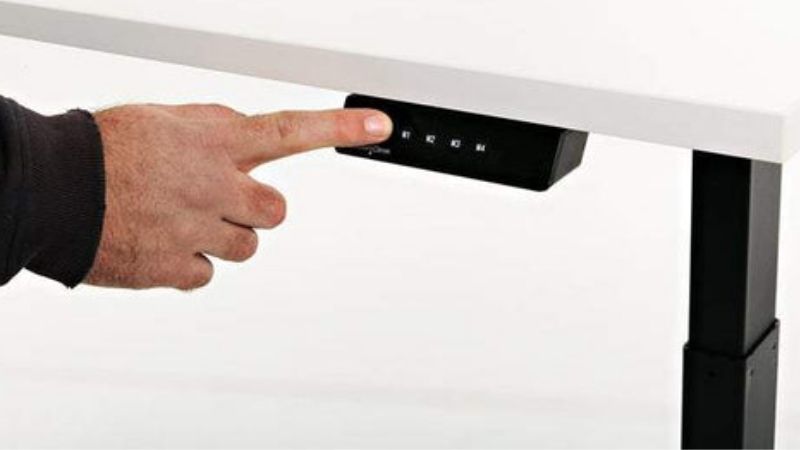
On the E2LB-V2 and E2LW-V2, press keys 3 and 4 together for 3 seconds until the display shows its reset prompt. Where a different code is showing and the keypad will not respond at all, the manual directs you to unplug the desk from the wall for at least 10 seconds before trying anything else.
Then hold the down arrow until the desktop reaches the bottom and rebounds slightly, without releasing before that rebound happens. Letting go before the rebound is the single most common reason this procedure appears to fail, and it leaves the controller in exactly the same state as before.
Know When to Stop Troubleshooting
Vari directs owners to contact support when a leg, data or connection error persists after reconnecting and resetting, and FlexiSpot gives the same instruction when its documented steps do not clear a code. Both of those are warranty paths rather than invitations to keep working on it yourself.
Stop sooner than that if a column is visibly out of line, if the desk makes a grinding or knocking noise under load, or if any cable is hot or scorched. Do not open a motor housing or a control box where the manual does not describe doing it, because that is usually the point at which warranty coverage ends.
Frequently Asked Questions
These four questions cover the gap between seeing an error and deciding what to buy. Every figure below belongs to one named brand’s own procedure, and these numbers are deliberately not averaged together, because averaging them is precisely how people end up applying the wrong hold time.
Why Does My Standing Desk Only Move Down?
That pattern usually means the controller is asking to be recalibrated rather than that one motor has failed. UPLIFT’s reset deliberately drives the desk to its lowest position before re-synchronising, so downward travel working while upward travel does not is consistent with lost calibration.
Run the reset for your own brand before concluding anything else, then retest with the desktop completely cleared of weight. If downward travel still works and upward travel does not after a fully completed reset, that is the point at which a support ticket becomes the reasonable next step.
How Long Should I Unplug a FlexiSpot Desk?
The E2LB-V2 and E2LW-V2 manual specifies at least 10 seconds unplugged in the relevant troubleshooting branch, used when a code will not respond to the keypad reset. That is a power cycle rather than a thermal cooldown, and the two appear as entirely separate instructions in the same manual.
Pull the plug out of the wall socket rather than switching off at a power strip, so that the control box discharges fully rather than only partially. Wait out the full interval before reconnecting it, and leave the desktop clear when you power it back up, so that a load fault cannot mask whatever happens next.
How Long Does a Standing Desk Motor Need to Cool?
It depends entirely on which controller is fitted. Vari asks for 20 minutes after an H01 thermal code, which it triggers after more than two minutes of continuous running, while FlexiSpot’s E2 V2 manual specifies at least 18 minutes of idle time once E01 or E02 has appeared on the display.
Those protocols are set per brand, so neither figure transfers to the other. If a desk reaches a thermal code during ordinary use rather than during a long setup session, note how long it had been running first, because frequent cutouts at short run times are worth raising with support.
Does an Error Code Mean the Motor Is Broken?
No, and most of the published codes point somewhere considerably cheaper than a motor. Vari maps E03 to overload, E05 to a stuck button, E06 to a connection fault, and E07 and E08 to height or cable issues, and every one of those has a reconnect or reset step documented before any part replacement is suggested.
Replacing a control box on the strength of a code alone is the expensive mistake here. UPLIFT states that around 70 percent of control boxes returned to the company are not faulty and could have been resolved with a quick reset [UPLIFT], which is worth knowing before ordering any replacement parts.
Final Thoughts
Write down the exact code and the brand printed on your keypad before searching for anything, because almost every instruction worth following is specific to that one pair. The order itself is what matters when a standing desk won t go up: power, obstruction, load, cooldown, reset, and only then support.