Key takeaways
- There is no single correct number. The ideal height for a computer desk is whatever puts the keyboard at about elbow height with your shoulders relaxed, which is a measurement taken on your own body in your own chair rather…
There is no single correct number. The ideal height for a computer desk is whatever puts the keyboard at about elbow height with your shoulders relaxed, which is a measurement taken on your own body in your own chair rather than a figure copied from a product page or a furniture chart.
As an Amazon Associate we earn from qualifying purchases.
By KK Home Furnishings Editorial Team
Ideal Computer Desk Height by the Numbers
OSHA publishes adjustment ranges rather than a single target, because the right point inside each range depends on the person and on the chair they sit in. Measure your own seated elbow height first, then read the table below as the window a workstation should be able to reach across rather than as a recommendation.
| Input | Result | Note | Exception |
|---|---|---|---|
| Seated keyboard plane | 22 to 30 in of adjustment | OSHA purchasing guidance for an adjustable workstation | Your own measured elbow height decides the point inside it |
| Standing keyboard plane | 36 to 46.5 in of adjustment | A 10.5-inch span, wider than the seated one | User height alone is not enough to set the figure |
| Elbow angle | 90 to 120 degrees | Neutral posture with elbows close to the body | Shoulders must stay relaxed, not lifted |
| Monitor distance | At least 20 in | A starting minimum rather than a target | Screen size and vision can move the placement |
Start With Your Elbows, Not Your Height
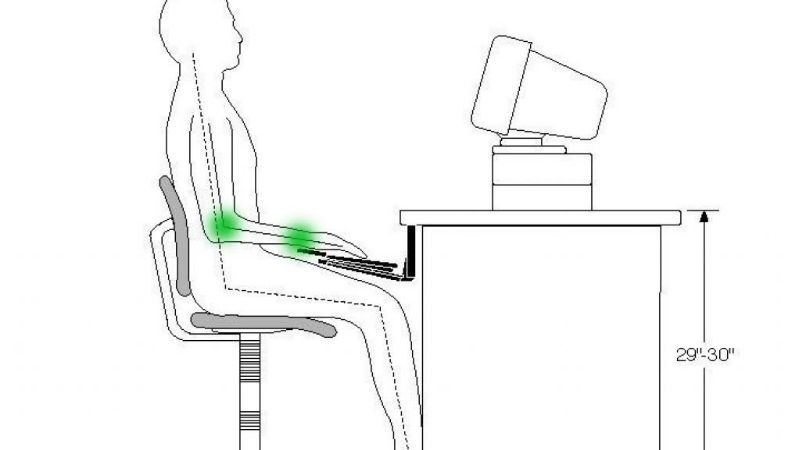
OSHA’s guidance puts the keyboard at roughly the same height as your elbows, with the upper arms hanging naturally and the shoulders relaxed rather than raised. Body height is a poor proxy for it, because torso length and arm proportions vary widely between two people who measure the same height.
Measure it directly. Sit back in the chair you actually use, with the feet supported, the forearms hanging and then raised until they are level, and measure from the floor to the underside of the elbow. That figure, rather than an average taken from a furniture listing, is the height the keyboard should meet.
Seated Work Needs an Eight-Inch Adjustment Window
OSHA’s purchasing guidance describes keyboard-height adjustability of 22 to 30 inches for seated tasks, which is an eight-inch span. The width of that window is really the point: it exists because no single fixed figure suits the full range of people who sit down at the same workstation.
Where your own measured elbow height falls inside that window depends on the chair as much as on your body, since raising the seat raises the elbow along with it. Set the chair up first, so that the feet are supported and the elbow angle is comfortable, and only then read the elbow height off that finished posture.
Standing Work Needs a Wider Range
For standing tasks, OSHA’s purchasing guidance gives a keyboard-height adjustability range of 36 to 46.5 inches, which is a span of 10.5 inches. That is two and a half inches wider than the seated range, which reflects how much more variation standing posture introduces across different users of one workstation.
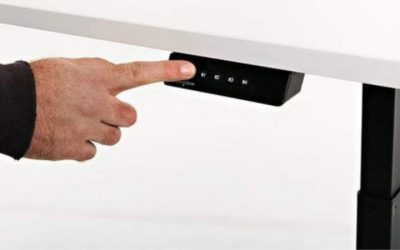
A desk marketed as sit-stand does not automatically cover both of those windows, so check its published minimum and maximum against your own two measured elbow heights. The low end of the range is where fixed-frame designs most often fall short, particularly for shorter users who spend most of the day seated.
Desk Height Is Only One Part of the Setup
OSHA’s purchasing guidance also puts the monitor at least 20 inches from the eyes, keeps the elbows at 90 to 120 degrees with the arms close to the body, and expects the feet to be supported. Those four conditions all have to hold simultaneously rather than being satisfied one at a time.
Work-surface thickness matters here too, and OSHA’s guidance keeps it generally at 2 inches or less wherever thigh and keyboard clearance are at stake. A thick top with a deep apron underneath can leave a desk that measures correctly at the surface entirely unusable at the knees once a chair is pushed in.
Adjust for Your Situation
Most desk-height complaints turn out to be solvable without buying a new desk at all. The chair, the footrest and the keyboard surface are all cheaper variables to change, and three of the four situations below are resolved by adjusting one of them rather than by replacing any furniture.
If the Desk Is Too High
Raise the chair first, but only as far as the feet stay supported flat on the floor beneath you. Once they no longer are, you have simply traded a shoulder problem for a leg one, and OSHA’s guidance notes that a footrest may be needed where a chair has been raised to suit a fixed work surface.
If the gap is still there with the chair raised and the feet supported on a rest, an adjustable keyboard platform below the desktop is the next option, since the keyboard plane rather than the desktop is what the elbow measurement actually governs. Replacing the desk is the last and most expensive route of the three.
If the Desk Is Too Low
Do not compensate for it by angling the wrists upward to reach the keys at an unnatural angle. OSHA notes that a keyboard set too low can force extreme wrist angles, and that is precisely the posture the whole elbow-height method exists to avoid, rather than something to work around by adding a wrist rest.
Lowering the chair only helps for as long as the elbow angle stays inside that 90 to 120-degree window and the thighs still clear the underside of the desk. Beyond that point, raising the desk itself, using risers rated for the load or a different frame underneath, is the honest fix for a surface that sits too low.
If a Drawer Blocks Your Thighs
A central pencil drawer is a very common obstruction, and OSHA’s guidance suggests removing it where it prevents the chair from being set to the correct height. That is a reversible change that costs nothing at all, and it frequently recovers the two or three inches the whole setup was short of.
Check the underside clearance after removing it, measured from the floor up to the lowest fixed part rather than to the desktop surface. A thick top or an apron rail can still bind, which is exactly where the guidance on keeping a work surface generally at 2 inches or less becomes relevant to the problem.
If Several People Share the Desk
Choose genuine adjustability over a compromise dimension that suits nobody particularly well. OSHA states plainly that no single workstation arrangement suits everyone, which is precisely why that guidance is written as ranges in the first place rather than as a recommended height for a shared office desk.
Where a shared desk cannot be made height-adjustable, give each user their own chair setting and footrest, and put the keyboard on a separate adjustable platform. That moves the variable onto components each person can change in seconds, rather than leaving it in furniture nobody can adjust.
Frequently Asked Questions
These four questions cover the figures people actually search for, and the reason not one of them works as a universal answer. Each is anchored below to published guidance rather than to a common retail dimension, because those two things get confused with one another constantly.
Is 29 Inches the Ideal Computer Desk Height?
Not universally, no. That figure sits inside OSHA’s 22 to 30-inch seated adjustment window rather than marking the correct point inside it, and the window itself exists because the right height moves with the person and with the chair rather than staying fixed at any single number.
A fixed 29-inch desk suits whoever happens to measure near that elbow height once their own chair has been set correctly. For everyone else it is either a surface to raise the chair against while using a footrest, or one that needs an adjustable keyboard platform fitted underneath it.
How High Should My Keyboard Be?
At roughly elbow height, with the shoulders relaxed, the upper arms hanging naturally and the wrists held straight rather than bent up or down. That is the relationship OSHA describes, and it is the single measurement that actually governs how a setup feels after an hour rather than after a minute.
Remember that the keyboard plane and the desktop are not always the same surface as each other. A keyboard tray sits below the desktop, so a desk measured at the correct height can still put the keyboard too low once a tray is fitted beneath it, and the two figures need checking separately.
How High Should a Standing Computer Desk Be?
OSHA’s purchasing guidance uses a keyboard-height adjustability range of 36 to 46.5 inches for standing work, rather than naming one recommended figure. Where you land inside that range depends on standing elbow height, measured with the shoulders down and the arms hanging naturally at your sides.
Measure standing elbow height separately from the seated figure, because the difference between the two is not predictable from your height alone. Check that figure against the desk’s own published maximum before buying anything, since the top of a range is where sit-stand frames most often fall short of expectations.
How Far Should the Monitor Be From My Eyes?
OSHA’s purchasing guidance uses at least 20 inches as its reference point for monitor distance. That is a starting minimum for setup rather than an ideal, and larger screens or corrected vision commonly push the genuinely comfortable distance further back than that reference figure suggests.
Desk depth is usually the constraint that decides whether you can reach that distance at all. Measure from the front edge to the back of the surface, then subtract the depth of the monitor stand itself, because a shallow desk forces the screen closer regardless of how well the rest is set up.
Final Thoughts
Before buying anything, set the chair, support your feet and measure your seated elbow height against the surface you already own. In most cases the ideal height for a computer desk is reached using a footrest, a chair adjustment or a keyboard platform rather than a replacement desk.