
Key takeaways
- Choose the seat around the way your desk actually moves, not the word “standing” on its label. The best way to decide how to choose a chair for a standing desk is to test whether the desk reaches a comfortable…
Choose the seat around the way your desk actually moves, not the word “standing” on its label. The best way to decide how to choose a chair for a standing desk is to test whether the desk reaches a comfortable seated keyboard height. If it does, a regular task chair may fit better than a tall stool.
As an Amazon Associate we earn from qualifying purchases.
By KK Home Furnishings Editorial Team
How to Choose a Chair for a Standing Desk That Fits
Begin with the lowest usable desk setting, then decide whether your normal work requires full sitting, brief leaning, or a high seated position. OSHA treats chair, input devices, and work surface as one workstation, so a chair that reaches the tabletop but leaves feet hanging is not a complete fit [OSHA, accessed October 2026].
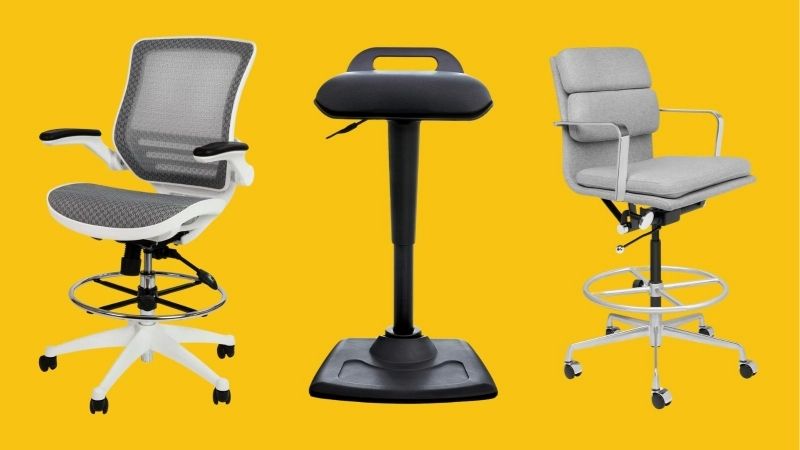
| Workstation Condition | Seat to Consider | Critical Fit Check | Trade-Off |
|---|---|---|---|
| Desk reaches a natural seated keyboard position | Adjustable task chair | Seat supports feet on floor; arms and desktop align | Does not keep you seated at high standing height |
| Desk or bench stays above normal sitting height | Drafting chair with back and foot support | Published seat range, stable footring, safe mounting | Taller seat may be harder to enter or move |
| You want brief weight-off-feet pauses | Stable leaning or perch stool | Feet stay controlled and base suits floor | Not a full-back chair for long typing |
| Desk is shared by different-height users | Task chair and truly adjustable desk | Lowest desktop and seat travel suit each person | Users must reset both desk and chair |
| Armrests strike desktop or frame | Adjustable or removable-arm task chair | Check arm clearance at seated desk position | Less forearm support if arms removed |
| Desktop cannot lower enough | Reassess desk or keyboard surface first | Can a safe input surface be positioned lower? | A taller chair adds foot-support demands |
Check the Desk’s Lowest Height Before Shopping
For a desk that travels down to a comfortable sitting height, start with a conventional adjustable office chair. In a seated trial, elbows should reach the keyboard with shoulders relaxed, while both feet rest flat on the floor. Buying a drafting chair simply because the desk also rises can create needless instability.
Published desk heights are often measured to the tabletop, not the top of a thick keyboard or mat. Test the actual input surface rather than relying on the desk’s marketing range. If the lowest position remains too high, a compatible lower keyboard surface may solve the mismatch more effectively than a new tall chair.
Match Seat Travel to Feet and Elbows
A chair’s seat-height specification is useful only when it covers the height where your forearms approach the keyboard without lifting the shoulders. OSHA’s chair buying checklist suggests 15 to 22 inches as a general task-chair adjustment reference, not a universal fit guarantee [OSHA, accessed October 2026].
At drafting height, the legs may not reach the floor. OSHA specifically calls for suitable foot support with tall seating and distinguishes a mounting rail from a broader rest for longer sitting [OSHA, publication 3213]. Test the range at the seat’s lowest and highest intended positions, with the user actually sitting on it.
Check Back Support, Arms, and Under-Desk Clearance
For sustained keyboard use, back support and a seat depth that does not press behind the knees matter more than a dramatic chair silhouette. OSHA recommends that the backrest support the lower back and the seat allow comfortable thigh support without blocking circulation [OSHA, accessed October 2026].
Look beneath the desktop for crossbars, drawers, and the motor housing. Tall-chair footrings and broad chair arms can collide with hardware long before the seat reaches the keyboard. Adjustable or removable arms can help, but test whether forearms remain comfortable on the input surface if armrests must be moved aside.
Six Standing-Desk Seating Situations and Better Choices
The same chair type will not solve every adjustable-desk problem. These situations identify what you should measure, which kind of seat usually deserves consideration, and when changing the desk setup is safer or less expensive. Treat the choice as a fit decision, not an unverified claim that one posture prevents pain.
1. Your Electric Desk Drops to Normal Sitting Height
Choose a conventional task chair when the desk already lowers to your seated elbow level. A padded seat, adjustable backrest, usable depth adjustment, and feet supported on the floor usually offer more practical working positions than a high drafting stool. This is the strongest default for long writing and computer sessions.
Move the desk to its actual low setting, sit in a trial chair, and place both hands where the keyboard will be. Confirm the chair can tuck in without the arm pads striking the tabletop. The tall version of an otherwise similar chair adds complexity without adding useful reach if the desk already descends far enough.
2. A Fixed-Height Worktop Cannot Lower to Sit
A taller drafting chair can make sense when a counter, studio table, or fixed-height worktop cannot come down. The chair must reach the working surface and provide a safe, supported place for both feet. Choose a model with a usable backrest if you expect sustained typing rather than only short drafting tasks.
Check the manufacturer’s actual seat-height range and footring adjustment, not an unsupported claim that the chair “works with all standing desks.” OSHA notes that tall chairs should provide safe mounting and dismounting support, while a proper footrest is important during longer use [OSHA, publication 3213].
3. You Want Short Perching Breaks Between Standing Tasks
A leaning or perch stool can offer brief, partial weight support while you remain close to standing height. It may suit quick reading, phone calls, or sketching when the workstation is already arranged for standing. It is not interchangeable with a backed office chair for a long editing or spreadsheet session.
Choose a stool that is specifically intended for leaning use and check its rated floor contact and movement behavior. Your feet should remain controlled rather than dangling. If you frequently settle in for an extended period, switch to a proper sitting height and supportive chair instead of asking an active perch to perform an office chair’s job.
4. Shorter and Taller People Share the Same Desk
Prioritize a desk with a genuinely usable low setting and a chair with accessible adjustments when several people use one station. The shorter user may need a lower seat and narrower seat depth; a taller user may need more leg clearance. A single “ergonomic” label does not show that either person will fit.
Have each person trial the full seated configuration and record their workable desk setting. If the chair cannot lower enough for someone’s feet to rest comfortably, a stable footrest may help, but only if the keyboard also aligns properly. When the desk will not suit both users, consider changing the work surface before buying a specialized chair.
5. A Small Office Has Carpet, Obstacles, or Tight Clearance
In a compact room, rolling behavior and clearance can dominate comfort. A chair that fits the user may still snag on deep carpet, collide with the desk frame, or block the standing area when pushed back. Check the width of its base and the route used when moving from sitting to standing.
Follow the chair maker’s guidance for suitable casters or glides on the actual floor. A mat should not introduce a lip that makes the base unstable. For a drafting chair, leave enough room to mount and leave the seat safely; moving a tall chair on its wheels while occupied is not an alternative to a secure standing transition.
6. You Are Considering a Taller Seat to Fix a Laptop Setup
Do not buy a tall chair solely to bring your eyes closer to a raised laptop screen. The screen and keyboard of a laptop move together, but viewing height and typing height often need different adjustments. Raising the seat can move the keyboard problem upward and leave the legs unsupported at the same time.
First test a separate keyboard and mouse with a stable laptop riser or monitor arrangement. OSHA advises positioning frequently used input devices for relaxed arms and a comfortably placed display [OSHA, accessed October 2026]. If those inexpensive changes solve the mismatch, keep your existing well-fitting chair and save the chair budget.
Frequently Asked Questions
Before ordering, verify what the seller actually publishes and what you can test at home. These answers deal with converters, product ratings, long-term use, and return conditions that may not be obvious from a product photograph or a chair’s advertised maximum height.
Can I Use My Existing Office Chair With a Desk Converter?
Yes, provided the converter returns the keyboard to a comfortable seated level when lowered. The converter’s raised height is measured from the supporting desk, so the base desk height remains important. The chair should still place your feet on stable support and let your shoulders stay relaxed while typing.
Check the converter’s lowered thickness, keyboard-tray location, and the available space underneath. A tall chair will not fix a converter that makes the seated keys too high. In that case, changing the converter or the supporting desk may be more practical than replacing a chair that already fits your body.
Does a Standing-Desk Chair Need a Five-Leg Base?
Not every sit-stand support uses a five-leg office-chair design. OSHA favors a sturdy five-leg base for conventional computer-workstation chairs, while purpose-built perch stools use different bases and movement patterns [OSHA, accessed October 2026]. The intended use matters more than copying one base shape.
Evaluate the specific product’s instructions and stability on your floor. If you need a conventional rolling task chair, follow the five-leg guidance and use suitable casters. If you choose a perch, confirm it is rated for its leaning function instead of treating it like a swivel desk chair with a full backrest.
What Should I Verify About Weight Capacity and Warranty?
Verify the model’s published user-weight rating and the warranty coverage for the seat lift, base, casters, and moving mechanism. Do not infer a particular capacity from a broad claim about meeting a chair standard. The rating must come from documentation for the exact version and configuration you intend to buy.
For a raised drafting seat, pay particular attention to the height-adjustment mechanism and the foot-support assembly. Check whether replacement components are sold and whether the warranty excludes wear or commercial use. An unusually cheap tall chair can be a poor value if its common service parts cannot be sourced later.
Can You Sit on a Drafting Chair Throughout the Workday?
It may be suitable for extended work if the individual chair supports your back, thighs, and feet at a workable height, but the label alone does not prove an all-day fit. High perches without suitable foot support are a different case. Use the chair as intended rather than assuming every elevated seat can replace a task chair.
CDC/NIOSH advises against staying in one sitting or standing posture for long periods and recommends varying tasks and taking breaks [CDC/NIOSH, July 2026]. A supportive chair is one part of that routine, not a health treatment. If numbness or persistent discomfort develops, reassess fit and seek professional advice as appropriate.
Final Thoughts
The decision about how to choose a chair for a standing desk starts with the lowest usable keyboard height. Select a regular task chair when the desktop can lower enough, a drafting chair with reliable foot support for genuinely high worktops, or a stable perch for brief leaning. Measure first and avoid unnecessary upgrades.









