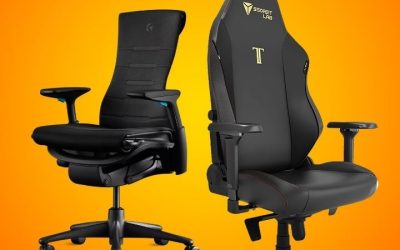
Key takeaways
- Yes, a well-fitting ergonomic chair can support your back during desk work by accommodating your body and allowing changes of position. But are ergonomic chairs good for your back in a medical sense? A chair is a workstation tool, not…
Yes, a well-fitting ergonomic chair can support your back during desk work by accommodating your body and allowing changes of position. But are ergonomic chairs good for your back in a medical sense? A chair is a workstation tool, not a proven treatment for back pain, and its benefit depends on fit, adjustment and the rest of your setup.
As an Amazon Associate we earn from qualifying purchases.
By KK Home Furnishings Editorial Team
What Makes an Ergonomic Chair Useful for Back Support?
The practical advantage of an ergonomic chair is adaptability, not a special shape that works for everyone. OSHA describes adjustable seating as a way to support different body sizes and seated positions while reducing awkward reach and contact stress [OSHA, accessed October 2026]. That makes a fit assessment more useful than a marketing label.
| Chair Feature | Potential Back-Support Benefit | What to Verify | Important Limit |
|---|---|---|---|
| Adjustable lumbar support | Can make contact with lower-back curve | Height and firmness or depth adjustment | More pressure is not necessarily better |
| Seat depth adjustment | Lets user sit against backrest with thigh support | Clearance behind knees when fully seated | Oversized seat can defeat lumbar contact |
| Seat height range | Helps coordinate feet, thighs and desk reach | Feet supported at usable keyboard height | A fixed desk may require a footrest |
| Recline or tilt control | Allows supported changes of sitting position | Tension, movement and return to work position | Does not replace getting up periodically |
| Adjustable armrests | Can allow relaxed arms and nearer desk access | Height, width and clearance under desk | Oversized arms may block a close desk position |
| Appropriate seat and back size | Distributes support without forcing a posture | Usable width, depth and backrest contact | One size does not fit every body |
| Accessible adjustment controls | Facilitates repeatable settings for daily tasks | Can you adjust while seated, per manual? | Many features are useless if never adjusted |
Fit Matters More Than the Ergonomic Label
An office chair described as ergonomic is not automatically a good match. The seat might be deep enough to keep a shorter user away from the backrest, while the lumbar contour may sit too high or too low. OSHA advises trying chairs and checking the dimensions and adjustments against the individual user [OSHA, accessed October 2026].
For a useful test, sit back normally, place your feet on stable support and type at the desk you actually use. You should be able to use the backrest without the front seat edge pressing behind your knees. This is a practical selection test, not a medical examination or evidence that a particular chair can prevent future symptoms.
Useful Adjustments Work as a Connected System
Lumbar support is easiest to use when the seat height and depth also fit. A sliding seat can preserve leg support without forcing a shorter user forward; a height-adjustable backrest can place its contour nearer the person’s lower-back curve. OSHA’s chair guidance emphasizes these relationships rather than one isolated adjustment [OSHA, accessed October 2026].
Armrests should not keep the chair too far from the keyboard. Mayo Clinic recommends a setup that permits supported feet, relaxed shoulders and easy mouse reach, with the desk and screen arranged together [Mayo Clinic, May 2023]. If buying a chair requires compensating with a permanently awkward desk position, the purchase may miss the real problem.
Research Supports Caution About Pain-Relief Claims
Good workstation geometry is sensible, but evidence that a particular chair directly improves back pain is limited. A systematic review of office-chair interventions reported conflicting effects on lower-back pain and discomfort, with very low- to low-quality evidence [Chair intervention systematic review, 2021]. That does not mean fit is unimportant.
A broader review of ergonomic workplace interventions found some reductions in reported musculoskeletal pain, but those studies combined varied workplace changes and cannot establish that buying a chair alone produces the same result [Ergonomic interventions meta-analysis, 2025]. Treat medical-sounding product promises with skepticism and judge each chair on usable adjustments.
Six Situations Where an Ergonomic Chair May Make Sense
Consider what your work actually requires before paying for more chair features. The following situations focus on when an adjustable chair offers a practical advantage over a basic seat. They are buying and setup decisions, not predictions about a medical outcome, and none requires a specific brand or a premium-priced model.
When You Spend Much of the Day at a Computer
A chair with a usable backrest, accessible recline control and a seat that supports your thighs may help you change between working positions without abandoning desk reach. Try returning from a modest supported recline to typing. If the mechanism resists movement or the armrests trap you away from the desk, features advertised as ergonomic may go unused.
Remaining motionless for long periods is a separate issue. CDC/NIOSH advises office workers to avoid extended sitting or standing and reports that short computer-work breaks can reduce discomfort [CDC/NIOSH, July 2026]. Choose a chair that supports ordinary movement and build opportunities to stand or walk into the workday, rather than assuming a chair replaces activity.
When Several People Use the Same Workstation
Shared desks are where clearly marked, reachable controls earn their place. One person may need a higher seat and deeper cushion; another may need the opposite arrangement to use the backrest. Adjustable lumbar height, armrests and seat depth can make individual fit possible if their available ranges genuinely cover the users.
OSHA specifically notes that greater adjustability is useful when a chair has multiple users [OSHA, accessed October 2026]. Before buying, ask each regular user to reach the keyboard and screen from a supported position. A chair with many controls but a seat that is fundamentally too large for one person is not a suitable shared solution.
When You Are Shorter or Taller Than Typical Chair Users
For a shorter person, a deep seat can prevent backrest contact even when the lumbar pad appears adjustable. For a taller person, a shallow seat may leave much of the thigh unsupported. These are sizing limitations rather than signs that a chair is medically harmful. Check published seat-height and depth ranges instead of assuming a universal fit.
If your feet cannot reach the floor at a usable desk height, a firm footrest may be appropriate; if the backrest contour misses your lower back, verify its adjustment range before purchasing. OSHA advises seat depth that supports the thighs without pressure at the backs of the knees [OSHA, accessed October 2026]. Do not confuse maximum stated load with body-size fit.
When Your Desk Height Cannot Be Changed
A fixed desk may force a trade-off between reaching the keyboard and keeping your feet supported. Raising the chair may improve elbow position while leaving the legs unsupported; lowering it may make your shoulders rise toward the desktop. A well-adjustable chair helps only within the physical limits of that desk and its under-desk clearance.
Mayo Clinic suggests changing desk height where feasible or supporting the feet when the chair needs to sit higher [Mayo Clinic, May 2023]. Before spending on a new chair, check whether your current seat can already reach the correct working height with a footrest. If the desk is the mismatch, replacing furniture in isolation may accomplish very little.
When You Alternate Focused Typing With Reading
Changing from keyboard work to reading or video calls may make a supported change of backrest angle useful. Look for recline tension and a stable range you can control rather than a mechanism that unexpectedly drops backward. Armrest and headrest options are secondary to whether you can resume normal typing without pulling your shoulders forward.
OSHA lists backrest recline and adjustable resistance among desirable design characteristics for office chairs [OSHA, accessed October 2026]. The purpose is to accommodate different seated postures, not to hold the spine at one mandated angle. A chair that locks into a single upright position can be limiting even when its backrest looks sculpted.
When You Already Experience Persistent Back Pain
It is reasonable to seek a chair that fits and feels manageable during daily tasks, but do not buy an ergonomic chair as a substitute for a diagnosis or treatment plan. Pain has many potential causes, and a product description cannot show that a particular lumbar pad is appropriate for your symptoms. A chair trial can assess usability, not medical effectiveness.
The NIH recommends medical assessment for concerning or persistent back symptoms; seek urgent care for serious neurological warning signs or new bladder or bowel control problems [NIAMS and MedlinePlus, accessed October 2026]. A clinician may suggest relevant activity or workstation changes in context. Avoid chairs marketed with unsupported promises to correct or cure back conditions.
Frequently Asked Questions
After deciding whether an adjustable chair suits the workstation, a few buying claims deserve closer scrutiny. These answers address what labels, chair dimensions and computer equipment do not establish, without repeating the earlier setup scenarios or treating seat preference as a medical test.
Do Ergonomic Labels Guarantee a Chair Is Better for Your Back?
No. The word ergonomic does not tell you whether the actual adjustment ranges suit your body. Look for manufacturer-published seat-height and seat-depth ranges, backrest controls and a clear return policy. If the seller describes lumbar support but does not show how it adjusts, assume less flexibility until the manufacturer confirms the mechanism.
OSHA recommends comparing chairs in person where possible and checking whether the seat, backrest and arms provide support for the user [OSHA, accessed October 2026]. No generic marketing term substitutes for a fit test. Even a chair designed for office use does not establish that a specific buyer will experience an improvement in back-related symptoms.
Does a Taller Backrest Automatically Provide Better Lumbar Support?
No. Lower-back contact depends on where the supportive contour sits relative to your body, not simply on how high the backrest reaches. A tall backrest may help support more of the torso, but its lumbar shape can still miss its intended location. An adjustable lumbar element or backrest height may matter more than overall height.
Inspect the backrest while sitting with feet supported and the seat fully occupied. You should not need to perch forward just to avoid pressure from a misaligned contour. OSHA identifies backrest placement and its fit to the natural lower-back curve as relevant checks [OSHA, accessed October 2026]. Avoid treating more padding as a clinical advantage.
Can a Good Ergonomic Chair Make a Laptop-Only Setup Work?
It can improve seating fit, but it cannot separate a laptop’s low screen from its attached keyboard. If the screen is lifted to a more suitable height, the built-in keys may become difficult to reach; leaving the laptop low can encourage you to look downward. These trade-offs can remain even with a highly adjustable chair.
Mayo Clinic suggests using an external keyboard and mouse with an appropriate laptop stand to create a better desk setup [Mayo Clinic, May 2023]. Check the full equipment arrangement before concluding that the chair is the missing upgrade. You may get a more usable workstation by adjusting the screen and input devices first.
What Should You Do if Back Pain Continues With a Well-Fitting Chair?
Do not interpret ongoing pain as proof that you need a more expensive chair or firmer lumbar support. A comfortable workstation may be worth maintaining, but symptoms can reflect circumstances beyond furniture. Speak with a healthcare professional about persistent or worsening pain, especially if it limits daily activities or follows an injury.
Seek prompt medical assessment for symptoms such as significant weakness, fever or unexplained weight loss with back pain, and urgent care for new bladder or bowel dysfunction [NIAMS and MedlinePlus, accessed October 2026]. Keep product choices separate from medical decisions. An ergonomic chair can support desk tasks without diagnosing or treating a health condition.
Final Thoughts
So, are ergonomic chairs good for your back? They can be a useful choice when the seat, backrest and controls fit your body and help you work with supported, changeable positions. Prioritize usable dimensions, desk compatibility and movement over medical marketing. If pain persists, pursue appropriate clinical advice rather than expecting a new chair to provide treatment.