
Key takeaways
- Choose the chair that fits your body and desk, not the label on its product page. An ergonomic vs gaming chair decision comes down to seat dimensions, usable adjustments, materials, and how you work or play. Gaming chairs can offer…
Choose the chair that fits your body and desk, not the label on its product page. An ergonomic vs gaming chair decision comes down to seat dimensions, usable adjustments, materials, and how you work or play. Gaming chairs can offer genuine ergonomic features, while some office chairs offer little beyond a basic height lever; neither category guarantees a better fit.
As an Amazon Associate we earn from qualifying purchases.
By KK Home Furnishings Editorial Team
Ergonomic vs Gaming Chair: The Differences That Matter
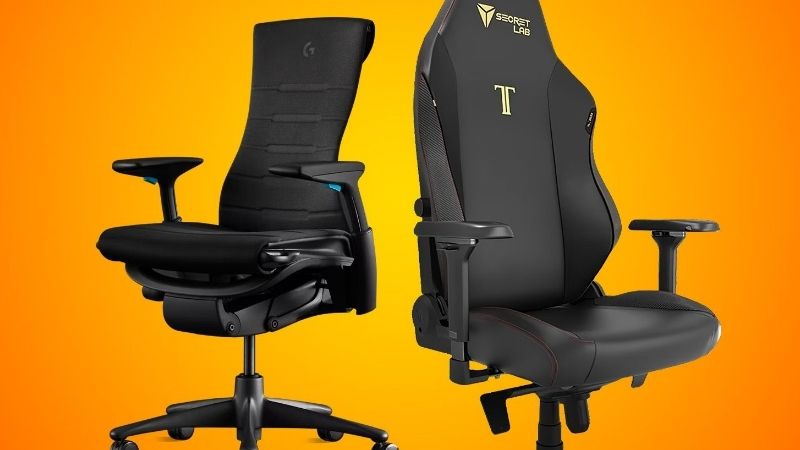
For desk use, start with whether both chairs let you bring your feet, torso, arms, and work surface into a workable relationship. OSHA’s computer-workstation guidance emphasizes adjustable seat height, appropriate seat depth, back support, and arms that do not obstruct desk access [OSHA, Computer Workstations: Chairs, accessed October 2026]. Those are fit criteria, not exclusive properties of an office-chair category. Use this side-by-side table as a checklist, then confirm every control for the particular model.
| Decision Factor | Ergonomic Office Chair | Gaming Chair | Best Way to Decide |
|---|---|---|---|
| Visual design | Often understated task-chair styling | Often tall back, sports styling, or themed upholstery | Ignore appearance until fit is confirmed |
| Seat shape | May have an open seat with adjustable depth | May have side bolsters or a broad flat seat | Measure usable width and front-to-back support |
| Lumbar control | Varies from fixed contour to adjustable support | Varies from a cushion to built-in multiway support | Check where support actually meets your lower back |
| Reclining | May offer synchronized tilt and adjustable stops | May offer independently reclining back and tilt lock | Test the position used at your keyboard |
| Upholstery | Mesh, fabric, foam, or hybrid | Fabric, leatherette, mesh, or foam | Check contact surface, care, and ventilation |
| Adjustment range | Some models emphasize seat-depth and arm positioning | Some models emphasize deep recline and 4D arms | Verify exact SKU controls, not marketing labels |
Category Labels Do Not Prove Better Ergonomics
Ergonomic is a description of an intended human-centered design, not a promise that one chair fits all bodies or prevents injury. Gaming describes a market and common styling cues, not the absence of office functionality. A conventional task chair may include only seat-height adjustment, while a well-equipped gaming model can include multi-directional lumbar and arm settings. The practical question is whether those controls match the user and the workstation.
Secretlab publishes a built-in four-way lumbar system, four-directional armrests, and seat tilt control for its TITAN Evo [Secretlab, TITAN Evo technical specification, accessed October 2026]. That is a concrete example of adjustable gaming seating, not proof that all gaming chairs offer these settings. Likewise, Steelcase lists seat-depth adjustment and recline controls on its Gesture office chair [Steelcase, Gesture product page, accessed October 2026]. Compare model with model, including optional features, instead of assuming either category always wins.
Seat Geometry Usually Matters More Than the Backrest Shape
A chair can look supportive yet have the wrong seat pan for you. A deep seat may keep a shorter user from contacting the backrest without pressure near the knees; a shallow seat may leave a taller user’s thighs poorly supported. Rigid side wings can also reduce usable sitting width even when the advertised overall dimension seems generous. Separate usable seat width and depth from the chair’s exterior width and frame measurements.
OSHA advises that the seat accommodate the user’s thighs and allow backrest contact without the front edge pressing behind the knees [OSHA, Computer Workstations: Evaluation Checklist, accessed October 2026]. Use that as a physical fitting test rather than applying one quoted seat dimension to everyone. If the retail listing only gives chair-wide measurements or a height recommendation, request a seat-pan drawing and check the seller’s return terms before purchasing.
Back Support and Recline Must Work at a Desk
Full recline photographs show a chair’s lounge position, not necessarily its useful angle during typing. A recliner-style gaming back may adjust independently of the seat, while an office task mechanism may change seat and back angles together. Neither movement pattern is universally preferable. A functional test is whether you can work close to the desk with your back supported and shoulders relaxed, then lean back or change position without fighting the mechanism.
Steelcase describes its Gesture with variable back stops and a separate control for seat height and depth [Steelcase, Gesture U.S. product page, accessed October 2026]. Secretlab’s TITAN Evo specification lists a backrest recline range of 85–165 degrees with the tilt mechanism unlocked [Secretlab, TITAN Evo technical specification, 2024 document]. The degrees apply to that specific gaming model, not all gaming chairs, and greater maximum recline does not automatically translate to better desk support.
Six Situations: Which Chair Should You Choose?
Think of the following as six purchasing decisions rather than a ranking of brands. For each situation, identify the likely better starting point, the condition that could reverse the decision, and the specification you need to verify. These scenarios deliberately focus on type selection; a general office-chair buying guide should cover broader checks such as assembly, overall budget, and retailer selection.
For Typing and Video Calls Through the Workday
Start with a task-oriented ergonomic office chair if you primarily write, edit, attend meetings, or use a keyboard and mouse. The useful features are stable seat height, suitable seat depth, armrests that let the chair approach the desk, and a backrest that supports upright or slightly reclined tasks. A headrest, aggressive side bolsters, or extreme recline is not the deciding feature when those tasks dominate your time.
A gaming chair is a reasonable alternative if its seat dimensions fit and the arms, lumbar region, and backrest can be positioned for the desk. Try moving the chair fully under the work surface with the controls set for working, not for lounging. OSHA flags armrests that prevent close positioning as a potential problem [OSHA, Computer Workstations: Chairs, accessed October 2026]. This specific desk-access check can rule out an attractive model before you spend money.
For Gaming After Work on the Same Computer
If one chair must handle office hours and evening play, the distinction becomes less meaningful. Prioritize a model that supports both keyboard concentration and relaxed gamepad sessions without replacing the seat or adding makeshift cushions. An office chair with a flexible reclining mechanism can work for games, while a well-adjustable gaming chair can serve at a workstation. Choose the design that holds a usable working posture first, because that is often the more demanding arrangement.
Herman Miller sells a gaming version of the Embody office-chair platform, using a shared core ergonomic architecture with differences in cushioning and tuning [Herman Miller, Embody Chair Buyer’s Guide, accessed October 2026]. This manufacturer-specific example shows that the two markets overlap. It is not evidence that every hybrid chair performs the same way or that its advertised gaming enhancements are necessary for a person’s use.
For People Who Need More Seat Width or Freedom to Shift
Favor the chair with a usable, unobstructed seat width rather than the one labeled ergonomic or XL. Some racing-inspired shapes have raised side contours, while other gaming products use flatter seats designed for movement. Some office seats have firm perimeter frames that can also limit comfortable positions. Compare the space between the edges that actually touch the body, plus the ability to bring both feet down without lifting the chair too high.
Secretlab publishes separate Small, Regular, and XL configurations for the TITAN Evo, each with its own recommended user ranges [Secretlab, TITAN Evo technical specification, 2024 document]. These are manufacturer recommendations and load limits for that product family, not universal body-sizing rules. Check the exact chair’s dimensions and maximum load, then try the seat if possible. A wider chair that is too deep or high is not necessarily a better fit.
For a Warm Room or a Preference for Fabric Rather Than Leatherette
Compare materials and construction rather than categories. Open-weave mesh backs may allow more airflow at the backrest than a continuous upholstered panel, but many mesh chairs have foam seats, and some gaming chairs use textile upholstery instead of leatherette. Feel depends on the seat assembly and the room, not simply whether a photo shows perforation or a fabric-looking pattern. Avoid treating breathable as a measurable cooling guarantee without comparable testing.
The TITAN Evo U.S. listing offers leatherette and SoftWeave fabric alternatives [Secretlab, TITAN Evo U.S. product page, accessed October 2026], while many office-chair lines offer multiple coverings. Look at the specific SKU’s seat and back separately, how the material may be cleaned, and what the manufacturer excludes from its warranty. If you need a full-mesh suspension seat, confirm that phrase in the specification instead of assuming a mesh back supplies it.
For Deep Recline, Streaming Breaks, and Controller Play
A gaming model with independent backrest recline may be convenient when you regularly shift from desk input to a controller or short rest. But the recline lever needs safe clearance behind the chair, and the seated user must be able to return to a working position smoothly. The ability to reach a dramatic advertised angle should not be confused with an assurance that the chair is appropriate for sleeping or for unsupervised use while almost flat.
Razer’s U.S. specifications give the Iskur V2 X an adjustable backrest recline up to 152 degrees [Razer, Iskur V2 X U.S. product page, accessed October 2026]. Secretlab lists 165 degrees for the TITAN Evo with tilt unlocked [Secretlab, TITAN Evo technical specification, 2024 document]. Those values describe different products under stated configurations, not a meaningful category average. Also verify backrest and seat movement, the lock positions, room clearance, and the actual usage manual.
For a Shared Desk or Frequently Changing Users
An office task chair with clearly accessible adjustments is often the easier starting point when different people use the same workstation. Seat height, back support, arm placement, and recline resistance may need resetting repeatedly. A chair with controls that are confusing or hidden can remain poorly fitted even if it has many nominal features. The strongest advantage here is rapid, repeatable adjustment rather than a particular visual design.
OSHA notes that adjustable chairs can accommodate differences among users and advises trying chairs before purchase [OSHA, Computer Workstations: Chairs, accessed October 2026]. A gaming chair with straightforward controls can also pass this test. Have both intended users adjust the same demo chair independently, check that neither runs out of height or depth range, and verify whether optional accessories are included before deciding which market category to shop.
Frequently Asked Questions
These final questions concern assumptions that product photos and short spec tables often leave unresolved. They focus on what a category name does and does not establish, so they do not repeat the six usage scenarios or present general medical claims about pain prevention.
Is a Gaming Chair Automatically Less Ergonomic Than an Office Chair?
No. Gaming is not a technical classification that automatically excludes ergonomic design. A gaming chair may offer adjustable back support and arms, while a chair sold for offices may be basic. The comparison must account for the exact configuration, fit, and controls. Marketing language alone does not prove either chair supports a particular person’s workstation better.
Consult manufacturer adjustment diagrams and, when possible, test the seat with the keyboard or desk height you use. The TITAN Evo technical document, for example, specifies lumbar and arm controls [Secretlab, 2024 document]. That provides evidence for that model, not for every gaming chair or any claimed medical benefit.
Do Gaming Chairs Always Have a Lumbar Pillow?
No. Some use removable pillows, others have integrated adjustable lumbar assemblies, and some rely on a molded back contour. The presence of a detachable cushion in one product photo should not be generalized to every gaming design. Look for the manufacturer’s description of how support moves and whether it can be positioned at your lower back.
Razer’s Iskur V2 support documentation describes separate control of lumbar protrusion and height for that model [Razer, Iskur V2 support article, updated June 2026]. This is an example of built-in adjustment, not a recommendation for a particular user. If the seller only says lumbar support without identifying the mechanism, request the manual.
Is the Headrest a Reason to Choose One Chair Type?
Not by itself. A headrest may matter during reclining or resting, but many people do not need contact with one while typing. An attached headrest can also fit poorly if its height or forward projection does not match the intended user. The relevant question is what tasks you perform with the head supported and whether the accessory can be moved out of the way.
Check whether the headrest adjusts in both position and angle, or whether it is an optional model-specific accessory. OSHA’s purchasing checklist discusses a headrest in relation to large backward recline angles [OSHA, Computer Workstations: Purchasing Guide, accessed October 2026]. That guidance does not make a headrest mandatory for every office or gaming chair.
Can a Gaming Chair Be Used for Remote Work?
Yes, if its seat fits, its adjustments suit your desk, and it remains stable for your intended tasks. A gaming appearance does not prevent office use. Test the same functional conditions you would for an office chair: feet supported, usable desk clearance, lower-back contact, and arms that do not force you to reach for the keyboard.
Inspect the product’s available adjustments, load rating, warranty conditions, and return policy rather than relying on a category claim. If a specific gaming model cannot accommodate your working position, reject that model even if it is comfortable during brief play. The reverse applies to an office chair that feels awkward during your actual tasks.
Final Thoughts
An ergonomic vs gaming chair choice has no automatic winner. Favor an office-task design when desk-focused adjustment is your priority, and consider a gaming design when its seat fits and its recline style matches your routine. Compare the exact seat dimensions, lumbar controls, arm clearance, materials, and return terms before deciding.









