
Key takeaways
- The best chair is one you can adjust to your body, desk, and daily tasks, not the one with the most controls. To learn how to find a good office chair, start by testing seat depth, back support, and arm…
The best chair is one you can adjust to your body, desk, and daily tasks, not the one with the most controls. To learn how to find a good office chair, start by testing seat depth, back support, and arm clearance, then compare stability and the seller’s return terms before committing.
As an Amazon Associate we earn from qualifying purchases.
By KK Home Furnishings Editorial Team
How to Evaluate an Office Chair Before Buying
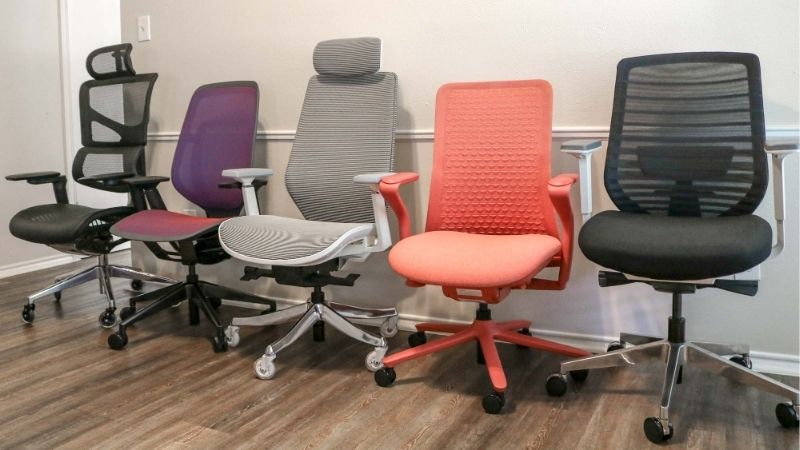
Begin with a shortlist of chairs that publish dimensions and adjustment details, then sit in them whenever possible. OSHA recommends trying chairs before purchase because no listed adjustment range fits every body [OSHA, accessed October 2026]. Use the checks below as filters, not as a promise of better health or productivity.
| Buyer Situation | Priority Test | What to Check | Walk Away If |
|---|---|---|---|
| Seat feels too high | Lowest occupied seat position | Feet reach floor; seat can align with keyboard | Feet dangle and the desk cannot accommodate support |
| Seat edge presses behind knees | Usable seat depth | Back contacts backrest while thighs are supported | Front edge crowds knees at shortest adjustment |
| Back support misses waist | Backrest and lumbar movement | Support lands where this user needs it | Fixed ridge pushes the pelvis or ribs awkwardly |
| Arms prevent desk approach | Armrest clearance | Arms lower, shift, or detach as needed | Chair must remain too far from keyboard |
| Chair moves poorly | Base and floor compatibility | Stable five-leg base and suitable casters | Casters slip or snag on actual floor |
| Online model cannot be tested | Verification and returns | Exact dimensions, warranty exclusions, return cost | Policy is unclear or the model differs from listing |
Start With Seat Height, Width, and Usable Depth
First, check whether the chair supports your feet and thighs while your back actually reaches its backrest. The seat should not cut into the backs of your knees, and the width should allow you to shift position. This fit test rules out more unsuitable chairs than comparing mesh color, styling, or decorative headrests.
OSHA’s purchasing guide uses 15 to 22 inches as a general seat-height adjustment reference and 15 to 17 inches for seat-pan length, while warning that its criteria may not fit everyone [OSHA, accessed October 2026]. Compare the maker’s measurement method with your seated trial; numbers are screening tools, not universal targets.
Check Backrest Support and Recline Under Your Weight
A promising chair supports the lower back when you sit normally without forcing you to perch at the seat edge. Test whether the backrest moves with you and whether its support feels different in a working posture and a relaxed posture. A dramatic lumbar pad is not useful if its curve lands in the wrong place.
OSHA advises adjustable back support and a recline option with a lock or usable resistance [OSHA, accessed October 2026]. Confirm that the mechanism responds while occupied, without abrupt release or wobble. Avoid buying solely from an advertised recline angle; the chair must remain comfortable and controlled in your own working range.
Inspect Armrests, Stability, and Service Terms
Armrests should allow the chair to move close enough to your keyboard, with room for the shoulders to stay relaxed. Check whether pads move inward, lower enough, or detach entirely. Also roll and swivel the occupied chair on a floor like yours. A premium-looking base offers little value if it snags or shifts unexpectedly.
OSHA recommends a sturdy five-leg base and floor-appropriate casters for conventional task chairs [OSHA, accessed October 2026]. Ask the seller for the exact model’s load rating, replacement-part availability, warranty exclusions, and return-shipping rules. A standards claim should never substitute for a documented user-weight rating.
Adjust for Your Situation
A good chair-buying test changes with the person and room. The six situations below explain what to prioritize in a showroom or during an online comparison, including when a popular design is the wrong choice. They are selection scenarios, not a list of products or a setup tutorial for a standing desk.
1. You Are Shorter and Most Seats Feel Too Deep
Start with the chair whose seat can become genuinely shallower while the backrest still supports your lower back. If the seat edge crowds your knees, moving forward to escape pressure defeats the back support you paid for. A compact seat with adjustable depth may be a better choice than an oversized executive-style silhouette.
In a showroom, sit back and check the remaining space at the back of your knees before judging softness. Online, request the minimum usable seat depth, not only the chair’s overall dimensions. A footrest can help when feet lack support, but it cannot fix a seat pan that is fundamentally too long for your thighs.
2. You Are Taller and Lose Thigh Support
Favor a seat with enough usable depth and width to support your thighs without concentrating pressure at its front edge. Then check that the backrest reaches the part of your spine that needs contact when you sit all the way back. A tall overall chair is not automatically a good fit for a longer-legged person.
Compare the actual seat-depth travel and the height of the backrest from the compressed seat, not just the product’s full height including its base. If a model feels cramped at full depth, look for a different size rather than relying on extra cushioning. Confirm the arm spacing and headrest position do not restrict natural movement.
3. Your Household Shares One Desk Chair
Give adjustability and easy-to-read controls more weight than a specialized contour made for one person. The chair should let both users reach a suitable seat height, back support, and arm position without complicated tools. A fixed lumbar bump that pleases one person may be uncomfortable for the other.
Have each user complete an independent seated test, then switch settings and repeat. Watch for controls that are too stiff or hard to find while occupied. OSHA notes that greater adjustability matters especially with multiple users [OSHA, accessed October 2026]. Save the settings that work rather than assuming one shared configuration fits everyone.
4. You Sit for Long Writing or Computer Sessions
Prioritize sustained fit and changes of position over flashy features. A seat that feels plush for a brief sit may become unhelpful if it slopes, loses support, or restricts movement. Test several ordinary tasks: keyboard use, reading, and leaning back briefly. The best option lets you change posture without a struggle.
Ask whether seat cushioning, lumbar components, casters, and the lift are covered under the same warranty terms; they often are not. For computer work, NIOSH recommends avoiding prolonged static postures and taking short breaks [CDC/NIOSH, July 2026]. A chair cannot replace sensible task variation or address a medical condition.
5. You Work in a Small Room With Carpet or Hard Floors
Footprint and rolling behavior can eliminate an otherwise well-fitting chair. Check that the base clears desk legs and nearby drawers and that the arms can slide below the desktop. A chair that traps you away from the desk may force reaching, even when its back support and seat dimensions appear excellent on paper.
Try the chair on carpeting or flooring similar to your own, paying attention to whether the casters resist movement or roll too freely. OSHA specifically advises matching casters to floor conditions [OSHA, accessed October 2026]. Ask about compatible caster or glide replacements rather than assuming a universal wheel upgrade fits the stem.
6. You Must Order Online Without a Showroom Trial
Narrow your shortlist to listings that disclose actual seat-height and seat-depth ranges, armrest movement, model-specific load ratings, and clearly identified versions. Photographs cannot establish how a chair fits an individual body. Favor complete documentation and realistic return options over a long list of unverified comfort claims.
Before paying, verify who handles a defective gas lift or damaged base, whether return shipping or disassembly is required, and whether an assembled chair qualifies for return. Save the listing and policy wording for the exact seller. If essential measurements are missing and support cannot supply them, choose a more transparent model instead.
Frequently Asked Questions
These questions cover common purchasing decisions that a short showroom sit may not answer: standards labels, headrests, material choices, and how to judge an unfamiliar online model. They complement the fit checks rather than repeating the six buying situations.
Does ANSI/BIFMA X5.1 Mean an Office Chair Will Fit Me?
No. ANSI/BIFMA X5.1 evaluates aspects of office-seating safety, structural strength, and durability; it does not establish personal comfort or guarantee a fit for your height [BIFMA, accessed October 2026]. A compliant general-purpose chair may still have a seat pan or armrest geometry that does not work for your body.
Request the exact test standard and the model-specific documentation when a listing says only “BIFMA certified.” BIFMA also identifies a separate X5.11 large-occupant chair standard [BIFMA, accessed October 2026]. Check the maker’s own published user-weight rating rather than inferring a limit from the standard’s reference test load.
Is a Headrest Necessary for a Good Office Chair?
No. A headrest is not a universal requirement for effective seated computer work. Some people value it when reclining; others find that a poorly positioned headrest pushes their head forward. The important question is whether it supports a comfortable posture during the tasks and recline positions you actually use.
Test the headrest both while sitting upright and while reclining, then check whether it adjusts or can be removed. OSHA’s workstation evaluation checklist says a headrest, if present, should be adjustable and not push the head past a neutral position [OSHA, accessed October 2026]. Do not pay for this feature without a use case.
Is Mesh Always Better Than a Padded Seat?
No. Mesh and padding offer different contact sensations, and neither guarantees comfort for every person. Mesh may allow more air movement, while a padded seat can spread contact pressure differently depending on its shape and firmness. The fit of the seat pan and backrest matters more than choosing a fabric by its marketing label.
Sit long enough to notice whether the seat edge feels supportive or whether the frame contacts your thighs. Check how the cover, tensioned mesh, or cushion can be serviced if it wears. Do not treat vague claims about cooling, posture correction, or all-day comfort as substitute evidence for a real fit test.
What Is a Red Flag in an Online Office Chair Listing?
Missing model-specific dimensions, vague warranty terms, and a capacity claim with no identifiable manufacturer are meaningful warning signs. So are photos that show different controls from the specification sheet. If the listing does not identify exactly which chair arrives, comparisons with the illustrated features may be unreliable.
Ask the seller for the version number, lowest and highest seat positions, arm-clearance details, and return conditions before ordering. Keep a record of answers, especially when a third-party marketplace seller handles the shipment. If the business cannot confirm critical details, move to another listing rather than guessing.
Final Thoughts
Learning how to find a good office chair means filtering by fit first, testing the occupied seat and backrest, and then checking the base, serviceability, and return risk. Shortlist only models with usable measurements; keep the one that fits your body and normal work, not the one with the longest feature list.









