Yes, many fireplace TV stands let you show simulated flames while leaving the heating element off. The answer to can you use tv stand fireplace without the heater is model-dependent: look for independent flame and heater controls, sometimes called flame-only or no-heat mode. Dimplex and ClassicFlame document that capability on specific electric fireboxes, but you should confirm it in the manual for the insert installed in your own cabinet.
As an Amazon Associate we earn from qualifying purchases.
By KK Home Furnishings Editorial Team
How Flame-Only Mode Works on a Fireplace TV Stand
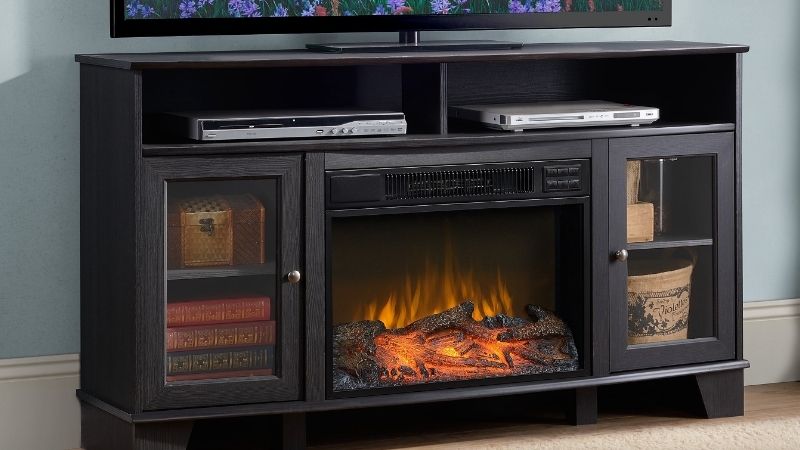
A fireplace media console combines two different things: furniture that holds electronic equipment and a powered fireplace insert that creates an artificial flame display. Turning off the heater is a control choice for the insert, not a modification to the furniture. Start by locating the insert’s model label, since the cabinet model and firebox model may be different.
| Control or Display | What It Usually Changes | How to Confirm No-Heat Operation | Important Exception |
|---|---|---|---|
| Flame or fire-effect button | Turns visual flames on, or adjusts brightness | Keep the effect on after disabling the heater | Button behavior differs between models |
| Heater or heat button | Activates or disables the heating function | Select the manual’s Off setting for heat | Thermostat standby is not the same setting |
| Thermostat setting | Controls heating in response to room temperature | Do not rely on a low target to disable heat | The heater may engage after the room cools |
| Power or standby button | Starts or stops the appliance | Use alongside the dedicated heater-off command | Some models restore previous settings |
| Timer button | Sets an automatic operating period | Check which functions the timer switches off | It does not establish a permanent no-heat mode |
| Cabinet accent-light button | Controls shelf or background lighting | Check separately from the firebox’s heater setting | Lights may use another control or circuit |
Confirm the Exact Insert Supports Flames Without Heat
Dimplex states that its Nova Firebox series can operate in flame-only mode, and its Revillusion models likewise separate flame effects from heating [Dimplex, Nova Firebox and Revillusion product documentation, accessed October 2026]. Those references establish that independent operation exists; they do not prove an unrelated fireplace console has the same controls. If a retailer’s listing simply says realistic flames, check the instruction manual before making that assumption.
A Twin-Star International ClassicFlame manual covering models such as 23II042FGL and 26II042FGL describes separate flame selections and a heater setting that can be switched Off [Twin-Star International, ClassicFlame 23II/26II/28II series manual]. Find the actual insert identification sticker rather than choosing the instructions for a console that only looks similar. If the model is unknown, ask the seller or manufacturer before relying on flame-only use.
Use the Flame and Heater Buttons as Separate Functions
On a model with independent controls, turn the unit on, enable its flame effect, then choose the heater’s explicit Off setting. Observe the display and listen for whether a heating cycle starts. The Dimplex BLF3451 owner manual describes separate flame-effect and heat-on/off buttons, with a fan that can continue briefly after heating stops [Dimplex, BLF3451 Owner’s Manual, operation section]. Read your model’s own button diagram because icons and button sequences are not interchangeable.
Some models offer a flame setting with no heat directly on a switch rather than on a remote. An Ameriwood Home fireplace TV stand insert identified in instructions for model 1764296COM uses separate FLAME and HEATER switches [Ameriwood Home, 1764296COM operating instructions]. This is an example of an implementation, not a universal setup sequence. If the remote shows flame, heater, temperature and power icons together, do not assume that pressing Power leaves heat disabled.
Understand What Heater Off Does and Does Not Mean
Flame-only mode normally keeps the visual effect operating while the room-heating function is disabled. It still consumes electrical power to run lighting, electronics and possibly other effect components. The exact consumption depends on the insert design, selected visual effects and accessories; the heater’s full wattage is not a valid figure for the flame-only setting. Do not claim a specific energy saving without measurements for the exact model.
Turning off heat also does not prove every part becomes instantly cool. If the heater operated moments earlier, components may remain warm and the cooling fan may run as designed. Keep openings clear and observe the installation manual even when the display is the only feature you intend to use. The appliance remains connected to electricity, and no-heat mode is not the same as unplugging it for cleaning or servicing.
Adjust Flame-Only Use for Six Real-Life Situations
The simplest situation is a unit whose manual names a flame-only mode and shows how to turn the heater off. Other situations need an extra check, especially where a remote has been lost, a thermostat is controlling heat, or a unit seems to behave unexpectedly. These cases explain the next decision without turning the article into a heater-repair guide.
You Want Fireplace Ambiance During Warm Weather
For a summer evening, flame-only is often the purpose of the independent controls: simulated logs, ember beds or color effects can create a focal point without activating the supplemental heater. Select a visual setting that suits the room and make sure the heater control reads Off, not merely a low temperature. A thermostat target below the current room temperature might suppress heating temporarily while still permitting it to start later.
Check the room after enabling the effect and listen for a heating fan that should not be running under the chosen mode. If the heater begins producing warmth despite a documented no-heat setting, stop operation and check the model-specific manual. Do not treat a warm-weather preference as a reason to disconnect heating wires or alter factory settings. Properly supported controls are the right way to obtain a decorative display.
The Fireplace Remote Is Missing or Not Responding
First look for a control panel on the insert itself. Some fireplace consoles provide an on-unit heater switch and flame switch, while others require specific remote commands for certain effects. If the manual describes an alternate local-control sequence, use it exactly. If no manual controls exist for the feature, order a remote that matches the full insert model instead of assuming a generic infrared remote will send the correct signals.
A dead remote battery, blocked sensor or a control lock can make it appear that flame-only mode is unavailable. Identify which control actually failed before deciding the product lacks the feature. The ClassicFlame instructions for the cited series discuss remote battery and signaling checks, but those fixes apply to that series rather than all inserts [Twin-Star International, ClassicFlame manual, troubleshooting]. Avoid dismantling the heater to compensate for an unavailable remote.
The Heater Fan Keeps Running After Heat Is Switched Off
A fan that runs briefly after the heater is disabled may be performing a normal cool-down. Dimplex’s BLF3451 documentation specifies a delay of about 60 seconds after heater shutdown for that model [Dimplex, BLF3451 Owner’s Manual]. Other designs can use a different interval. During this period, the flame effect might remain visible while the fan circulates air to cool internal components, so continued airflow alone does not show the heat setting is still active.
There is a difference between a documented cool-down cycle and unexpected, sustained heating. If hot air continues well beyond the behavior described by your model’s manual, switch the appliance off and contact the maker. Do not remove the plug immediately to interrupt a normal manufacturer-specified cool-down unless an electrical or overheating hazard requires immediate disconnection. Where the manual gives a different shutdown instruction, that instruction takes precedence.
The Room Thermostat Has Its Own Automatic Heating Setting
Some fireplace inserts have a temperature setting that can trigger their heating element when the sensed room temperature falls. Choosing an apparently cool target is therefore less reliable than selecting a dedicated Heater Off or Heat Off function. On the documented ClassicFlame series, the heater’s thermostat settings include a specific Off choice; the temperature range alone does not define permanent flame-only operation [Twin-Star International, ClassicFlame manual, Function Details].
After changing settings, check whether the display uses a thermostat symbol, heat icon or other model-specific confirmation. If the insert remembers previous settings after standby, inspect the heater state again on the next use. A scheduled timer can stop the whole appliance but generally should not be mistaken for disabling heating indefinitely. For households where a no-heat display is important, keep the appropriate operating instructions near the remote.
Your Fireplace TV Stand Includes Separate LED Shelf Lights
Media consoles may add accent lighting outside the firebox. Those LEDs can be visually coordinated with the flames without necessarily sharing the same controls. A flame button might change the simulated fire while a light button changes shelf illumination; on other models a single remote may adjust both. Determine which settings are for the fire effect, for cabinet LEDs and for heat, so a lighting adjustment does not accidentally change the heater mode.
The Twin-Star ClassicFlame documentation lists LED cabinet lights as a separate function on its specified inserts [Twin-Star International, ClassicFlame manual, Function Details]. This example is useful for reading a feature list, but it is not a promise that every TV stand includes shelf LEDs. If only the shelf lights turn on and the firebox remains dark, consult the firebox control section rather than replacing the console or guessing that the heater must run to create flames.
You Are Checking a Used Unit With No Documentation
Identify two things separately: the cabinet maker and the fireplace insert maker. Open the cabinet doors or inspect the accessible firebox label without removing electrical panels. Record the full model number and search the manufacturer support section for a manual or control diagram. A product advertisement that says electric fireplace television stand is not sufficient evidence of separate heat and flame functions, particularly if an older insert has been replaced.
If the precise manual cannot be found, customer support may be able to confirm whether heat can be disabled during flame display. Do not operate a damaged insert or rely on trial and error with unknown switches. And remember that no-heat functionality cannot validate a furniture top’s TV weight limit: that is a separate question resolved by the cabinet’s documentation, not by the firebox controls.
Frequently Asked Questions
These questions focus on assumptions that can lead to misuse even after you locate a flame-only setting. The manufacturer’s current documentation for your exact insert remains the controlling source when advice differs between product families.
Does Flame-Only Mode Still Use Electricity?
Yes. A visual flame effect needs electricity even when its heater is disabled. LEDs, displays, controllers and, in some designs, motors or other effect mechanisms still use power. That means flame-only is not a zero-energy setting, and its usage cannot be estimated accurately from the heater’s maximum published wattage alone.
For a reliable estimate, check whether the manufacturer publishes flame-only power consumption for the precise insert. If not, a compatible plug-in electricity meter may provide a measurement when used within its own and the appliance’s electrical instructions. Never treat an estimate for one fireplace model as a verified number for a different console.
Can I Run the Flame Effect If the Heater Is Broken?
Not automatically. An appliance that no longer produces heat may have a harmless control setting, but it may also have a faulty sensor, wiring problem or protective shutdown. A working flame display does not prove the remaining electronics are safe to use. Stop operating a malfunctioning fireplace until the manufacturer or a qualified service provider confirms an approved remedy.
Do not bypass a thermal cutoff, defeat a safety switch or remove the heater assembly to manufacture a no-heat feature. The ClassicFlame manuals contain model-specific fault indications that should be handled according to their instructions, not copied onto an unrelated insert [Twin-Star International, ClassicFlame manual, Troubleshooting].
Can Flame-Only Mode Be Left On Overnight?
Follow the operating and unattended-use precautions for the exact appliance. A visual effect without active heat may reduce the thermal demand compared with a heating cycle, but it does not erase electrical hazards or the instructions about turning off or unplugging the unit when not in use. A timer may be convenient, yet it is not a substitute for proper supervision or safe installation.
The U.S. Consumer Product Safety Commission advises turning portable electric heaters off while sleeping and connecting them directly to wall outlets rather than power strips [CPSC, 2026, Keep Warm and Safe This Winter]. Those are general portable-heater precautions, not proof that every built-in flame-only appliance has identical operating rules. Apply the stricter applicable instructions for your model.
Do I Have to Unplug the Unit to Stop the Heat?
No, not when your model has an approved heater-off control. Use that function to preserve flame effects without activating the heater. Unplugging the appliance normally shuts down the effect as well, and a plug should not be used as an improvised substitute for a missing heat control during normal operation.
Disconnect the appliance as the manual instructs before cleaning or service, and stop using it if the plug, outlet or cord becomes hot or damaged. For the covered ClassicFlame units, the operating manual specifies a grounded 120-volt outlet and prohibits extension cords and relocatable power taps [Twin-Star International, ClassicFlame manual, Important Instructions]. Respect those directions whether you intend to heat the room or show flames alone.
Final Thoughts
For can you use tv stand fireplace without the heater, the useful answer is yes on inserts that document separate flame and heat functions. Find your firebox model, select its explicit heater-off setting, and account for possible fan cool-down and remembered controls. Never modify wiring or treat flame-only operation as permission to ignore installation and electrical-safety instructions.
More from Amazon
Programs that pair well with the guide above. Offers and eligibility are set by Amazon and may change.
Collect the home and kitchen items you want in one registry that guests can shop from.
Create a wedding registrySet up recurring deliveries of everyday items on eligible products. Terms and savings are set by Amazon.
Explore Subscribe & SaveFree shipping on eligible items, Prime Video and more. Eligible new members can start with a free trial.
Start a Prime free trialAudiobooks and podcasts to listen to on the go. Eligible new members can start with a free trial.
Try Audible freeAs an Amazon Associate we earn from qualifying purchases.