Key takeaways
- An electric blanket not heating may have a loose connector, a power-supply problem, or a controller that has shut the heater off. Unplug it, inspect for damage, and follow your model’s reset instructions before trying it again. If you find…
An electric blanket not heating may have a loose connector, a power-supply problem, or a controller that has shut the heater off. Unplug it, inspect for damage, and follow your model’s reset instructions before trying it again. If you find scorching, melting, or a matching recall, stop using it.
As an Amazon Associate we earn from qualifying purchases.
By KK Home Furnishings Editorial Team
Why Your Electric Blanket Is Not Heating
Start with the symptom, not a replacement controller. A dark display, a flashing code, and a blanket that seems only mildly warm can point to different issues. This guide draws on published Sunbeam and Beautyrest support instructions, electrical-safety guidance, and U.S. recall notices reviewed in October 2026; it is not based on detailed research.
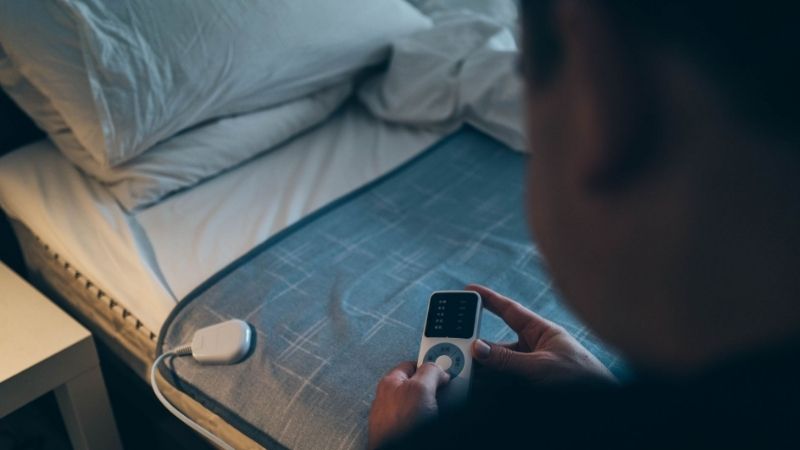
A Power Problem Can Leave the Controller Dark
If the controller has no light or display, a disconnected plug, switched-off outlet, tripped circuit, or damaged power cord may be responsible. These are possibilities, not a diagnosis. Check for obvious damage before touching any connector, and do not keep trying a unit that smells burnt or has discoloration.
A working lamp can help confirm that a wall outlet supplies power, provided the outlet is dry and shows no damage. If a breaker trips again or an outlet feels hot, stop and consult a qualified electrician. Avoid extension cords, power strips, and improvised adapters when testing heated bedding.
A Loose Connector or Controller Error Can Stop Heating
Many heated blankets use a removable controller that plugs into a connector sewn into the blanket. Some controls detect faults and disable the heater rather than continuing to supply power. A controller that lights up therefore does not prove that the heating circuit is operating correctly.
Sunbeam directs owners of certain warming products to unplug the power cord and confirm the controller-to-blanket connection before restarting. Beautyrest support describes flashing E, E1, E2, E3, or E4 on certain heated-product controllers. Error meanings and reset timing are model-specific; never assume every brand uses the same codes.
Gentle Warmth Is Different From a Complete Failure
A functioning heated blanket may feel less hot than expected, especially when spread flat in a cool room. Sunbeam notes that some warming products regulate heat and may not feel hot to the touch during a casual check. This alone cannot establish that a blanket has failed—or that it is safe to continue using.
Compare performance only with the procedure in the exact model manual. Do not fold or bunch the blanket to make the warmth easier to feel: concentrated heat can be hazardous. If the recommended check still produces no warmth, or one zone stays cold, move to the controlled steps below instead of raising the setting repeatedly.
How to Fix an Electric Blanket Not Heating, Step by Step
The safest sequence is inspection, power check, connector check, permitted reset, and manufacturer support. Each step applies only while the blanket is intact, dry, and not subject to a recall. Stop at the first sign of overheating, electrical damage, or repeated error codes; there is no safe do-it-yourself repair to the internal heating wires.
| Symptom | Sign Alongside | Possible Cause | First Safe Action |
|---|---|---|---|
| Display stays dark | No lights when switched on | Outlet, plug, or controller power issue | Unplug, inspect, then check the outlet with another appliance |
| Flashing E or numbered E code | Heater does not start | Model-specific controller fault | Record the code and follow that model’s manual |
| Controller lights, no warmth | Connector may be loose | Interrupted connection or heating circuit | Unplug and reseat the removable connector if the manual permits |
| Only one zone warms | Dual-control blanket | Zone, controller, or connection issue | Confirm zone assignment; contact the maker if unresolved |
| Scorch marks or burning smell | Heat, melting, or damaged fabric | Potential electrical hazard | Switch off, unplug safely, and do not restart |
Step 1: Turn It Off and Look for Damage
Switch the controller off and unplug the mains plug before inspecting the blanket. Check the plug, accessible cord, connector housing, fabric, and controller for frayed insulation, bent contacts, scorch marks, melted plastic, or an unusual odor. A visibly damaged product should be retired from use, not put through a reset cycle.
Keep the fabric unfolded and dry during inspection. Do not open the controller case, probe internal wiring, or attempt to splice a heating element. Electrical Safety Foundation International warns against using worn heated bedding and against folding electric blankets during operation [ESFI, Home Safety guidance, accessed 2026].
Step 2: Verify the Wall Outlet Without an Extension Cord
With the blanket disconnected, test the wall outlet using another small appliance that you know works, if it is safe to do so. Check a switched receptacle or a tripped breaker only within your normal level of competence. This helps separate a supply problem from a blanket problem without energizing damaged bedding.
Once the outlet is confirmed and no damage is visible, connect the blanket directly to the suitable wall outlet specified in its manual. Sunbeam’s dual-control support guidance explicitly says not to use an extension cord or power adapter [Sunbeam, Heating & Performance FAQ]. Do not repeatedly reset a tripping circuit.
Step 3: Reseat the Blanket Connector While Unplugged
Locate the detachable cord connection where the controller cable meets the blanket. After the mains plug is removed, check that the connector is fully seated in the orientation shown in the manual. A half-connected fitting can prevent operation, but forcing an unfamiliar connector can break its contacts or housing.
If the product has two controls, match each controller to its designated side before powering on. Some designs label the corresponding side on the fabric or controller. Never substitute a controller from another brand or model unless the manufacturer explicitly lists it as compatible, even when its plug appears to fit.
Step 4: Perform Only Your Manufacturer’s Reset
For certain Sunbeam warming products, the published reset consists of unplugging the wall cord, checking the controller connection, and plugging the system in again. For certain Beautyrest heated products, the support procedure calls for switching off, unplugging for about 15 minutes, checking the connection, then restarting [Sunbeam FAQ; Beautyrest Support, updated September 2026].
These are two examples, not a universal 15-minute rule. Consult the model number, instruction label, and manual before following either procedure. If a controller reports the same fault after the permitted reset, stop. Repeatedly bypassing or clearing a fault warning is not a repair and may conceal a defective control or heating circuit.
Step 5: Check a Cold Zone Without Improvised Testing
For dual-zone blankets, first confirm that the correct controller operates the cold side and that its connector is secure. Beautyrest describes a controller-swap diagnostic for certain dual-control products, but only where its own support instructions apply. Do not generalize this technique to models with different electrical connections.
Never use a multimeter on exposed blanket wiring, bridge a thermal cutoff, cut the fabric open, or test while the blanket is folded. If one side remains cold after the approved checks, document which side failed and any code displayed. That information is more useful to the manufacturer than another attempt at DIY internal repair.
Step 6: Check Recall Status and Request Service or Replacement
Before reusing an older or unfamiliar blanket, compare its exact brand and model number with current U.S. Consumer Product Safety Commission notices. In September 2026, CPSC announced recall 26-778 for JKMAX heated blankets and pads because internal heating elements could overheat. Owners of affected products were instructed to stop using them and seek a refund [CPSC, 2026].
The JKMAX notice does not mean every heated blanket is recalled. Look up the precise model, including any label or controller identification, and follow the named recall remedy if it matches. For an unrecalled unit that still fails, contact the manufacturer or retailer with the model number, purchase details, displayed error, and steps already attempted.
Frequently Asked Questions
Why does my electric blanket controller blink but not heat?
A blinking controller may be reporting a detected fault, rather than indicating that a higher heat level is needed. Beautyrest lists E and E1–E4 signals for some of its heated products; Sunbeam documents F-family messages on certain models. Neither set of codes has a universal meaning across brands.
Write down exactly what appears and consult the instruction sheet for that controller. If the approved reset leaves the code unchanged, unplug the product and ask the manufacturer about warranty service. A continuing fault signal is a reason to stop troubleshooting, not an invitation to defeat a safety mechanism.
Can I buy a replacement controller for a heated blanket?
Sometimes, but only when the manufacturer confirms that a particular replacement part fits the exact model and production version. Similar-looking connectors can differ in wiring, temperature sensing, and control logic. An aftermarket control with a matching plug is not automatically safe or compatible.
Ask customer support for a documented part number and the correct warranty procedure. If the model is discontinued or the cord and fabric show damage, replacement of the entire product may be more appropriate. Do not borrow a controller from a different blanket merely to see whether the heating wires turn on.
Does UL 964 mean my blanket can be repaired at home?
No. UL 964 is a safety standard whose scope includes electrically heated blankets, throws, and mattress pads; it is not a homeowner repair procedure. It also does not establish that any particular blanket has been independently certified without model-specific listing evidence [UL Standards & Engagement, UL 964].
Look for the applicable certification mark and confirm it through the relevant certification body if safety status matters. A mark cannot override a recall, physical damage, or the maker’s instructions. Internal wire repairs, controller bypasses, and homemade adapters should not be attempted as troubleshooting shortcuts.
When should I replace a blanket that has stopped warming?
Replace it or obtain authorized service when the manufacturer-directed checks fail, a fault persists, or the unit shows damage. Immediately stop use when a recall identifies your model. Age alone does not prove failure, and there is no single service-life number that accurately predicts when every heated blanket will stop working.
Keep the product label and proof of purchase while contacting support. Ask whether the warranty covers the controller, the heated fabric, or both, and whether parts remain available. Compare the cost of an authorized replacement with a new unit, but prioritize safe retirement when repair eligibility cannot be confirmed.
Final Thoughts
When an electric blanket is not heating, check for damage first, then verify wall power and the correct controller connection. Use only the reset instructions for your model. Persistent codes, a cold zone, or any evidence of overheating call for manufacturer support or replacement—not a homemade fix.