Key takeaways
- The herman miller aeron ergonomic office chair is sold in three sizes, not one, so the review that matters is a size-by-size fit comparison. Getting Size A, B, or C right for your body decides comfort far more than any…
The herman miller aeron ergonomic office chair is sold in three sizes, not one, so the review that matters is a size-by-size fit comparison. Getting Size A, B, or C right for your body decides comfort far more than any single generic Aeron spec ever could.
Aeron Size and Fit
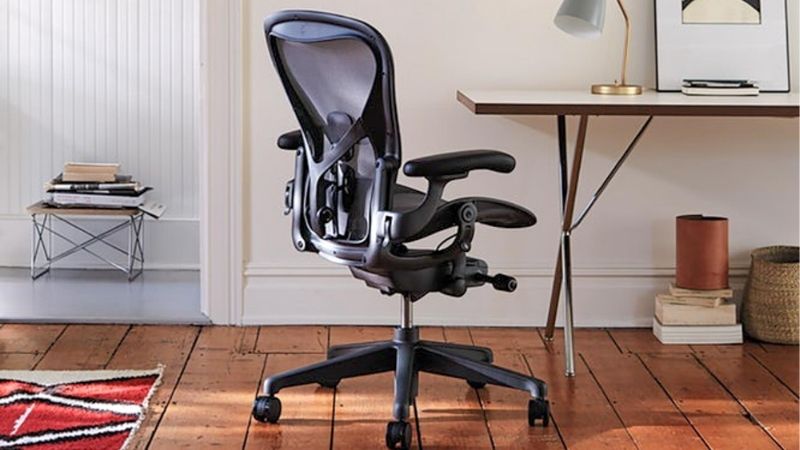
The Aeron comes in Size A, B, and C, each with its own seat geometry and capacity, so choosing the correct size is the first and most important decision. The table below sets out the manufacturer figures for all three sizes plus price and warranty, so you can match the chair to your build before anything else.
| Spec | Manufacturer Rating | What It Means | Watch Out For |
|---|---|---|---|
| Size A fit | Seat 14.75–19 in; 300 lb; 406 mm depth | Suits smaller builds | Overall 38.5×25.75×16 in |
| Size B fit | Seat 16–20.5 in; 350 lb; 432 mm depth | Suits average builds | The most common size |
| Size C fit | Seat 16–20.5 in; 400 lb; 470 mm depth | Suits larger builds | Older 2023 sheet listed 350 lb |
| Price and warranty | ~$2,445 (Size C config); 12-year | A premium investment | Price varies by configuration |
Size A
Size A is the smallest Aeron, with a manufacturer-stated seat-height range of 14.75 to 19 inches, a 406-millimeter seat depth, and a 300-pound capacity, on an overall frame of 38.5 by 25.75 by 16 inches. It suits smaller builds and shorter users who find a standard chair too deep or too tall at its lowest setting.
Because the seat geometry is fixed per size rather than adjustable in depth, picking Size A is how a smaller user gets a proper fit from the Aeron. If you fall at the lower end of height and weight, Size A’s shallower seat keeps your back against the support without the front edge pressing into the backs of your knees.
Size B
Size B is the most common Aeron, with a seat-height range of 16 to 20.5 inches, a 432-millimeter seat depth, and a 350-pound capacity. It covers the broadest span of average builds, which is why it is the default choice for most buyers and the size most offices standardize on for a mixed group of users.
The wider fit window makes Size B the safe pick when you are unsure, since it accommodates a large middle range of heights and weights. If your measurements sit comfortably within its seat-height and depth figures, Size B gives the Aeron experience without the risk of a size that runs too small or too large for you.
Size C
Size C is the largest Aeron, sharing the 16 to 20.5-inch seat-height range with Size B but offering a deeper 470-millimeter seat and, per the current US listing, a 400-pound capacity. It suits larger and taller builds who need more seat depth and a higher weight rating than Size B provides.
One figure to resolve carefully: an older 2023 spec sheet listed Size C at 350 pounds, while the current US Store lists 400 pounds, so use the current figure and confirm it at purchase. If you are near the upper end of weight or want more thigh support, Size C’s deeper seat is the reason to choose it over Size B.
Why Seat Depth Matters
Seat depth is the quiet reason the Aeron is sized rather than one-size, since it sets the gap behind your knees that governs long-sitting comfort. The 406, 432, and 470-millimeter depths for A, B, and C are not adjustable, so the depth you get is determined entirely by the size you select at purchase.
A seat too deep for your legs presses the front edge into your calves, while one too shallow leaves your thighs unsupported, which is why matching depth to your body matters as much as height. Measure your thigh length against the size depths, since this figure often decides whether the Aeron feels right all day.
Ergonomic Features Reviewed
Beyond size, the Aeron’s reputation rests on a set of ergonomic features, from its suspension seat to its tilt and lumbar systems. Judged on what they do rather than on marketing, these features explain why the chair commands its price, and where its adjustability helps or leaves some users wanting more.
8Z Pellicle Suspension
The Aeron’s 8Z Pellicle is a woven suspension material rather than foam padding, which spreads weight across the seat and back and lets air pass through. For long sittings, the breathable suspension tends to run cooler than a foam-padded chair, a practical advantage in a warm office or for anyone who sits for hours.
The trade-off is feel: a suspension seat is firmer and less plush than thick foam, so it suits people who prefer support over softness. Whether you like it is personal, so try the Pellicle if you can, since the same firm, breathable surface that one user praises can feel too stiff to another over a full workday.
Tilt
The Aeron’s tilt mechanism lets the chair recline with your body and can be adjusted for tension and limited to set positions, supporting the posture changes that help over a long day. A chair that moves with you rather than locking you upright encourages shifting position, which many long-hours sitters prefer.
Tilt tension should be set to your weight so the recline feels neither stiff nor loose, and higher configurations add more control over the tilt range. Treat the tilt as a tool to vary your posture through the day rather than a setting to fix once, since movement is part of what the chair is designed to enable.
PostureFit SL and Lumbar
Aeron configurations offer back support options such as PostureFit SL, which is designed to support the lower back and pelvis as you recline. The right support option helps the chair follow your spine rather than pushing against one fixed point, which is a meaningful factor in long-hours comfort for many users.
Because back support is a comfort feature and not a medical treatment, treat it as support rather than a remedy for any condition. If you have a specific health concern, consult a medical professional about your needs, and choose the support that feels right for your back rather than assuming a feature fixes a problem.
Arms and Casters
Arm and caster options round out the Aeron’s adjustability, with configurations ranging from fixed to fully adjustable arms and casters suited to different floor types. Adjustable arms let you bring support close so your shoulders stay relaxed while typing, which matters as much as the seat for all-day comfort.
Caster choice should match your floor, since the wrong caster can roll poorly on carpet or scuff a hard floor, so confirm the type for your setup. Because these options affect both comfort and price, decide which arm and caster configuration you need before buying, as they shift the final cost of the chair.
Is the Aeron Worth It?
At a premium price, the Aeron’s value depends on how you use it and whether the fit and features justify the cost over cheaper chairs. This section weighs the use cases it suits, its real drawbacks, the price and warranty, and the alternatives worth comparing before you commit to the investment.
Use Cases
The Aeron suits people who sit for long stretches and want a durable, breathable, size-matched chair they will keep for years. For full-time desk work where comfort and longevity justify the spend, the combination of a size-specific fit and a long warranty makes it a reasonable long-term investment rather than an impulse buy.
It is less compelling for light or occasional use, where a far cheaper chair would do, since the Aeron’s strengths show up over long daily hours. Match the chair to your actual sitting pattern, because the value case rests on heavy, sustained use rather than the occasional hour at a home desk.
Drawbacks
The main drawbacks are price and the firm suspension feel, which not everyone prefers over cushioned padding. The Aeron is a significant outlay, and its Pellicle seat is supportive rather than soft, so buyers expecting a plush chair may be surprised and should try the feel before committing to the cost.
The sizing that is a strength can also be a hurdle, since choosing the wrong size undermines the whole chair, and the non-adjustable seat depth leaves no margin to correct a mis-sized purchase. Confirm your size carefully, because an Aeron in the wrong size delivers far less than its price would suggest.
Price and Warranty
The Aeron sits at a premium price, with one current Size C configuration listed around $2,445 as of October 2026, backed by a 12-year warranty. That long warranty reflects confidence in the chair’s durability, which is part of what the price buys alongside the materials and the size-specific engineering.
Price varies by configuration, since arms, casters, finish, and back support all change the total, so the figure above is one example rather than a fixed price. Confirm the price for the exact configuration and size you choose, and weigh the premium against the 12-year coverage and your expected years of daily use.
Alternatives
Worthwhile alternatives include other high-end task chairs such as the Steelcase Gesture and Leap, which offer their own adjustability and long warranties at a similar tier. If you prefer a cushioned seat over suspension or want different adjustment options, those chairs are the natural comparison before settling on the Aeron.
The right choice depends on whether you value the Aeron’s breathable, size-matched fit over a competitor’s padded comfort and adjustment range. Try more than one if you can, since these premium chairs differ in feel more than in headline specs, and the one that fits your body best is the one worth the money.
Final Thoughts
Buy the herman miller aeron ergonomic office chair when you sit long hours and can pick the right size, since Size A, B, or C fit is what makes or breaks it. Skip it for light use or if you prefer a plush seat; confirm the Size C capacity and your current configuration price, and compare it with the Steelcase options first.