Sitting all day wears you down, but most sit-stand desks leave nowhere to put your pens, cables and paperwork. An adjustable desk with drawers solves both problems at once, yet every drawer and hutch you add trades away a little legroom and asks the lifting column to carry more weight than a bare top would.
As an Amazon Associate we earn from qualifying purchases.
By KK Home Furnishings Editorial Team
How to Choose an Adjustable Desk With Drawers
Choosing an adjustable desk with drawers comes down to four numbers the product photos rarely show: the real height range measured at the tabletop, how much usable drawer space you actually keep, the published load figure and the work surface you end up with. Read each one carefully, because a desk with storage changes all four at once.
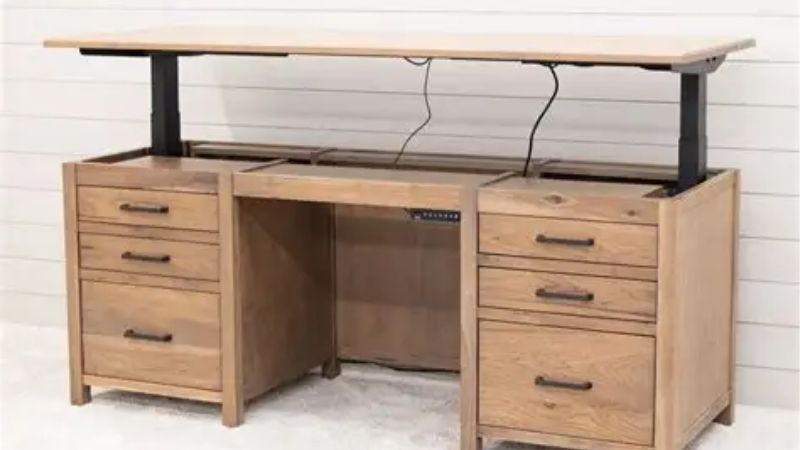
Check the Real Height Range
Height range is the gap between a desk’s lowest and highest tabletop setting, and it decides whether you can both sit and stand at the same surface. The FlexiSpot Comhar Pro Q8 travels 23.6 to 48.8 inches including the top, while the Eureka I55 lists 34 to 52 inches as a configured desk, so their usable bands barely overlap at the bottom.
Match that band to your body rather than to the longest-sounding number. A comfortable seated surface lands near elbow height, often around 23 to 29 inches for average-height adults, so the Costway’s 28.5-inch floor suits taller sitters while the Q8’s 23.6-inch minimum reaches shorter users. Measure your own comfortable sitting and standing heights first.
Get the band wrong and you live with it daily, since a motorized column is not something you shim later. The common failure point on this category is the lifting column or control box rather than the frame, so favor a maker that sells replacement controllers and check whether the warranty covers the motor separately from the top.
Measure Drawer Space and Knee Clearance
Storage is the whole reason to buy here, but a drawer only helps if it fits what you own and leaves room for your knees. The Q8 uses one wide embedded drawer measuring 28.3 by 12.8 by 1.97 inches, the Eureka I55 gives you two built-in drawers, and the Costway stacks four, split between two fabric bins and two under-desk drawers.
Think about where that storage sits before you order. An embedded drawer under the front edge eats into the space your thighs occupy when seated, so taller users or anyone who pulls their chair in close should map knee depth against the drawer housing, and a shallow 1.97-inch drawer holds flat supplies rather than a laptop or a stack of books.
Drawers are also where a cheaper build shows its age first. Budget units tend to use lighter slides that bind or sag once loaded, and fabric bins stretch over a year of daily use, so check whether the slides are metal and whether the maker treats the drawer hardware as a replaceable part rather than a sealed assembly.
Separate Static Load From Lifting Capacity
Two very different numbers get printed as “capacity,” and confusing them is the classic mistake with this kind of desk. FlexiSpot and Eureka both publish a 220-pound figure described as load capacity, while Costway publishes 200 pounds as a maximum static load, which is weight the frame can hold at rest, not weight the motor is rated to raise.
That distinction matters once you add monitors, an arm, a mini PC and the drawers themselves. Count the whole load the mechanism has to lift, not just the top, and treat a static figure as a ceiling for a parked desk rather than a promise about repeated travel under a loaded surface. When a maker lists only static load, read it as the cautious number.
Overloading a lifting desk rarely fails loudly; it usually shows up as uneven travel, a stalled column or a tripped overload cutout months later. Keep a margin between your real load and the rated figure, and remember that a heavy embedded-drawer top already uses part of that budget before you place a single device on the desk.
Match Desktop Size to Your Setup
The last number is the surface you actually work on, which drawers and frame width quietly limit. The UPLIFT Narrative offers tops from 54 to 72 inches wide at a 30-inch depth, the Eureka runs a 23.6-inch-deep top, and most drawer-equipped desks lock you into a fixed layout because the storage is built into the frame.
Depth is the figure to protect if you run two monitors. A 23.6-inch-deep top leaves limited room to push screens back to a healthy viewing distance once a keyboard and drawer front are in play, so a 30-inch depth is easier to live with for a dual-monitor setup; measure the wall-to-edge space your room allows before committing to a width.
A fixed, storage-integrated top also narrows your upgrade path. You cannot simply swap a larger surface onto most of these frames the way you can with a bare two-leg kit, so the desktop you buy is close to the desktop you keep, which makes getting the depth and width right the first time more important than on a plain adjustable frame.
Top Picks
These four cover the realistic trade between storage and everything storage costs you, from one clean overall choice to a maximum-drawer option. Specs below come from each manufacturer’s published figures; pricing moves constantly on this category, so each pick lists a tier rather than a fixed number and you should check the current price before ordering.
| Product | Best For | Key Spec | Watch Out For |
|---|---|---|---|
| FlexiSpot Comhar Pro Q8 | Best Overall | 23.6–48.8 in; 220 lb; wide embedded drawer | Fixed 55-in class layout |
| UPLIFT Narrative | Best Premium Storage | Three integrated drawers; 54–72 in tops | Premium, custom configuration |
| Eureka I55 | Best for Dual Drawers | Two drawers; 220 lb; 34–52 in | 23.6-in desktop depth |
| Costway 55" | Best for Maximum Storage | Four drawers; 28.5–46 in | 200 lb figure is static load |
FlexiSpot Comhar Pro Q8 – Best Overall
The Q8 is the pick for someone who wants one tidy surface that does both jobs well. It travels 23.6 to 48.8 inches including the top, carries a manufacturer-rated 220-pound load and hides a single wide drawer measuring 28.3 by 12.8 by 1.97 inches, so the storage disappears into the frame instead of bolting on underneath. It sits toward the premium tier, so check the current price.
Its strength is the low 23.6-inch minimum, which is genuinely useful for shorter users and for anyone who wants a true seated elbow height rather than a desk that only ever feels “a bit high.” The all-in-one top also means fewer parts to align during assembly, and the embedded drawer keeps the deck clear without a separate bin hanging off the back.
The trade is flexibility: the Q8 comes as a fixed 55-inch-class layout, so you cannot grow the surface or move the drawer later. As with any motorized desk, the column and controller are the parts that tend to fail before the steel, so confirm the current warranty split between the motor and the top before you buy this one.
UPLIFT Narrative – Best Premium Storage
The Narrative is for buyers who treat storage as the point, not an add-on. It is built around three integrated drawers and offered in tops from 54 to 72 inches wide at a 30-inch depth, on a V3 frame family stated at 22.6 to 48.7 inches, so you get real drawer capacity and a deeper working surface than most storage desks allow. It is a premium, made-to-order piece, so check the current price.
Because you configure the top width and drawer layout, it is the easiest of these to fit to an awkward room or a dual-monitor setup, and the 30-inch depth leaves room to push screens back. That configurability is the reason to choose it over a fixed layout when you already know the exact footprint your space allows.
The downside is the same as the upside: custom configuration costs more and takes longer to arrive, and a built-in drawer system is harder to service than a clip-on tray. Keep the order details, since a specific integrated drawer or center slot on this design is not a universal part you can source from a third party later.
Eureka I55 – Best for Dual Drawers
The I55 lands between the all-in-one and the storage-heavy builds. It gives you two built-in drawers, a stated 220-pound capacity and a 34 to 52-inch height range as a configured desk, which is a sensible middle path for someone who wants organized storage without a four-bin layout. It reads as a mid-tier choice, so check the current price before ordering.
Two drawers is often the right amount: enough to separate cables, notes and small gear without the bulk or weight of a full bank. The higher 34-inch minimum suits average and taller sitters, and the pair of drawers sits cleanly under the top rather than intruding on legroom the way a single deep front drawer can.
Its limit is depth. The 23.6-inch-deep top is tight for two monitors once a keyboard and the drawer fronts are in place, so measure your screens’ preferred viewing distance against that figure. Like the others here, the lifting mechanism is the long-term wear point, so check whether Eureka covers the motor and controller separately from the frame.
Costway 55" – Best for Maximum Storage
If raw storage count is what you are after, the Costway holds the most: four compartments split between two fabric bins and two under-desk drawers, on a tabletop that adjusts from 28.5 to 46 inches. It is the budget-leaning option of the group, which is part of its appeal for a first sit-stand setup, so check the current price.
The extra bins make it easy to keep a cluttered desk sorted, and the 28.5-inch starting height suits taller sitters who find very low minimums unnecessary. For a home office that needs to swallow a lot of small items without a separate drawer cabinet, the four-compartment layout does the job in one piece of furniture.
Read its capacity figure carefully: the 200-pound number is a static load, not a lifting rating, so it describes what the parked frame can hold rather than what the mechanism will raise under a loaded top. Treat it as a ceiling, keep a margin once monitors and the loaded drawers are added, and expect fabric bins and lighter slides to be the first parts to show wear.
Frequently Asked Questions
These are the questions buyers ask most once they start comparing a storage-equipped sit-stand desk against a plain adjustable frame, answered with the figures from the picks above.
Do drawers reduce legroom on a standing desk?
Often, yes, especially a front-mounted embedded drawer, which occupies some of the space your thighs use when you pull the chair in. A shallow drawer around 2 inches deep, like the Q8’s, intrudes less than a deep bank, but any under-top storage trades a little clearance for capacity.
How much it matters depends on your height and how close you sit. Taller users and anyone who leans in should measure knee depth from the seat to the desk edge and compare it against where the drawer housing sits; a side or rear drawer layout preserves more legroom than a deep front drawer if clearance is tight for you.
If you already own a frame you like, a clip-on under-desk tray is the lower-commitment way to add storage, since you can move or remove it. A built-in drawer, by contrast, is permanent, so decide whether you value the cleaner look or the flexibility before choosing an integrated design.
What height range should a standing desk have?
Aim for a band that reaches both your seated elbow height and a comfortable standing elbow height, which is why a wide range like 23.6 to 48.8 inches is useful: it covers short sitters and tall standers on one desk. The single most important end is the low number, because many desks stand tall enough but never sit low enough.
The right figures shift with your body and your floor. Measure your comfortable seated surface and your standing surface against your own elbows, add or subtract for a thick desk mat, and remember that a desk’s stated range sometimes includes the top and sometimes does not, which can shift the real surface height by an inch or more.
If two people share the desk, choose the widest band you can and rely on memory presets rather than a mid-point compromise. A range that only suits one height forces the second user into a poor posture, which defeats the reason to buy an adjustable surface in the first place.
Is static load the same as lifting capacity?
No. Static load is the weight a frame holds at rest; lifting capacity is the weight the motor is rated to raise and lower. Costway’s 200-pound figure is a static load, while FlexiSpot and Eureka publish 220-pound load ratings, so you cannot line those numbers up as if they measured the same thing.
The practical reason to care is that you lift the desk loaded. Add the top, monitors, an arm, a mini PC and the drawers, and that total is what the mechanism works against every time you change position; a static-only figure tells you nothing about repeated travel under load, so treat it as the more conservative number.
When a listing gives only one capacity figure without saying which it is, assume the cautious interpretation and keep a margin. If you run a heavy multi-monitor rig, prioritize a desk with a clearly stated lifting rating over one that advertises a big static number, because the lifting figure is the one your daily use actually tests.
How deep should a desk be for two monitors?
A depth near 30 inches is the comfortable target for two screens, because it lets you push the monitors back far enough for a healthy viewing distance once a keyboard and drawer fronts are in the way. A 23.6-inch-deep top, like the Eureka’s, is workable but tight, and often forces screens closer than you would like.
Depth needs change with monitor size and whether you use a stand or an arm. Large screens and deep stands need more room, while a monitor arm claws back a few inches by floating the display off the desk; measure from your seated eye position to the screen you want and check that the top supports that distance before you buy.
If your room cannot accommodate a 30-inch depth, an arm is the practical fix rather than squeezing both screens onto a shallow surface. The point is to protect viewing distance, so size the depth to your real setup, and treat a storage desk’s fixed top as a measurement you need to get right once rather than tune later.
Final Thoughts
The right adjustable desk with drawers is the one whose four numbers match your body and your room: a height range that truly sits low enough, drawer space that fits what you own without stealing your knees, a load figure read as lifting rather than static, and a depth that holds your screens. Get those right and the storage earns its place; guess at them and you inherit a fixed layout you cannot tune, so measure first and treat the published specs as the floor for your decision.