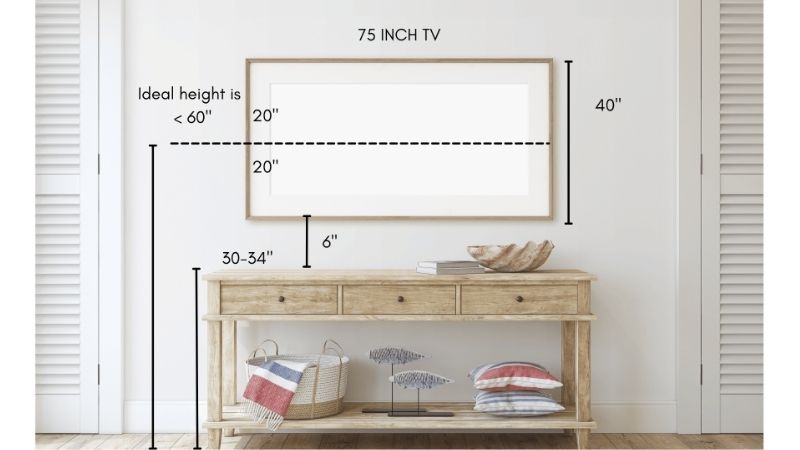
For a typical seated living-room setup, aim to place the center of a 75-inch TV near your seated eye level, often about 42 inches above the floor. On one verified 2026 Sony 75-inch model, that puts the bottom of the TV housing near 23 inches from the floor. The best answer to how high should 75 inch tv be from floor changes with your couch, screen dimensions and the furniture beneath it.
As an Amazon Associate we earn from qualifying purchases.
By KK Home Furnishings Editorial Team
A Starting Height for a 75-Inch Television
Start by measuring to the center of the picture where you actually sit. Sony, Samsung and SANUS describe a centered, seated-eye-level position as a useful starting point; Samsung and SANUS give approximately 42 inches from the finished floor as a typical seated reference [Sony Support, 2019; Samsung Support, 2026; SANUS HeightFinder, accessed October 2026]. It is not a regulation or a required height for everyone.
The table uses the official 38.06-inch housing height of Sony’s 2026 BRAVIA 3 II K-75XR30M2 as a specific example [Sony USA, 2026]. It approximates the screen center with the housing center for planning; bezel position and actual display area differ by model. Values are rounded illustrations, not six manufacturer-approved mounting positions.
| Measured Eye / Target Center Height | Approx. Bottom Edge of Example TV | Typical Planning Context | Before Choosing This Height |
|---|---|---|---|
| 38 inches from floor | 19 inches from floor | Lower seated viewpoint | Check furniture, feet and floor-level clearance |
| 40 inches from floor | 21 inches from floor | Seated viewer below standard reference | Measure seated eye height, not standing eye height |
| 42 inches from floor | 23 inches from floor | Common starting point for a seated couch | Confirm actual TV model dimensions and wall location |
| 44 inches from floor | 25 inches from floor | Slightly taller seated eye position | Check the primary viewer and nearby cabinet |
| 46 inches from floor | 27 inches from floor | Higher chair or upright viewing posture | Confirm this matches measured eye height |
| 48 inches from floor | 29 inches from floor | High viewpoint or room constraint | Avoid treating a tall location as the default |
The central lesson is that the bottom of a 75-inch TV is not supposed to sit at 42 inches merely because 42 inches appears in a mounting guide. That number generally describes the center of the picture. Measure from the finished floor, and use the dimensions of your own television to estimate the lower edge before drilling.
Measure Seated Eye Level Before Picking a Wall Height
Sit on the couch or chair in which you watch most often, with your usual posture and cushions. Have another person measure the vertical distance from the finished floor to your eyes. Repeat the check for another regular viewer if the household uses different seating positions. A household average can be more useful than designing the room around a visitor who rarely watches there.
Samsung explicitly recommends checking eye level from the favorite viewing spot and offers 42 inches to the center as a fallback for typical couch seating [Samsung Support, 2026]. A recliner changes your line of sight when tilted, while a bar stool may place your eyes higher than a sofa. There is no evidence-based reason to force all those viewers into one mandatory dimension.
Mark the intended screen center temporarily with removable tape on the wall. Sit back down and look at the mark for a few minutes, then compare it with the location of windows and lamps. This simple position check is about visual comfort and layout; it does not demonstrate that the wall or any proposed bracket can carry the TV.
Use the Physical TV Height, Not Its 75-Inch Diagonal
A 75-inch class label measures the display diagonally. It is not the television’s height. The 2026 Sony K-75XR30M2, for example, has a published width of 65.75 inches and a height of 38.06 inches without its tabletop stand [Sony USA, 2026]. When its housing center is placed around 42 inches above the floor, the housing bottom is close to 23 inches above the floor.
Another 75-inch model may have different bezels, body height and rear mounting-hole placement. Sony lists the 2024 K-75S30C at 37.88 inches high without its stand, showing that even similar screen classes differ [Sony USA, 2024]. Look up the complete “without stand” dimensions for your exact model rather than transferring the Sony example as a universal template.
For an installed television, the relevant lower boundary includes any frame and nearby devices; a separately mounted soundbar adds its own dimensions and access requirements. Do not use advertised diagonal size to locate a screw or assume the glass picture begins exactly at the outside edge of the housing.
Separate Screen Height From Bracket Hole Position
The level you want for the screen is not necessarily the level where the wall plate belongs. Rear mounting holes can sit above or below the television’s physical midpoint. Brackets also differ in how their arms, hooks and wall plates position a screen. The correct wall mark must come from the particular television and mount instructions, not from the viewing-height illustration alone.
SANUS HeightFinder expressly asks whether mounting holes are centered or offset and requests the distance from the top edge when needed [SANUS HeightFinder, accessed October 2026]. Sony likewise provides model dimensions and mounting-hole distances for supported sets [Sony Support, 2025]. These sources support checking the TV-to-bracket geometry before choosing the final wall-plate elevation.
Keep this decision separate from installation technique. Before the wall is drilled, confirm mount compatibility, total TV weight, exact fastening requirements and the wall’s structural suitability with the manufacturers’ documentation. If those checks are uncertain, use a qualified installer; do not compensate for an unsuitable wall by moving the screen a few inches lower.
Six Room Layouts That May Change the Ideal Position
The center-at-eye-level starting point works best when the television and furniture have space to coexist. The situations below show why your actual room can justify a different placement without changing the meaning of the main measurement. Each case addresses a particular conflict, rather than claiming a different TV height is universally correct.
A Living-Room Sofa With No Cabinet Beneath the Screen
When the TV can hang on a properly selected wall bracket without furniture below it, the layout is straightforward. Measure the main viewers’ seated eye height and make the picture center approximately level with it. This avoids using a tall media center as the reference point when the screen is actually watched from a low couch.
Check whether the location produces window glare during the hours you usually watch. Sony lists lighting conditions as one element in mounting placement [Sony TV Wall Mount FAQ, accessed October 2026]. Moving the TV to a wall with less glare can matter more than gaining an extra decorative shelf underneath, provided the alternative wall supports the specified bracket.
The trade-off is access. A screen placed lower may leave little room below for a soundbar or cables, while a very high position can be tiring over long viewing sessions. Plan the power outlet and attached devices before committing to the wall layout, and do not use the mount’s tilt feature as an excuse to ignore obvious placement problems.
A Console Table Directly Under the Television
A media cabinet can make the standard center target impossible, especially when the furniture is tall. Suppose the television’s lower edge would sit around 23 inches from the floor in the verified Sony example. A cabinet occupying that area obviously cannot fit below the screen as planned. Start by measuring the actual furniture top and its permitted device clearance, not by choosing a bracket height from an online picture.
Samsung suggests positioning a mounted TV roughly 4 to 6 inches above furniture when a table or cabinet prevents the usual center-at-eye-level placement; that is a manufacturer’s general layout suggestion, not a universal building clearance [Samsung Support, 2026]. The result may place the screen center higher than your eyes, so decide whether a lower cabinet or a different furniture arrangement is a better compromise.
The crucial distinction from TV-stand sizing is that a wall-mounted screen does not rest on the console. The console’s job here is storage and visual balance; the wall bracket carries the TV. The cabinet still has its own stability and anchoring requirements, and nothing in a height diagram establishes the load rating of either installation.
A Reclining Sectional or Deep Lounge Seat
A recliner or a deep couch can change how you look at the TV once your head rests against the seat. Instead of measuring from an upright chair and assuming that is the only viewpoint, sit in the position used for regular movies or gaming. Check whether your gaze naturally meets the middle of the screen or whether you must lift your chin.
A modestly higher screen can sometimes match a reclined line of sight, but that is a room-specific choice, not a rule that 75-inch TVs should be mounted high. Sony notes that viewing position and preferences affect the recommendation, and that TV models differ in off-axis viewing performance [Sony Support, 2019]. Compare positions with temporary wall marks rather than inventing an ergonomic angle.
If multiple people share the sectional, ask which seat is used most. A layout tailored to one fully reclined chair may feel poor for someone sitting upright beside it. Consider seating orientation and the mount’s approved tilt or swivel movement before settling on a height that creates a needless conflict between regular viewers.
A Bedroom Where You Watch From Bed
Bedroom viewing is not identical to watching from a sofa. Pillows, headboard height and how far you recline all affect the line of sight. Measure from your usual pillow-supported viewing position instead of borrowing the living-room default without checking. Some bedrooms make a higher position reasonable because the viewer faces the screen at a different angle.
Make a temporary outline of the actual television size on the intended wall. A large screen that looks reasonable in a spacious living room may sit close to a bedroom ceiling or dominate a small wall. Consider glare from bedside lamps and daylight as well as how the remote and any streaming equipment will remain accessible.
Use the manufacturer’s approved mounting system for the specific wall type and TV. Do not attach a bracket to a headboard or ordinary wardrobe panel unless the relevant product documentation expressly permits that loading. Choosing a convenient sightline does not override the mechanical requirements of a large television.
A Higher-Seat Game Room or Open Kitchen
At a counter, bar stool or standing-height viewing area, the typical couch reference may be too low for the intended use. Samsung distinguishes living-room seating from home bars and rooms where people watch while standing [Samsung Support, 2026]. Establish which position dominates and measure from that viewer’s actual eye height.
Keep the height suited to the main activity. A screen centered for people standing behind a kitchen island may appear very high to guests sitting on a low couch in the same space. If both viewing zones matter, test the compromise on the wall before selecting a fixed bracket; a manufacturer-approved adjustable mount may provide more flexibility.
A taller mounting position can also change how light reflects off the panel and where the cables become visible. That is a layout issue to solve together with the viewing position, not a reason to claim that larger screens automatically need to be higher. The 75-inch diagonal does not determine whether the audience will sit or stand.
A Fireplace Mantel That Forces the TV Upward
A mantel can place the lower edge far above seated eye height, pushing the center of a large television even higher. This is a common visual design, but it is not the first choice for long seated viewing. Samsung warns that above-fireplace locations tend to sit well above eye level and may expose the television to heat, depending on the fireplace [Samsung Support, 2026].
The immediate decision is whether another wall is possible. If not, consult the TV and fireplace manufacturers’ manuals for operating temperatures, required separation and permitted mounting locations. Samsung states a temperature limit of 104°F in its general TV installation advice; that is Samsung-specific guidance, not a guarantee that other brands share the same limit [Samsung Support, 2026].
Tilting a compatible bracket may improve how the screen faces the viewer, but tilt does not remove the heat concern or reduce the structural load on the wall. For electric fireplace furniture, requirements may differ again by exact design. Avoid deriving a clearance from a generic article; follow the instructions for the installed appliance and television.
Frequently Asked Questions
These questions address installation details that come up after choosing a viewing target. They concern the screen edge, soundbar arrangement, an unsuitable wall and a change in television model—not another definition of what the 42-inch seated reference means.
Is the TV Mounting-Plate Height the Same as the Center of the Screen?
No. The wall plate supports a particular bracket, which attaches to mounting holes that may be offset on the television. A screen center chosen for comfortable viewing does not automatically reveal where to drill for that bracket. The offset can also change when you switch to a different mount design.
Use your television’s mounting-hole drawing, the bracket manual and any approved manufacturer height calculator. SANUS specifically asks for rear-hole alignment or top-edge offsets because that information affects placement [SANUS HeightFinder, accessed October 2026]. A guessed plate position can leave the screen several inches from the intended line of sight.
Should the Soundbar Sit Above or Below a Wall-Mounted 75-Inch TV?
Either arrangement may be workable when both devices support it, but the position must respect the soundbar’s orientation, ports, remote receiver and mounting hardware. Many home arrangements put the soundbar below the picture; that is a practical placement choice, not a structural rule for televisions of this size.
If a soundbar occupies the gap between the screen and cabinet, include its actual housing height and space for cable plugs before finalizing the TV. Check whether the TV remote or infrared sensor will be blocked. Mount the soundbar on its own approved support or a compatible manufacturer-specified accessory, rather than resting it on an unsupported edge of the television.
What If the Preferred Height Has No Suitable Wall Support?
Do not mount the television at a comfortable eye-level mark if that point cannot be used with an approved structural installation. A suitable bracket and verified load-bearing wall are prerequisites, not optional extras. Sony’s BRAVIA guidance requires model-specific wall strength and appropriate wall-mount hardware [Sony Support, 2026].
A qualified installer may be able to locate an approved alternative position or provide a manufacturer-permitted support solution. If no suitable support exists, reconsider the wall or use TV-rated furniture with the required anti-tip measures. Do not assume that ordinary drywall fasteners or a decorative wall finish are equivalent to the fastening design required for a heavy television.
Does Replacing One 75-Inch TV With Another Change the Hanging Height?
It can. The new model may have a different housing height, bezel placement, weight or rear mounting-hole offset. A replacement that still says “75-inch class” on the box can end up with a different lower edge if it is attached to the same bracket position without rechecking the geometry.
Before replacing the set, confirm the new model’s dimensions without stand, weight, VESA pattern and bracket compatibility. Sony publishes these details separately by model [Sony USA, 2026; Sony Support, 2025]. A height choice that worked well for the old screen is a useful reference, but it does not make the old wall screws or adapter rails automatically safe for the new one.
Final Thoughts
For how high should 75 inch tv be from floor, aim first for a screen center close to measured seated eye level. About 42 inches is a common starting point, not a universal requirement. A specific 2026 Sony 75-inch example puts its housing bottom near 23 inches at that center height. Recheck the exact television, bracket and furniture before mounting.
More from Amazon
Programs that pair well with the guide above. Offers and eligibility are set by Amazon and may change.
Collect the home and kitchen items you want in one registry that guests can shop from.
Create a wedding registrySet up recurring deliveries of everyday items on eligible products. Terms and savings are set by Amazon.
Explore Subscribe & SaveFree shipping on eligible items, Prime Video and more. Eligible new members can start with a free trial.
Start a Prime free trialAudiobooks and podcasts to listen to on the go. Eligible new members can start with a free trial.
Try Audible freeAs an Amazon Associate we earn from qualifying purchases.