No, you do not always need a dedicated TV cabinet. The practical question behind do i need a tv stand is whether your television will be supported by an approved wall mount or placed on properly rated furniture. Storage, room layout, children and cables then determine whether a separate console is worth having.
As an Amazon Associate we earn from qualifying purchases.
By KK Home Furnishings Editorial Team
When You Do and Do Not Need a TV Stand
Start with the way the screen is supported, not the style of the room. A television held by a correctly installed wall bracket does not need a cabinet underneath to carry its weight. A set resting on its supplied feet does need a stable, TV-rated supporting surface and an appropriate tip-over prevention setup.
| TV Setup | Separate TV Stand? | Key Check | Practical Decision |
|---|---|---|---|
| TV fixed on approved wall mount | Not required for support | TV-to-bracket fit and wall structure | Add furniture only if you need storage or a visual base |
| TV on factory feet or pedestal | A TV-rated supporting surface is required | Entire base footprint, TV load and anchoring | Use a documented TV bench or media center |
| Small rental where mounting is restricted | Often useful | Lease conditions and furniture anti-tip anchoring | Choose a properly secured freestanding TV unit |
| Home with children or climbing pets | Depends on support method | Tip-over prevention and accessible cables | Favor approved wall mount or anchored TV furniture |
| Gaming room with a receiver and consoles | Useful, not mandatory | Equipment depth, cable routing and airflow | Storage furniture helps if it fits the components |
| Minimal room with no media boxes | Usually unnecessary if wall-mounted | Mount access, outlet position and wire management | Keep the floor open if installation is appropriate |
The decision table is a use-case guide rather than a building code or a claim that every wall permits mounting. Sony and Samsung both direct owners to check exact television and bracket requirements. For sets sitting on furniture, the US Consumer Product Safety Commission recommends furniture intended to hold a TV and anchoring to prevent tip-overs [Sony, 2025; Samsung, 2026; CPSC Anchor It!, accessed October 2026].
First Decide Whether the Television Will Hang on the Wall
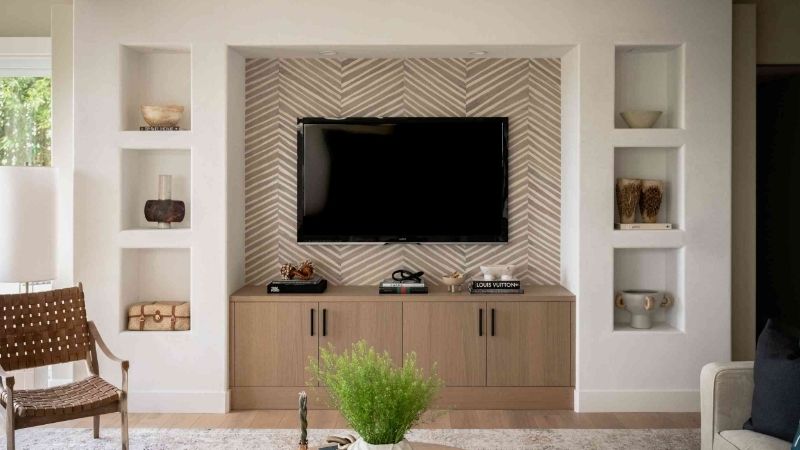
A wall-mounted television supports its weight through a bracket and the wall structure, not through the console below it. That is the simplest situation in which a TV stand becomes optional. You can use the freed area for an open floor, a slim decorative shelf or nothing at all, provided cords and outlets remain safely accessible.
Sony advises checking the TV weight, physical dimensions and mounting-hole pattern in the exact model documentation. Its 2026 mounting guidance also warns that wall strength and approved mounting parts are model-dependent [Sony Support, 2025; Sony Support, 2026]. An attractive empty wall is not proof it can safely carry the screen.
Check Support Capacity Before Considering Furniture Style
If your TV rests on its own feet, the furniture must be designed for television use. Compare the set’s full weight with its base installed against the manufacturer’s allowable TV load. The entire foot or pedestal footprint must sit on the usable top without overhang, and the assembled unit must follow its anchoring instructions.
Published ratings are not interchangeable even within one furniture family. IKEA lists a 47 1/4-inch BESTÅ unit with a 35-pound maximum TV load, whereas its 70 7/8-inch, 15-inch-high BESTÅ unit lists 66 pounds [IKEA US, October 2026]. Width and attractive proportions alone cannot establish a safe match.
Decide Whether the Cabinet Solves a Real Storage Problem
A TV stand can hold a soundbar, streaming box, router, receiver, game console or everyday accessories. A wall bracket only holds the television; it does not create shelves or hide every cable. If your equipment already lives elsewhere, an additional cabinet may occupy precious floor space without solving a problem you actually have.
Plan around the working depth of electronics, including plugs, ventilation and how you reach the controls. A low shelf that looks large in a product photo can be too shallow for a receiver with rear cables. Conversely, a slim, open cabinet may be enough when you need only one console and accessible power.
Six Living Situations That Change the Answer
The same television can reasonably work with or without a media console depending on the home. These six cases focus on the choice itself: which support method makes sense, what trade-off matters and when a separate unit adds value. They are not six product picks or a guide to improvising TV furniture from unrelated household items.
When You Can Use a Properly Installed Wall Mount
You can skip the TV stand when the television is compatible with a wall bracket and the wall can safely carry the installation. This keeps the footprint clean and makes it easier to arrange furniture underneath without accounting for a heavy screen on top. The supporting bracket must be intended for the model and installed as instructed.
Samsung’s mounting guide explains that bracket compatibility depends on the TV’s specifications and on the structural integrity of the mounting surface [Samsung Support, 2026]. Sony additionally calls for a qualified installer where required and refers owners to their specific manual for wall-strength and screw requirements [Sony Support, 2026].
The trade-off is less flexibility to rearrange the room and a possible installation cost. You also need a plan for the television’s power cord and any external boxes before installing the mount. Do not place standard power cords inside walls unless the wiring solution is expressly rated and installed for that use; consult a qualified professional for wiring work.
When You Rent or Cannot Modify the Wall
A freestanding TV stand can be the more practical choice when the lease, wall type or room arrangement prevents safe mounting. Choose furniture intended for a television, with a documented top load and a surface large enough for the feet. A console with a stable footprint also provides a convenient location for streaming gear.
Renting does not remove the tip-over hazard. The CPSC’s Anchor It! guidance says a flat-screen TV placed on furniture should be secured to the wall or the furniture itself, and tall or storage furniture also needs the relevant anti-tip protection [CPSC Anchor It!, accessed October 2026]. Arrange approved anchoring with the property owner rather than abandoning safety because drilling is inconvenient.
If approved anchoring is impossible, revisit the setup before putting a large screen on a movable shelf. A freestanding television mount or another purpose-built alternative still requires exact manufacturer instructions and a suitable stable base. The goal is not simply to avoid holes; it is to avoid transferring the fall risk to a less secure support.
When Young Children or Active Pets Share the Room
A television sitting on furniture is an appealing climbing or pulling hazard, especially when drawers and shelves hold toys or remotes. The CPSC urges families to secure TVs and furniture, and recommends placing televisions only on sturdy, purpose-designed TV furniture when they are not mounted [CPSC, Anchor It! safety guidance]. A low cabinet alone does not eliminate tip-over risk.
An approved wall installation can remove a TV’s footprint from the top of a cabinet, but the bracket still needs proper hardware and a supporting wall. Any storage furniture beneath the screen may require anchoring separately. Keep tempting items and dangling cables away from places children can climb or grab; a mounted television is not permission to ignore the furniture below it.
For households that prefer a floor-standing configuration, prioritize a supported TV cabinet, a manufacturer-approved anti-tip solution and organized wiring over a decorative look. Check fasteners over time as the furniture maker directs. Treat child safety as a reason to scrutinize the full installation, not as an automatic reason to buy the widest console.
When You Have a Soundbar, Receiver or Several Game Consoles
A TV stand often earns its space when it stores substantial equipment. A receiver needs access to cables and airflow; a console has controllers and charging accessories; a soundbar may need an unobstructed position. A media unit with appropriate shelf geometry can reduce equipment crowding even when the television is separately wall-mounted.
Check real equipment dimensions and the appliance manufacturers’ ventilation instructions, not merely the cabinet’s advertised exterior width. Closed doors can hide clutter but may trap heat or block infrared controls. Sony cautions that blocked TV ventilation can cause problems, and refers owners to model-specific clearances for enclosed placements [Sony Support, 2019].
The disadvantage is more furniture to clean, assemble and potentially anchor. If a streaming device is hidden behind the screen and your soundbar has its own approved mount, a large entertainment center may be unnecessary. Buy storage in response to the equipment you own rather than assuming every TV requires surrounding shelving.
When You Want a Clean Look in a Very Small Room
Small rooms benefit when a properly mounted screen replaces a deep freestanding console. Removing the cabinet can clear a walkway, simplify cleaning and make the television feel visually lighter. This works particularly well when the set uses built-in streaming apps and there are no bulky external components to store.
The wall location still has to provide suitable support, a comfortable viewing position and a sensible cable path. A mounting bracket that articulates into a doorway or places connections against a corner can undermine the floor-space benefit. Compare the wall location with seating, doors, outlets and the screen’s viewing characteristics before choosing the minimalist arrangement.
If you need a little storage, a separate shallow cabinet may be enough while the wall bracket continues to carry the television. Do not treat a floating media console as the television’s mount. The shelf has its own wall and load requirements, while the TV uses a separate approved bracket as instructed by both manufacturers.
When You Rearrange Furniture or Expect to Move Soon
A rated freestanding console is often easier to relocate than a mounted screen, so it can suit rooms that change use frequently. You can shift seating and the TV together without planning new wall mounting locations. The stand remains worthwhile when it also protects the setup from clutter by keeping equipment and cables organized.
The flexibility comes with responsibilities. Each new location should allow proper anchoring, leave the TV base fully supported and keep cords away from traffic paths. Repositioning a heavy console does not mean its anti-tip straps can be ignored or reused incorrectly. Follow the cabinet’s instructions whenever it is moved or reassembled.
If you relocate often, keep the documentation and hardware identified for each item. Never assume a replacement television has the same feet, weight or mounting pattern as the old one. A console that was rated for one setup may not fit another even when both screens have the same advertised diagonal size.
Frequently Asked Questions
These questions address borderline arrangements that do not fit the simple mounted-versus-freestanding decision. They focus on what physically supports the screen, which furniture is appropriate and where a wall-mounted television can be placed without needing a decorative cabinet underneath it.
Can I Put a TV on a Regular Dresser Instead of a TV Stand?
Do not assume an ordinary dresser is suitable. The CPSC advises placing televisions on furniture designed to hold a TV, such as television stands or media centers [CPSC, Anchor It! guidance]. A dresser may lack a rated top, an adequate footprint or the manufacturer’s permission to carry the concentrated load of a large pedestal.
If the furniture maker explicitly approves television use, check the published top capacity, overall stability and anchoring method for that exact product. Do not infer safe capacity from the thickness of its top panel or from online photos of someone else’s installation. A purpose-designed media cabinet is the clearer option when product documentation is missing.
Does a Wall-Mounted TV Need a Cabinet Underneath?
No. An approved, correctly installed wall bracket provides the television’s support; a cabinet underneath is optional. You might still want one for a soundbar, network equipment, media devices or room styling. If none of those needs exists, the open area below the television can remain empty without creating a support problem.
Keep access to power and any required connections without blocking ventilation or service access. A decorative shelf should not be mistaken for a load-bearing TV support. If you add storage later, assess its own stability and anchoring independently from the bracket supporting the television.
Can I Use the TV Feet Included in the Box Without a New Stand?
Yes, if you already have suitable TV-rated furniture that supports the entire original foot or pedestal footprint and complies with the television and furniture instructions. The feet supplied with the television do not themselves provide a safe surface; they simply transfer the weight to the furniture beneath them.
Verify that the correct factory feet are fitted in their approved positions and that the cabinet’s specified television capacity covers the complete set. Also follow the anti-tip guidance applicable to the TV and cabinet. Never put the television directly on the floor where it could be struck or stepped over as a substitute for a safe installation.
Will a TV Stand Make a Wall-Mounted TV Safer?
Not by itself. A TV stand under a wall-mounted screen usually does not carry the television, so its width or weight does not compensate for an incorrect bracket or unsupported wall. The wall installation must meet the television and bracket manufacturers’ requirements regardless of the furniture you place beneath it.
Storage furniture can still tip if drawers are pulled out or if someone climbs on it. Anchor the cabinet where its instructions require, especially around children and pets. The safest design treats television mounting, furniture stability and cable access as separate responsibilities rather than assuming one item of furniture solves all three.
Final Thoughts
The answer to do i need a tv stand is no when your TV is safely wall-mounted and you do not need storage. A television on its own feet, however, needs an appropriately rated and secured support. Choose a console for verified support or useful storage, not because every screen must have furniture beneath it.
More from Amazon
Programs that pair well with the guide above. Offers and eligibility are set by Amazon and may change.
Collect the home and kitchen items you want in one registry that guests can shop from.
Create a wedding registrySet up recurring deliveries of everyday items on eligible products. Terms and savings are set by Amazon.
Explore Subscribe & SaveFree shipping on eligible items, Prime Video and more. Eligible new members can start with a free trial.
Start a Prime free trialAudiobooks and podcasts to listen to on the go. Eligible new members can start with a free trial.
Try Audible freeAs an Amazon Associate we earn from qualifying purchases.