
Key takeaways
- A footrest should support both feet when your chair must sit high enough for the desk but your shoes no longer reach the floor comfortably. To learn how to use a footrest at desk work, adjust the chair for your…
A footrest should support both feet when your chair must sit high enough for the desk but your shoes no longer reach the floor comfortably. To learn how to use a footrest at desk work, adjust the chair for your hands and work surface first, slide a stable footrest beneath both feet, and fine-tune its height and angle without crowding your knees. If both feet already rest securely on the floor, you may not need one.
As an Amazon Associate we earn from qualifying purchases.
By KK Home Furnishings Editorial Team
How to Position a Footrest at Your Desk
Set up the workstation before changing the footrest. OSHA’s computer-workstation guidance identifies stable floor or footrest support as the goal, particularly when the desk height prevents a lower chair setting [OSHA, Computer Workstations: Chairs, accessed October 2026]. A footrest is an accessory that closes a gap in the setup, not an object that should force a new sitting position.
| What You Notice While Sitting | What to Adjust First | Footrest Action | When to Recheck the Setup |
|---|---|---|---|
| Feet hang above the floor | Set chair for keyboard and relaxed arms | Raise the rest until both soles are supported | If knees press upward or feet still dangle |
| Feet reach floor comfortably | Check chair-to-desk fit | Usually keep the rest out of the way | If chair height changes for another task |
| Heels slide off a steep surface | Check footwear and foot placement | Reduce tilt or use a more grippy platform | If it shifts under light pressure |
| Chair rolls when feet push forward | Inspect casters and floor compatibility | Move the rest nearer and check traction | If the chair or rest still moves unexpectedly |
| Knees or toes hit the desk | Check seat height and under-desk clearance | Reduce rise or remove the rest | If any part of the desk traps your legs |
| Shared desk needs different settings | Reset chair and keyboard fit for each person | Readjust or replace a fixed-height rest | At every user or seat-height change |
Set the Chair and Keyboard Height Before Adding Support
Start by moving close enough to type without reaching forward. Sit against the chair back, relax your shoulders, and place your hands near the keyboard. With the seat height set for that task, look down to see whether your entire soles can touch the floor. This order matters: lowering an otherwise correctly positioned chair just to reach the floor can leave the keyboard too high for relaxed arms.
CCOHS explains that if a fixed desk makes you raise the chair until your feet lose floor contact, a footrest should support both feet [CCOHS, Office Ergonomics: How to Adjust Office Chairs, confirmed February 2025]. If the chair fits your legs but your thighs cannot fit beneath the desk, a footrest is not the fix. That is a desk-clearance problem that requires changing the furniture arrangement.
Place Both Soles on a Stable Surface Within Easy Reach
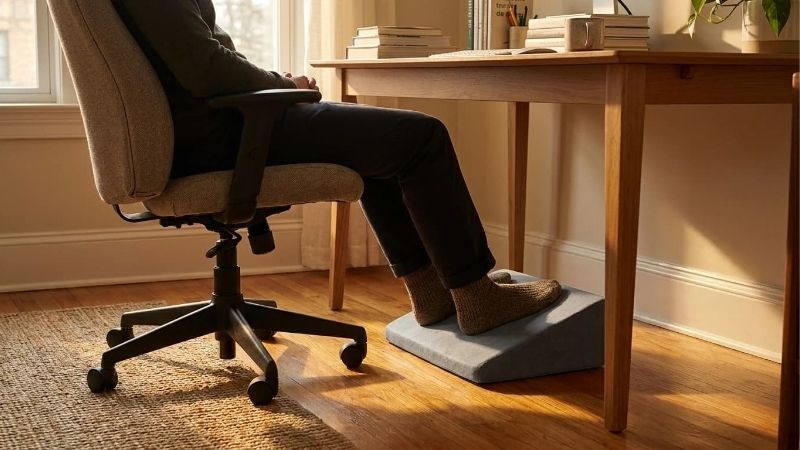
Slide the footrest forward only as far as allows a comfortable bend at the knees while your lower back remains against the chair. Put both feet on the platform rather than hooking only your heels over its edge. Your toes should have room to move, and the rest should not force you to sit at the seat’s front lip. Avoid using the rolling chair base as a substitute for a dedicated support.
Check that the platform stays still when you move each foot gently. Oregon OSHA describes an appropriate rest as stable, portable, and large enough for both soles, with nonslip contact [Oregon OSHA, Evaluating Your Computer Workspace, 2016]. These characteristics matter more than a fashionable material or a product’s marketing label. A small wobbling unit is not made suitable simply by raising its height.
Fine-Tune the Height and Angle Without Forcing Your Knees
Raise the platform only enough to keep your feet supported while your upper legs have clearance. Your heels should not float above the rest, and your knees should not be crowded into a drawer or desktop underside. If the rest rocks or tilts, choose a setting that maintains firm contact when your feet are relaxed. There is no single elevation that fits every chair, shoe, or person.
An Oregon OSHA workstation guide illustrates an angled footrest of no more than 30 degrees; this is a published ergonomic design recommendation, not a required setting for everyone [Oregon OSHA, Evaluating Your Computer Workspace, 2016]. Start with a gentle inclination and change it only if your ankles feel comfortable and both feet remain supported. Do not create extra tilt with loose books or unstable wedges.
Use Your Footrest in Six Common Desk Situations
Once the basic position is comfortable, check how it performs during the activities you actually do. The following six situations focus on placement and everyday adjustments, not on building or buying a footrest. Each one may change the amount of support or floor space you need, so treat the setup as adjustable rather than something to set permanently.
Working at a Fixed-Height Desk That Sits Too High
If the desk is too high to use with your feet flat on the floor, set chair height so your elbows can work near the surface without shrugging. Place the footrest where the soles would naturally land while your back remains supported. Lift its platform to close the gap beneath your feet instead of stretching your toes downward. This follows OSHA’s recommendation to use foot support when the work surface cannot be lowered [OSHA, Computer Workstations: Desks, accessed October 2026].
Retest with the keyboard and mouse, not only while sitting still. If reaching for the mouse makes you slide forward, bring the input devices closer instead of chasing them with the footrest. When the desktop is so low that knees cannot move freely underneath, stop and change the workstation dimensions; raising the feet will usually make that clearance problem more obvious rather than solve it.
Alternating Between Sitting and Standing at an Adjustable Desk
During the sitting portion of the day, lower the desktop and choose the chair height that allows your hands to work comfortably. If the lower desk position also lets your feet reach the floor, there is no reason to add extra height below them. Use the footrest only if feet remain unsupported after the sitting arrangement has been properly set; adjustable furniture sometimes makes a separate platform unnecessary.
When you stand, move a portable footrest out of the walking and leg-movement area. Do not stand on a regular seated footrest, even if its surface feels firm. Its stability and load expectations may differ from a rated step platform. Return it to position only after sitting again and checking desk height. OSHA recommends varying working postures rather than staying still for long periods [OSHA, Workstation Evaluation Checklist, accessed October 2026].
Using a Deep Chair That Leaves Your Back Unsupported
A footrest cannot make a chair with an excessively deep seat fit a shorter user. If you must slide forward to bend your knees comfortably, your lower back may lose contact with the backrest. Try a chair with a shallower or adjustable seat depth first, and verify that the edge leaves space behind the knees. Then use a footrest if your seated feet still do not reach the floor.
OSHA identifies seat-pan depth and back support as separate chair-fit issues from foot support [OSHA, Computer Workstations: Chairs, accessed October 2026]. A thick footrest might lift the knees while leaving the seat-depth problem intact. If you feel pressure behind the knees, stop increasing the rest’s height and assess the actual seat. A small platform cannot replace the right chair geometry.
Sharing a Desk With People of Different Heights
At a shared workstation, the footrest setting should not be inherited automatically from the previous person. Each user should first adjust chair height, seat depth if available, and keyboard reach. Only then should they reposition the rest for their leg length. The correct height for one person may push another person’s knees upward or leave their heels dangling.
An adjustable platform makes those changes easier than a fixed block, especially when footwear or chair settings vary throughout the week. CCOHS specifically recommends an adjustable rest that holds both feet at a fixed-height workstation [CCOHS, Office Ergonomics: How to Adjust Office Chairs, confirmed February 2025]. Marking one setting as universally ergonomic is less useful than teaching each user to repeat the support-and-clearance check.
Working on Hardwood, Tile, or Thick Carpet
Flooring can change how reliably a footrest remains in place. On tile or hardwood, check that its nonslip feet do not skate when you reposition your shoes; sweep away dust or grit that may affect grip. On carpet, look for rocking, sinking, or a base that catches the pile. Select pads or a base designed for the actual floor surface rather than assuming a single rubber texture suits every finish.
Also check the office chair’s casters, which may move too freely on a hard surface when you push forward with your feet. OSHA’s workstation checklist calls for casters appropriate to the flooring and a stable footrest [OSHA, Workstation Evaluation Checklist, accessed October 2026]. If a chair rolls unexpectedly, fix the caster or stability issue instead of bracing against the footrest harder, which could make both surfaces shift.
Changing Seated Positions to Read, Type, or Recline
Your foot position may change when you stop typing to read a document, turn toward a colleague, or lean back briefly. The rest should let you place your feet differently without trapping ankles under its edge. If you find yourself pushing it farther away every few minutes, that is useful feedback: check whether the board is too tall, the angle is steep, or the chair is too far from the desk.
Do not clamp your feet against a fixed board to hold the same posture for hours. OSHA’s computer-workstation guidance supports changing posture and tasks during the workday [OSHA, Workstation Evaluation Checklist, accessed October 2026]. A lightweight footrest can be moved aside for short changes, provided it never becomes a trip hazard. Ease of repositioning can be more valuable than an elaborate tilt mechanism.
Frequently Asked Questions
Can I Use a Footrest While Wearing Socks or No Shoes?
Yes, if the footrest has a comfortable, clean, nonslip top that does not irritate your feet. Socks may slide on smooth plastic or finished wood more readily than shoes with grippy soles. Test light pressure before working and make sure the surface has no sharp edges, protruding screws, or exposed hardware. Use footwear when the material or workplace requires it.
Never compensate for slipperiness by forcing your feet against the platform. Clean it according to its materials and use the manufacturer’s recommended pads or surface covering when appropriate. If the rest cannot stay stable under normal socked feet, it does not meet the practical support goal merely because it has an ergonomic label.
Should the Footrest Be Directly Under the Knees?
No fixed horizontal distance is suitable for everyone. Position the rest where both soles land naturally when you sit back comfortably, rather than forcing your knees above a marked location. A platform directly under your chair may make your ankles fold sharply, while one too far forward can encourage you to straighten your legs and slide toward the seat edge.
Make small front-to-back adjustments, then type for a short period with your shoulders relaxed and back supported. Confirm your legs can move and your heels stay planted. The useful measurement is your own seated fit at this workstation, not the distance someone else’s footrest is placed from a desk leg.
What If My Legs Feel Numb or Painful While Using It?
Stop using the current setting and check whether the platform, seat edge, or desktop is pressing against your legs. Try a less elevated position with enough space behind the knees and below the desk. A footrest is intended to provide support, not to compress tissue or make discomfort something you must tolerate to complete a work session.
Persistent numbness, pain, swelling, or symptoms that recur even after adjusting the workstation should be discussed with an appropriate healthcare professional. These symptoms have multiple possible causes, and a furniture setup cannot identify or treat them. Avoid relying on product promises that a particular platform will cure a medical condition.
How Do I Keep a Footrest Clean and Working Properly?
Wipe the top and inspect the base according to its manufacturer’s care instructions, especially after dust, spills, or a change in flooring. Make sure the tilt mechanism moves smoothly, the feet or pads are intact, and no screws or rough edges are exposed. Cleaning intervals depend on use and materials rather than a universal weekly schedule.
Replace damaged nonslip pads and stop using a product that collapses, rocks, or will not hold its height. If it is a wooden homemade rest, check joints and surface splinters before placing bare feet on it. A footrest is ready for daily desk use only when it supports both feet securely without limiting movement.
Final Thoughts
Knowing how to use a footrest at desk work means treating it as a fit adjustment, not a posture cure. Set the chair for the desk, support both soles on a stable platform, and keep the angle, height, and legroom comfortable. Move it when you change position, and remove it if your feet already reach the floor or the rest creates pressure.









