Key takeaways
- Width is the wrong headline. An l shaped desk for dual monitors is decided by the depth of the main surface, because that is what buys viewing distance behind two screens, followed by what the return can genuinely hold and…
Width is the wrong headline. An l shaped desk for dual monitors is decided by the depth of the main surface, because that is what buys viewing distance behind two screens, followed by what the return can genuinely hold and what the whole top is rated to carry safely.
As an Amazon Associate we earn from qualifying purchases.
By KK Home Furnishings Editorial Team
How to Choose an L Shaped Desk for Dual Monitors
Four specs, taken in order: usable depth on the main surface, the return’s own dimensions, the published load rating, and whether a monitor arm can actually clamp to the edge. The four desks below range from 23.625 to 30 inches of main depth and from 110 to 200 pounds of published capacity.
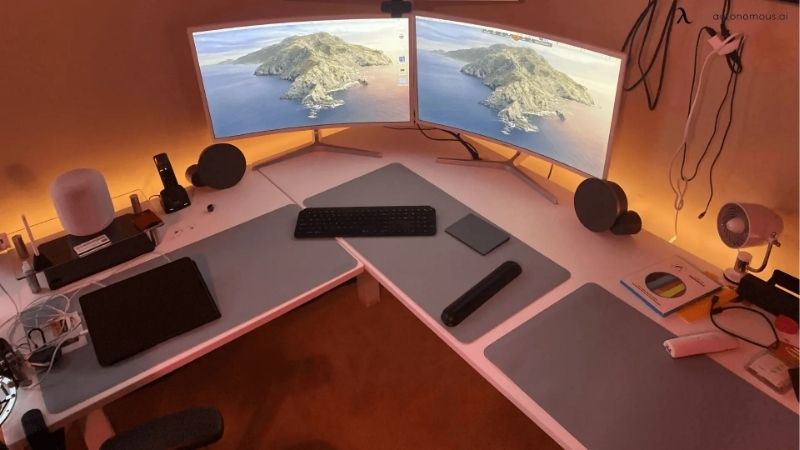
Prioritise Desk Depth Before Total Width
OSHA’s purchasing guidance puts the monitor at least 20 inches from the eyes, which makes depth a genuine decision axis here rather than a matter of preference. Main-surface depths here are 30 inches on the Bush Move 60, 25.625 inches on the IKEA GULLABERG and 23.625 inches on the LAGKAPTEN top.
The Bush has about 4.375 inches more depth than the GULLABERG, roughly 17 percent more using the IKEA figure as the base. On the shallowest option, 23.625 inches leaves only 3.625 inches beyond that 20-inch reference once a monitor stand and a keyboard zone still have to be counted.
Measure the Main Surface and the Return Separately
An L desk is really two surfaces carrying two entirely separate sets of numbers. The Bush Move 60 pairs a 60 by 30-inch main top with a 48 by 24-inch return, while the GULLABERG’s sideboard side measures only 35.375 by 15.75 inches, which is storage depth rather than monitor depth.
Decide which screen is going where before buying anything, then check that specific surface against the depth requirement. A return at 15.75 or 17.75 inches deep will hold a laptop, a notebook or reference material comfortably enough, but it is too shallow to place a second monitor at any sensible viewing distance.
Add the Weight of Monitors, Arms and the PC
Published capacity is 200 pounds on both Bush desks and 110 pounds on both IKEA configurations. That is 90 pounds of difference, about 82 percent above the IKEA figure, though the two makers do not publish a shared test method, so that comparison describes the two desks rather than ranking one above the other.
Count the real load: two displays, the arms or stands carrying them, a desktop tower if it sits on the surface, speakers, a dock and anything else that lives there permanently. A total figure applies to the whole desk and does not license putting all of that weight onto one half of it.
Check Monitor-Arm and Cable Routing Compatibility
Clamp-mounted arms need a specific edge thickness and clear space underneath the top, and a desk with a deep apron or a frame rail running along the back can block both of those. Check the arm’s manual against the exact desk rather than against the category before ordering either one.
Cable routing is the other detail that only becomes obvious after assembly is finished. The Bush Studio C includes wire-management grommets in the top, which matters more with two screens than with one, since the cable bundle behind a dual setup is usually what ends up pushing the monitors forward.
Top Picks
Main-surface depth separates these four desks more sharply than price does, and depth is the dimension two screens actually consume. Load ratings here come from two makers with no shared test method between them, so each figure describes its own desk rather than placing it above another one.
| Product | Best For | Key Spec | Watch Out For |
|---|---|---|---|
| Bush Move 60 | Best Overall | 60 x 30 in main plus 48 x 24 in return; 200 lb; 27 to 46.7 in electric | Premium tier; the largest footprint and the highest cost of the four |
| IKEA LAGKAPTEN and LINNMON | Best Value | 55.125 x 63 in overall; 23.625 in main depth; 110 lb | Budget tier; the 17.75-inch return is shallow for a second screen |
| IKEA GULLABERG | Best for Storage | 61 x 61 in; 25.625 in main depth; 110 lb; integrated storage side | Mid tier; the 15.75-inch sideboard suits reference use, not a monitor |
| Bush Studio C 72W | Best for a Wide Fixed Setup | 72 x 30 in main plus 42 x 24 in return; 200 lb; wire grommets | Upper-mid tier; fixed height rather than sit-stand, and stock varies |
Bush Move 60: Best Overall
It takes the slot on the axis this search is actually about, which is 30 inches of main-surface depth, which is the deepest figure here, paired with a 48 by 24-inch return that is genuinely usable for a second screen rather than only for storage. Capacity is published at 200 pounds.
Electric adjustment from 27 to 46.7 inches on a welded 16-gauge steel base adds the sit-stand range the IKEA options do not have. It is the premium tier of this group by a wide margin, and the combined footprint is the largest of the four, so measure the corner carefully before ordering.
IKEA LAGKAPTEN and LINNMON: Best Value
This configuration measures 55.125 by 63 inches overall with a 23.625-inch main top depth and a published maximum load of 110 pounds. It is the budget tier here by a long way, and the component format means a damaged top can be replaced on its own rather than the whole desk going out.
The return is the real limitation at 17.75 inches deep, which is simply too shallow to place a second monitor at a sensible viewing distance. Treat it as a laptop or paperwork wing and keep both screens on the main top instead, which then has to carry two stands across 55 inches of available width.
IKEA GULLABERG: Best for Storage
A 61 by 61-inch L with a 25.625-inch main desktop and an integrated file and storage side, rated to a 110-pound maximum across the whole desk. The storage is built into the desk rather than added underneath it, which keeps the legroom clear on the main surface where the chair actually sits.
The sideboard measures 35.375 by 15.75 inches, and that shallow depth is the catch with this one. It suits files, a printer or reference material, but a monitor placed there sits both too close and too far to one side, which means turning the head rather than just the eyes for anything shown on it.
Bush Studio C 72W: Best for a Wide Fixed Setup
The widest main surface here at 72 by 30 inches, with a reversible 42 by 24-inch return, a 200-pound rating and wire-management grommets in the top. For two large screens placed side by side on a single surface, that combination of width and depth is the most accommodating of the four here.
It is fixed height rather than sit-stand, which is the trade against the Move 60 at a lower tier. Availability moves between retailers on this model, so confirm the exact finish and the seller before planning around it, and check which way round the return should go before assembly starts.
Frequently Asked Questions
These questions come from the two things buyers consistently underestimate when running two screens: how much depth a sensible viewing distance consumes, and how quickly monitor arms and a tower add up against one published load rating. Each answer uses a figure from a named desk above.
How Deep Should an L-Shaped Desk Be for Two Monitors?
There is no single required depth to aim for, but OSHA’s guidance starts monitor placement at least 20 inches from the eyes, and the main surfaces here run from about 23.625 to 30 inches. Deeper surfaces simply give more room to move the screens back as they get physically larger.
Subtract the depth of your own monitor stands before judging any figure, since a wide-footed stand can take four or five inches off the back of the surface. Monitor arms recover most of that depth by clamping at the edge instead, which is often the cheaper fix on a desk that is already shallow.
Is a 60-Inch L Desk Enough for Dual Monitors?
Potentially, yes, and the Bush Move 60 pairs that width with a 30-inch depth, which is by far the harder half of the requirement to meet. Whether it works depends on the screen sizes, whether they sit on stands or on arms, and where the tower lives, rather than on the width alone.
Lay it out on paper before ordering: two 27-inch screens side by side need roughly the width of both bezels plus any gap between them, and a keyboard zone in front. If the pair does not leave working space on the main top, then the return has to be deep enough to take one of them.
Is 110 Pounds Enough for a Dual-Monitor Desk?
It depends entirely on the setup rather than on the number itself. IKEA publishes 110 pounds for both of its configurations here, and a pair of monitors with arms, a dock and peripherals usually sits well inside that figure, while adding a desktop tower on the surface changes the picture quickly.
Add the actual weights from each product listing rather than estimating them, and remember that a maximum for the whole desk is not an allowance for one half of it. Concentrating most of that load directly over the corner joint is also harder on a desk than spreading it across both surfaces.
Should Both Monitors Sit in the Corner?
Not usually, no. The primary screen belongs directly in front of you, with the second one angled beside it, so that the work you look at most does not require turning your body. The corner of an L is tempting because it is the deepest point on the desk, and it is simultaneously the furthest from the chair.
Use the return for the secondary screen only if its depth supports a sensible viewing distance, which rules out the shallower IKEA sides here. Where it does not, both screens stay on the main top and the return becomes space for a laptop, a printer or paperwork instead of a display.
Final Thoughts
Measure the straight desk you already own before replacing it. If it already offers 30 inches of depth, a good monitor arm frees up the surface that two stands were consuming, and the case for an l shaped desk for dual monitors narrows to whether you need a second work zone at all.