
Key takeaways
- Yes, leaning back slightly in an office chair can be a comfortable, supported way to work. But it should not make you reach for the keyboard or strain to see the screen. If you wonder should you lean back in…
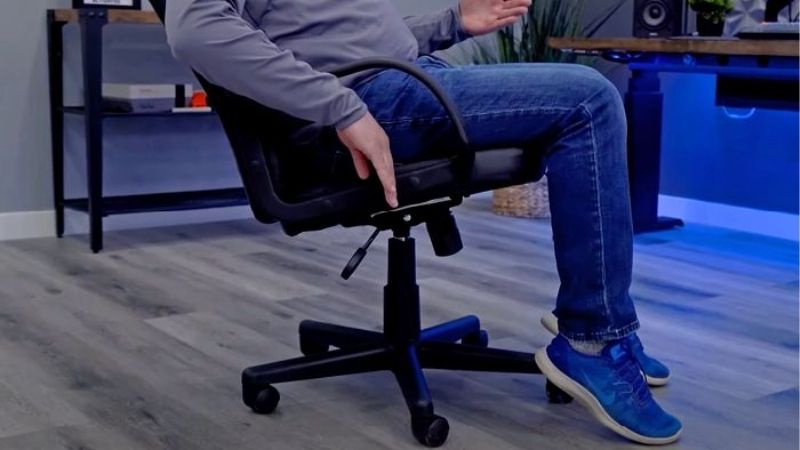
Yes, leaning back slightly in an office chair can be a comfortable, supported way to work. But it should not make you reach for the keyboard or strain to see the screen. If you wonder should you lean back in office chair, let the task, backrest contact, and ease of movement guide your choice instead of forcing one angle for the entire day.
As an Amazon Associate we earn from qualifying purchases.
By KK Home Furnishings Editorial Team
When Leaning Back in an Office Chair Makes Sense
A modest recline is a legitimate working position, not a sign of poor posture. OSHA includes reclined sitting among its example neutral positions, while emphasizing that no one posture suits every person or task [OSHA, Good Working Positions, accessed October 2026]. The useful test is whether the chair supports you while the work remains in reach.
| Task or situation | Leaning-back choice | Check during the task | Change course if |
|---|---|---|---|
| Reading a long document | Gentle supported recline may suit | Screen or page stays easy to view | Chin lifts or neck bends |
| Typing continuously | Upright or slight recline often works better | Keyboard and mouse stay close | Shoulders or arms reach forward |
| Listening in a meeting | Supported recline can provide variety | Lower back and feet remain supported | You slide toward the seat edge |
| Video calls and screen sharing | Choose an angle that preserves camera and display view | Head stays comfortably aligned | You crane forward to be seen or read |
| Paperwork on a desk | More upright sitting often improves reach | Paper can be handled near the body | You bend forward from a deep recline |
| Long uninterrupted work session | Alternate supported positions and movement | Changes happen naturally between tasks | One position leaves you stiff or tired |
Use Backrest Contact, Not a Specific Angle, as Your First Check
The backrest should contact and support the torso without requiring you to brace yourself with your legs. A slight backward shift can feel steadier when the lower back remains supported and your feet stay on the floor or a suitable footrest. OSHA identifies back support as important both while sitting upright and while leaning back [OSHA, Good Working Positions].
If you must perch on the seat edge to reach the desk, the useful recline has already ended. Similarly, do not assume that pressing harder against a lumbar pad produces a better posture. Different backrest curves fit different users, and a chair can be supportive during reading yet poorly suited to sustained keyboard work.
Keep the Screen and Input Devices Within Comfortable Reach
Reclining moves the upper body away from the work surface. The change may be small, but it can be enough to pull the mouse outside comfortable reach or make text harder to see. OSHA’s workstation checklist treats trunk alignment and access to frequently used items as connected decisions [OSHA, Workstation Evaluation, accessed October 2026].
Try your normal task while sitting back. Can you type without propping your shoulders forward? Can you read the monitor without thrusting your chin out? If the answer is no, return to a more upright supported position or reconsider where the equipment sits. The goal is easy access, not winning an angle contest.
Think of OSHA’s Reclined Illustration as a Reference, Not a Rule
OSHA depicts reclined sitting with the angle between the torso and thighs at roughly 105 to 120 degrees [OSHA, Good Working Positions]. That illustration helps distinguish a supported recline from upright sitting. It is not a prescribed personal target or proof that one number prevents discomfort in every user.
Chair mechanisms also vary in where the back pivots and whether the seat follows the backrest. Two chairs at an apparently similar angle may feel very different because the seat edge, lumbar contour, arm positions, and desk reach differ. Judge the working position as a whole, rather than copying a diagram by sight.
Six Desk Situations That Change the Best Lean-Back Choice
Whether you should lean back depends on the activity underway. The following situations focus on choosing between supported upright sitting, modest recline, or a movement break. They do not duplicate instructions for operating a recline control or troubleshooting a jammed chair; those are separate mechanical questions.
1. You Are Reading Instead of Typing
Reading gives your hands fewer reasons to remain close to the desk. A gentle recline may be easier to maintain while reviewing a report, especially when the screen remains legible and your head can stay balanced with your torso. This is the time to use the chair’s support, rather than hovering unsupported over a keyboard you are not using.
On a laptop, however, the same recline may make the small, low screen harder to view. If you pull your head forward to compensate, the position has lost its advantage. Consider using a suitable external monitor or a more upright position rather than stretching your neck toward a screen you cannot comfortably place.
2. You Must Type and Use the Mouse for Most of the Hour
Active keyboard and mouse work often rewards staying closer to the desk. Mild recline may still be comfortable if the chair moves with you and the devices stay near your body. But a deep backward lean can turn every click into a forward reach. This is a workstation problem, not a moral distinction between sitting straight and relaxing.
Mayo Clinic advises positioning the keyboard and mouse so the elbows stay close and the shoulders can relax [Mayo Clinic, Office Ergonomics, May 2023]. If a recline pulls you away from that arrangement, choose a more upright supported position while typing. Save a different angle for tasks that do not demand frequent arm movement.
3. A Long Meeting Gives You Few Reasons to Touch the Desk
Listening to a presentation offers an opportunity to vary the way you sit. Try resting against the backrest for part of the meeting, then shift again when you need to take notes or share a screen. OSHA encourages changes of chair position, standing, and short periods of walking when possible rather than remaining still all day [OSHA, Good Working Positions].
Keep your feet supported as you change position. A recline that sends your feet sliding, makes the seat feel unstable, or requires constant effort to stay put is not serving you well. There is no requirement to stay leaned back until the meeting ends. Switching positions is part of making the chair useful.
4. You Work With Two Monitors or Frequently Turn to Another Screen
Leaning back can create a larger gap between your eyes and the displays. When you use two monitors, that may prompt you to twist toward one screen or lean forward for small text. OSHA’s evaluation checklist recommends keeping the head, neck, and trunk aligned without repeated twisting [OSHA, Workstation Evaluation].
Place the most-used screen where you can see it comfortably during normal work. If a second monitor is only occasional, turning the chair or repositioning the content may be more practical than holding your torso twisted in recline. Judge this by the actual sequence of tasks, not the symmetry of the desk in a product photo.
5. Your Armrests Push You Away From the Desktop
A recline may feel fine until you pull the chair to the desk. Fixed armrests can catch the desktop and stop the seat from moving close enough for typing. You then choose between leaning your trunk forward, reaching with the arms, or giving up the backrest. OSHA flags armrests that interfere with desk positioning as a workstation-fit concern [OSHA, Workstation Evaluation].
The decision here is not necessarily to sit more rigidly. If the chair cannot approach the work surface without collision, the armrest height or desk clearance is the underlying obstacle. Assess whether the existing furniture can be made compatible before treating a particular lean-back angle as the cause of every uncomfortable reach.
6. You Notice You Remain in One Position for an Entire Work Block
Neither upright sitting nor reclined sitting is an all-day posture to defend. The longer a task continues without variation, the less useful it becomes to debate which single pose is best. OSHA explicitly recommends changing positions, adjusting the chair, standing, and moving during computer work [OSHA, Good Working Positions].
Use a real task transition as the cue: finish an email batch, answer a call, or stand to review a document. You need not invent a precise minute-by-minute posture schedule. The practical benefit is that the chair supports more than one comfortable working position, while your routine also allows you to stop sitting periodically.
Frequently Asked Questions
Is Leaning Back the Same as Slouching?
No. Leaning back can mean allowing the chair to support your trunk, with your head and shoulders comfortably aligned. Slouching generally describes collapsing into an unsupported position or sliding forward so the backrest no longer supports your lower back. They may look similar from a distance but feel different while working.
A reclined position is not automatically better than an upright one, and leaning back does not excuse a poorly located screen. The relevant distinction is whether the workstation permits comfortable support and easy access. If the supported position disappears as soon as you start typing, revisit how the equipment is arranged.
Is a 90-Degree Sitting Angle Required for Office Work?
No fixed hip angle is required for everyone. OSHA illustrates upright, declined, and reclined sitting as workable reference positions and says people should change working positions frequently [OSHA, Good Working Positions]. Those drawings show options; they are not rigid requirements for every chair design or user.
Focus on practical signs such as comfortable back support, stable feet, relaxed shoulders, and a reachable keyboard. An exact-looking angle is not useful when the user must strain to maintain it. If a chair advertises a specific recline range, that describes a mechanism, not a universal ergonomic or medical result.
Can I Lean Back if My Chair Has No Recline Mechanism?
A fixed-back chair may still provide a slight backward-seated posture if its shape supports your torso. Do not force a rigid backrest to move or rock a chair on its rear legs. The absence of a tilt function limits movement options but does not automatically make the chair unfit for every short desk task.
Check whether the fixed back allows relaxed contact while your feet stay supported. If it does not, you may need to change activities more frequently or evaluate a different chair for longer sessions. Testing the current seat is more informative than assuming every chair with a recline lever will feel comfortable.
Should I Recline More When My Lower Back Feels Sore?
Changing position may feel more comfortable for some people, but a deeper recline is not a treatment for back pain. It can also make screen viewing or input reach worse. Mayo Clinic emphasizes overall workstation arrangement, while OSHA stresses back support and position changes rather than a single therapeutic angle [Mayo Clinic, 2023; OSHA, Good Working Positions].
If discomfort persists, worsens, or interferes with normal activity, seek advice from a healthcare professional instead of repeatedly increasing the recline. A furniture article cannot diagnose the cause. Treat a comfortable posture change as one workplace option, not evidence that a particular chair mechanism will resolve symptoms.
Final Thoughts
For your next working session, match the chair position to a specific task: sit closer for frequent typing, use a supported gentle lean during reading or listening, and change positions when the task changes. If you can lean back only by moving farther from the keyboard, the desk arrangement deserves attention before the recline angle does.









