
Key takeaways
- Office chairs lean back to let you change seated positions while the backrest continues to offer support. That answers the question, “why do office chairs lean back?” Different designs move the seat, back, and pivot points in different ways. The…
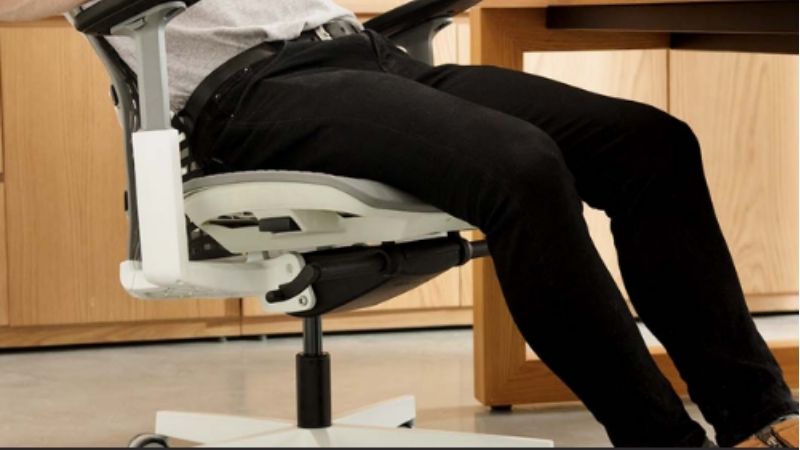
Office chairs lean back to let you change seated positions while the backrest continues to offer support. That answers the question, “why do office chairs lean back?” Different designs move the seat, back, and pivot points in different ways. The useful distinction is between supported movement and a chair that simply tips backward.
As an Amazon Associate we earn from qualifying purchases.
By KK Home Furnishings Editorial Team
Why Reclining Is Built Into Office Chairs
Recline is intended to create another supported posture, not to keep everyone leaning back throughout the day. The US Occupational Safety and Health Administration includes reclined sitting among its reference positions and recommends changing working positions regularly [OSHA, Computer Workstations eTool, Positions, accessed October 2026]. A well-designed movement system also considers what happens to your feet, reach, and backrest contact.
| Chair Movement | What Moves | Design Purpose | Limitation |
|---|---|---|---|
| Center tilt | Seat and back rotate together | Simple rocking motion | Seat front may lift |
| Knee tilt | Seat pivots nearer its front | Reduce front-edge rise | Feel varies by chair |
| Synchro-tilt | Back reclines more than seat | Open torso angle with less seat movement | Ratios differ by design |
| Independent back angle | Back angle changes separately | Change support without matching seat tilt | May not provide continuous rocking |
| Linked glide | Seat shifts as back reclines | Preserve useful work reach | Specific to equipped chairs |
| Body-linked tilt | Seat and back follow planned pivots | Maintain contact through movement | Mechanism is model-specific |
Recline Creates a Choice of Supported Postures
A fixed upright back can be suitable for some focused tasks, but it gives the sitter fewer opportunities to shift the relationship between torso and thighs. Recline adds a position in which the backrest can carry part of the upper body’s contact load while the person remains seated. This is a design choice, not proof of a medical benefit from any particular chair.
OSHA describes both upright and reclined seated positions, while emphasizing that remaining still for too long is undesirable [OSHA, Computer Workstations eTool, Positions]. A recline feature is therefore most useful as one option within a changing routine. It cannot replace getting up, walking, or fitting the keyboard and screen to your body.
Controlled Movement Helps the Backrest Stay Useful
A chair can only support your back in a reclined position if its backrest remains in meaningful contact as your torso moves. Designers use pivot placement, shaped backrests, flexible materials, and linked movement for this purpose. A backrest that loses contact at the lower back or pushes you away from the workstation may feel different from one that follows your movement smoothly.
Herman Miller’s technical description of Aeron’s Kinemat design explains that its seat and back pivots were arranged to maintain contact around the pelvis during recline [Herman Miller, The Kinematics of Sitting, accessed October 2026]. This describes a particular design approach; it does not establish that all ergonomic chairs use the same pivot geometry or perform equally.
Pivot Location Explains Why Chairs Feel Different
On a center-tilt chair, the seat and back largely tip together around a pivot beneath the seat. HON describes knee-tilt as moving the pivot closer to the chair’s front, while synchro-tilt moves the back farther than the seat [HON, Chair Functions, accessed October 2026]. These layouts change how much the front of the cushion rises when the sitter leans backward.
That difference can affect how steadily feet remain supported and whether a sitter feels pushed away from the desk. There is no universal mechanism ratio across all brands or model years. A product labeled reclining may describe anything from basic rocking to an engineered back-and-seat linkage, so the label alone does not identify the experience.
Six Everyday Reasons Office Chairs Lean Back
The benefit of a reclining mechanism depends on what you are doing and which parts of the chair actually move. These six situations explain the design logic behind common chair types, not steps for operating a specific adjustment control. If the chair behaves unpredictably, that is a separate troubleshooting issue rather than evidence of the feature’s intended purpose.
Reading After a Long Period at the Keyboard
When someone stops typing to review a document, the work may demand less forward reach. Leaning into a supported backrest can offer another seated position for reading rather than holding the torso in the same position used for active keyboard work. This is one reason chair makers include variable back angles instead of only a rigid vertical frame.
The change is less useful if a distant monitor forces the user to crane the neck forward to see small text. OSHA’s monitor guidance describes how poor viewing distance can draw a sitter away from the back support [OSHA, Computer Workstations eTool, Monitors]. A recline function works within the larger arrangement of desk, screen, and input devices.
Switching Postures During Video Calls
A listening-heavy call often allows more movement than precise mouse or keyboard work. A chair that can move between upright support and a modest lean offers another way to vary sitting without abandoning the backrest. The practical gain is a choice of supported positions during an otherwise static task, not an assurance that every position will feel comfortable.
Some chairs return smoothly with the sitter; others lock at selected points and require a separate change before moving again. That behavioral difference comes from the movement mechanism rather than a universal definition of an ergonomic chair. A good fit still depends on stable seating, desk clearance, and an angle that leaves the screen comfortably visible.
Rocking in a Basic Center-Tilt Task Chair
A center-tilt chair can provide an uncomplicated rocking action by moving the seat and back together. HON describes this approach as rotation around a fixed point near the center of the seat mechanism [HON, Center Tilt]. It offers recognizable backward movement at relatively modest mechanical complexity, which helps explain its presence on many conventional task-chair designs.
However, the seat’s front edge may rise as the chair tilts, changing the relationship between feet and floor. Someone with shorter legs may notice that movement more than a taller user. The trade-off is intrinsic to the pivot arrangement, not proof that the chair is defective or that every center-tilt chair is a poor choice.
Keeping Feet More Stable With Synchro-Tilt
Synchro-tilt mechanisms are designed so the backrest changes angle more than the seat. HON’s description of its synchro-tilt function explains why the front of the seat can stay closer to the floor as the user leans back [HON, Synchro-Tilt]. Compared with a seat and back that move together, this design can make posture changes feel less like the entire chair is tipping.
The geometry is not identical on every chair sold as synchro-tilt, and even a reduced seat movement cannot guarantee supported feet for every body size. Seat height, shoe choice, floor contact, and desk arrangement still matter. The intended result is coordinated motion with fewer unwanted changes in the lower body’s position, not a universal comfort rating.
Staying Near the Desk While Reclining
Leaning back can increase the distance between your eyes or hands and the work surface. Certain higher-end chairs address that issue by changing seat position as the back reclines. Steelcase describes the Leap’s Natural Glide System as allowing the seat to glide during recline to help preserve the user’s reach and viewing zone [Steelcase, Leap product page, accessed October 2026].
That is a useful illustration of why recline design involves more than a backrest hinge. It does not mean that a moving seat automatically solves every workstation problem, or that every Leap configuration behaves like other brands. Users still need an appropriate display distance and reachable keyboard; a specialized linkage cannot compensate for a badly positioned workstation.
Accommodating Different People in a Shared Chair
Two people can lean against the same backrest with very different force because body size, sitting habits, and comfort preferences vary. Many office chairs combine a reclining function with resistance or stopping features so the movement can respond to different users. Those controls exist to shape the feel and range of movement, rather than to change the reason recline is provided.
OSHA recommends chair adjustability in part because it helps accommodate multiple users and different seated postures [OSHA, Computer Workstations eTool, Chairs]. The exact adjustments available depend on model and options. If a shared chair is never supportive for one person’s body or task, the explanation may be overall fit, not a lack of additional tilt settings.
Frequently Asked Questions
Does Every Office Chair Have to Recline?
No. Fixed-back seating and chairs with limited back-angle adjustment also exist, and their suitability depends on the work being done and the person using them. A reclining feature expands the available supported positions but is not, by itself, evidence that a chair is well sized, stable, or comfortable for a particular user.
OSHA’s workstation guidance favors an adjustable backrest that supports a variety of postures, but workplace guidance is not a guarantee that every commercially sold chair has that mechanism [OSHA, Computer Workstations eTool, Chairs]. Compare the actual features of a chair rather than assuming every product labeled office chair has free recline.
Are Swivel and Recline the Same Feature?
No. Swivel is the chair’s rotation around a vertical axis so a person can turn toward different parts of the desk. Recline changes the backward angle of the backrest, the seat, or both. A chair may have a swivel base but a fixed back, or it may combine several distinct adjustments beneath the seat.
HON lists a swiveling function separately from center tilt, synchro-tilt, and independent back-angle adjustments [HON, Chair Functions]. That is why a product description such as swivel task chair does not tell you whether it can lean backward. Read the exact mechanism description when this distinction matters.
Does a Reclining Office Chair Always Need a Headrest?
No. Many task chairs have a reclining backrest without a headrest. Whether head and neck support is useful depends on the intended recline range, how the chair is used, the user’s proportions, and whether the backrest is designed to support the relevant body areas during that movement.
OSHA’s chair purchasing guide recommends a headrest when backrest recline extends beyond roughly thirty degrees from vertical [OSHA, Computer Workstations eTool, Purchasing Guide]. That is a conditional procurement recommendation, not a universal legal rule or proof that every smaller-angle chair is safe for every person. Check the specific chair’s support design.
Does Chair Recline Replace Standing or Walking Breaks?
No. Recline changes a seated posture; it does not make movement away from the workstation unnecessary. A chair can support a different torso angle while leaving someone seated in substantially the same place. A recline feature should therefore be viewed as one option for variation rather than a complete activity plan.
OSHA recommends making small chair adjustments and periodically standing, walking, and stretching during computer work [OSHA, Computer Workstations eTool, Positions]. This is general ergonomic guidance, not a prescription for a fixed break interval or a promise of symptom relief. Choose movement opportunities that suit your work and your circumstances.
Final Thoughts
Why office chairs lean back comes down to a design goal: offering supported changes of position, not simply tilting for comfort. Center tilt, coordinated motion, and linked glide solve different movement problems. Judge the usefulness of recline by back contact, stable feet, desk reach, and how the chair fits the task.









