
Key takeaways
- No. A chair can work well at a desk without wheels, but rolling casters make frequent repositioning easier. The question “do office chairs need wheels?” matters most when your flooring, reach around the desk, or preference for a stationary seat…
No. A chair can work well at a desk without wheels, but rolling casters make frequent repositioning easier. The question “do office chairs need wheels?” matters most when your flooring, reach around the desk, or preference for a stationary seat makes easy rolling either helpful or inconvenient.
As an Amazon Associate we earn from qualifying purchases.
By KK Home Furnishings Editorial Team
When Office Chair Wheels Are Useful or Unnecessary
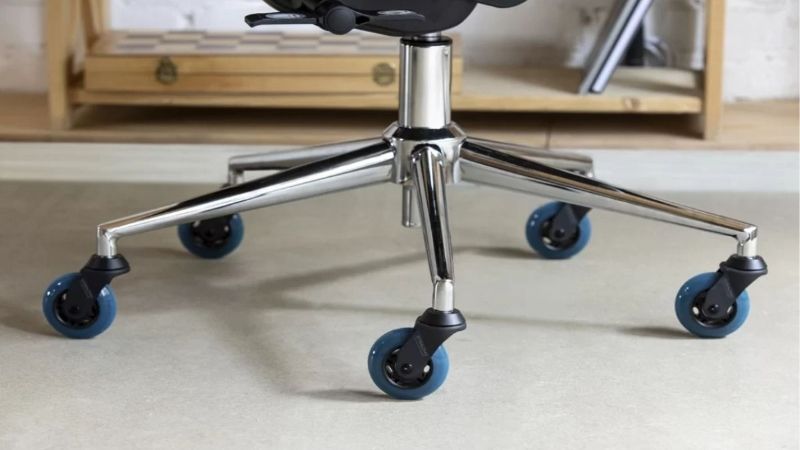
For everyday computer work, wheels are usually a practical advantage rather than an essential part of sitting support. OSHA’s Computer Workstations eTool recommends a strong five-legged chair base with floor-appropriate casters because positioning the chair near work equipment can otherwise become awkward [OSHA, Chairs, accessed October 2026].
| Workstation Condition | Best Starting Point | Why It Helps | What to Check |
|---|---|---|---|
| Frequent movement across a broad desk | Rolling casters | Easier short repositioning | Wheel type matches floor |
| Low-to-medium-pile carpet | Carpet-rated casters | Designed to roll on carpet | Actual pile and chair load |
| Hardwood, vinyl, or tile | Hard-floor or multi-surface casters | Controlled movement and suitable tread | Unwanted rolling and floor care |
| Workstation where the chair should stay put | Manufacturer-approved glides | Less free movement while seated | Base compatibility and floor contact |
| Mixed work areas and shared users | Floor-matched rolling base | Allows repeated position changes | Clearance and casters’ resistance |
| Chair moves too easily during transfers | Braking caster option or stationary base | Addresses unwanted roll-away | Which braking mode is provided |
Wheels Help With Reach, Not With Basic Chair Support
Casters let a seated person shift closer to the keyboard, pull away from the desk, or move toward files without lifting the entire chair. OSHA notes that unsuitable casters or no casters can make desk positioning difficult, potentially encouraging awkward reaching and bending [OSHA, Chairs, accessed October 2026].
That does not make every wheeled chair ergonomic or every stationary chair unsuitable. Backrest support, seat fit, available adjustments, and a stable base still matter. If everything you use is already within comfortable reach, a fixed chair may meet your routine without the additional movement of wheels.
Five-Leg Stability Is Separate From Having Casters
The number and layout of a chair’s supporting legs should not be confused with the presence of wheels. OSHA recommends a sturdy five-legged base for a conventional computer-workstation chair. Casters attach at the ends of that base, but rolling alone does not establish whether the chair resists tipping.
For a fixed chair, evaluate the complete approved design rather than assuming that removing wheels improves stability. A manufacturer-built five-star base with glides can be a legitimate configuration; Steelcase lists both glides and casters as options on its SILQ chair [Steelcase, SILQ product page, accessed October 2026].
Flooring Determines Whether Movement Is Controlled
A wheel that moves acceptably on carpet may behave very differently on smooth tile or hardwood. OSHA’s chair evaluation checklist says casters should roll on softer flooring yet not let the seat scoot away too easily during sitting down or standing up on hard flooring [OSHA, Evaluation Checklist, accessed October 2026].
Herman Miller illustrates the difference in its Aeron buying guide: one caster is designed for low-to-medium-pile carpet, while a multi-surface option includes a soft tread and a braking feature when unoccupied [Herman Miller, Aeron Chair Buying Guide, accessed October 2026]. These features are model-specific, not universal caster behavior.
Choose Wheels or Glides for Six Desk Setups
The right answer depends on whether your chair needs to travel, rotate in place, or remain planted as you work. The following cases focus on wheel necessity rather than repeating a general office-chair shopping checklist. Make the choice based on real movements at your desk and the floor beneath it.
A Carpeted Home Office With a Wide Work Surface
If a desk has papers on one side and a monitor on the other, a rolling chair can reduce the need to drag or lift the seat whenever your task changes. Start with casters specified for the carpet you actually have, because pile height and carpet-pad softness can affect how freely the chair moves.
Herman Miller describes the Aeron carpet caster as intended for low-to-medium-pile carpet rather than every type of deep carpet [Herman Miller, Aeron Chair Buying Guide]. If a chair sinks into thick carpet or its wheels stall, check the manufacturer’s floor guidance before treating a generic replacement caster as a guaranteed fix.
A Hardwood or Tile Floor Where the Chair Slides Too Easily
On smooth flooring, easy motion may become unwanted motion when someone sits or stands. A hard-floor-rated caster with suitable tread, a manufacturer-approved braking configuration, or glides may fit the situation better than basic carpet wheels. The goal is predictable movement, not the fastest possible rolling action.
Herman Miller’s multi-surface Aeron caster is a useful example because its unoccupied braking function is expressly described by the manufacturer [Herman Miller, Aeron Chair Buying Guide]. Do not assume the same function is fitted to another chair. Confirm whether the caster brakes under load, when empty, or through a user-operated lock.
A Compact Desk Used Mostly for Focused Typing
At a narrow desk, there may be little need to roll from one work zone to another. A stable chair with approved glides can be reasonable when the keyboard, mouse, and display are already reachable. Check that you can pull the seat out and stand up comfortably without having to fight floor friction.
The chair must still fit the person and desk. A fixed base does not make incorrect seat height, armrest interference, or poor monitor reach disappear. If changing the chair’s position several times an hour becomes inconvenient, casters can improve workflow even in a room with very little free space.
A Shared Workspace With Several Work Zones
In a shared home office or workplace, people may move between keyboards, side tables, and storage surfaces. Casters can make those short transitions less cumbersome, especially when users frequently change where they sit. This is a mobility decision, not evidence that a rolling chair will fit every person’s body.
OSHA emphasizes chair adjustability when workstations serve multiple users, while its base guidance addresses floor-appropriate casters [OSHA, Chairs, accessed October 2026]. Treat those as separate checks: the chair must move appropriately and still offer usable seat, backrest, and height adjustments for the people sharing it.
A Visitor or Meeting Area Where Chairs Rarely Move
Guest seating around a compact meeting table may not need the repeated short movements common at a computer workstation. A manufacturer’s stationary chair or glide configuration can make sense when chairs mostly remain in place and should not roll unexpectedly as people sit. Consider ease of entry and exit as well as layout.
Some models are offered with either wheels or glides rather than requiring one universal base type. The Herman Miller Eames Executive Chair product configurator lists both [Herman Miller, Eames Executive Chair, accessed October 2026]. This shows a real choice exists, but suitability still depends on the specific chair and how the space is used.
An Existing Rolling Chair That Needs a Stationary Base
If you already own a chair but dislike its movement, do not assume all casters can simply be swapped for a generic set of glides. The stem, socket, mounting style, and expected seated height may be different. Look first for accessories explicitly approved for your exact chair model and base configuration.
For instance, Steelcase lists glides as an option for SILQ, but that does not establish interchangeability with unrelated chairs or with every existing SILQ unit [Steelcase, SILQ product page]. Confirm the replacement part through the manufacturer or authorized supplier. Avoid improvised removal or unstable substitutes that leave the chair unsupported.
Frequently Asked Questions
Can an Office Chair Swivel Without Having Wheels?
Yes. Swiveling and rolling are independent features: a swivel mechanism lets the seat turn around a vertical axis, while casters let the base travel across the floor. A chair can rotate while remaining on a stationary base, depending on how the manufacturer designed and configured it.
This distinction is especially useful for people who want to turn toward nearby materials without the chair sliding backward. Do not infer swivel capability merely because a chair has glides or a five-star base. Read the specification for that particular model before assuming it combines rotation with stationary feet.
Do Office Chair Casters Have a Universal Stem Size?
No. Replacement casters are not universally compatible with every office chair. Different chairs can use different attachment styles and dimensions, and a wheel that seems to fit may not be approved for the original base. Confirm the product or parts number and mounting specification before ordering replacements.
Even when the mounting connection fits, a different caster height can change the seat’s effective adjustment range. The wheel material, floor suitability, and any braking behavior also need to match the intended use. Manufacturer documentation is a better starting point than assuming a common aftermarket wheel fits all office chairs.
Are Chair Wheels Guaranteed Not to Mark Wood Floors?
No. A hard-floor designation indicates the caster is intended for a category of surface, not a guarantee against wear, dents, debris scratches, or finish damage in every home. Floor finish, grit trapped near the tread, chair load, and the manufacturer’s care instructions can affect the outcome.
Before using any caster or mat, check both the flooring manufacturer’s guidance and the chair maker’s recommended wheels. Keep the floor and wheel treads clean, and inspect for tracking or unexpected wear. An aftermarket accessory described as floor safe may still be inappropriate for a particular surface finish.
Do Braking Casters Lock Automatically When Someone Sits?
Not necessarily. Braking systems behave differently by model. Some are designed to resist rolling when the chair is unoccupied, while other locking products use a manual control or operate differently under load. A braking caster label alone does not describe which behavior you will experience.
Herman Miller specifically describes its Aeron multi-surface Quiet Roll caster as preventing roll-away when the chair is unoccupied [Herman Miller, Aeron Chair Buying Guide]. Do not reinterpret that as automatic locking when seated. Verify the exact brake behavior, especially if predictable transfers are important to a user.
Final Thoughts
So, do office chairs need wheels? Not always. Rolling casters are useful when desk work involves frequent repositioning, while suitable glides can make sense for a mostly stationary seat. Choose based on floor conditions, movement needs, and the chair maker’s approved base options rather than the presence of wheels alone.









