
Key takeaways
- To make an office chair lean back, first identify its recline or tilt control, release any restriction according to its manual, and adjust the resistance until the backrest moves smoothly while you remain supported. If you need to know how…
To make an office chair lean back, first identify its recline or tilt control, release any restriction according to its manual, and adjust the resistance until the backrest moves smoothly while you remain supported. If you need to know how to adjust an office chair to lean back, start with the chair’s actual control layout rather than assuming every lever works the same way. A tension knob and a tilt lock perform different jobs.
As an Amazon Associate we earn from qualifying purchases.
By KK Home Furnishings Editorial Team
Know Which Office Chair Controls Allow Reclining
Before moving a control, identify the chair’s brand and model. Some chairs use a large spring-tension knob, some combine positions in a lever, and others have dials with several preset comfort settings. A Steelcase Series 1 and a Herman Miller Aeron are useful contrasting examples: they do not use one interchangeable adjustment method [Steelcase, Series 1 User Guide; Herman Miller, Aeron Adjustment Guide].
| Control or feature | What it changes | Typical clue | Check before operating |
|---|---|---|---|
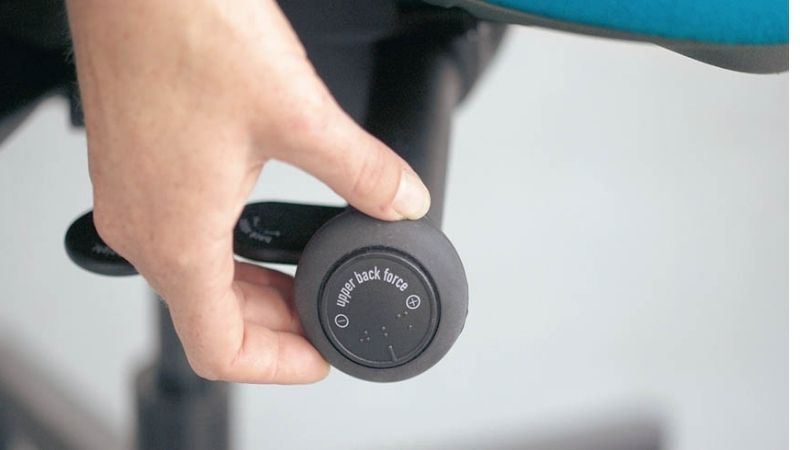
| Tilt or back tension | Resistance felt when leaning backward | Dial or knob, sometimes marked plus/minus | Follow your model’s direction markings |
| Tilt lock | Whether the chair can move through a recline | Lever, paddle, or setting on a dial | Know which state permits movement |
| Tilt limiter | How far the chair can lean backward | Rotary control with range settings | Do not confuse limiting range with adding resistance |
| Back-angle adjustment | Fixed backrest position on applicable designs | Separate backrest control or lever | Confirm whether the back can move independently |
| Weight-activated recline | Resistance responds to the seated user | Few or no conventional tension knobs | Use the manufacturer-defined comfort settings |
| Seat height or seat-depth lever | Seat position, not necessarily recline | Lever under the seat or sliding handle | Do not pull unrelated controls hoping the back will tilt |
Distinguish Resistance From the Recline Range
Resistance is how hard you have to press into the backrest to move it. Range is how far the chair is allowed to travel. If the back feels heavy but still moves, the tension may be set high. If the back stops at one repeatable position, a limiter may be defining the permitted range. A true malfunction is a separate diagnosis and should not be assumed from a control’s unfamiliar behavior.
On the Aeron adjustment guide, the right-side tension knob changes resistance; a separate left-side tilt limiter changes the permitted backward range [Herman Miller, Aeron Adjustment Guide]. Those locations describe that chair’s illustrated configuration, not all office chairs. For another model, consult the printed control labels, user manual, or manufacturer’s adjustment video.
Understand Why Two Chairs May Use Opposite Controls
The Steelcase Series 1 uses a comfort dial with an upright setting and weight-activated recline options. The user guide describes distinct settings rather than an endlessly turning generic spring knob [Steelcase, Series 1 User Guide]. By contrast, the Aeron guide separately explains tension and tilt-limiter adjustments. Neither operating sequence can safely be pasted into the other chair’s instructions.
A manufacturer’s current manual is the controlling source when labels, lever direction, or part positions disagree with generic advice. Guides also differ by market and production configuration. When a chair has been refurbished or modified, compare the controls on the actual seat with the exact model identification before making any assumptions about replacement mechanisms.
Begin With a Stable Sitting Position
A reclining test should begin with the base settled on the floor, the chair assembled correctly, and your feet supported. OSHA recommends a backrest that supports varied sitting positions and a seat that allows supported feet; it also emphasizes adjusting the workstation as a whole [OSHA, Computer Workstations eTool: Chairs, accessed October 2026].
A desk can interfere with a recline test if armrests hit the edge, casters jam against furniture, or the chair is too close to a wall. Create enough clearance for the backrest to move, and keep your hands away from any moving mechanism under the seat. Never force a lever, remove a protective cover, or pull on a spring assembly to make the chair lean back.
How to Adjust an Office Chair to Lean Back in Six Steps
Use the following sequence for a working chair with an adjustable reclining mechanism. It is a general decision procedure, not a substitute for the controls specified in your chair’s manual. Stop if a control binds, the base shifts, or the backrest moves unexpectedly; a broken or jammed mechanism requires a different troubleshooting process.
Step 1: Sit Fully Back and Make Room for Movement
Place the chair on a stable floor, away from the wall and desk edge. Sit with your hips back against the seat and your back in contact with the backrest. Check that your feet can remain supported. If the chair sits unusually high, use the height adjustment or an appropriate footrest before evaluating how much force it takes to recline.
Apply gentle, even pressure to the backrest without rocking the base or pushing off the desk. You are testing whether the chair has usable reclining travel, not trying to reach the end stop in one motion. If a chair has a rigid fixed back, do not treat it like a hidden tilt mechanism: some designs simply do not recline.
Step 2: Locate the Exact Recline Control for Your Model
Inspect the accessible levers and dials at the sides and beneath the seat without putting your fingers inside the mechanism. Look for symbols indicating tilt, a reclining figure, a padlock, or plus and minus marks. Record the chair’s product label or model number if the controls are not obvious; the manufacturer’s instructions should identify their positions and functions.
Check for dual-purpose controls. A paddle can operate seat height in one direction and a tilt function in another, but that behavior must be confirmed rather than guessed. On the Steelcase Series 1, for example, the back-control options are selected with a comfort dial [Steelcase, Series 1 User Guide]. A lookalike chair may put its back adjustment somewhere else entirely.
Step 3: Select a Setting That Permits Backward Travel
If the chair is currently set to upright lock or a restricted tilt range, follow its manual to select an available reclining mode. Move only the appropriate control and make the change with the chair supported as the instructions specify. Some mechanisms operate more readily after you reduce pressure on the backrest, but the correct position for changing a setting is model-dependent.
For the Series 1, the comfort dial distinguishes upright back lock from settings that allow full recline [Steelcase, Series 1 User Guide]. The Aeron uses a tilt limiter to set how far the chair can recline [Herman Miller, Aeron Adjustment Guide]. This step is about enabling controlled travel; a separate guide addresses how to lock a chair against unwanted reclining after you finish testing.
Step 4: Set Backrest Tension in Small Changes
Try a gentle backward lean. If the backrest barely moves although the recline setting allows it, consult your model’s manual for how to reduce tension. If it falls backward too readily, raise the resistance where the chair provides that adjustment. Make a small change, sit fully back again, and retest. Avoid large blind turns or turning a control past its intended travel.
On the Aeron guide, moving the knob toward its marked plus direction increases tilt tension, while the minus direction decreases it [Herman Miller, Aeron Adjustment Guide]. This is a verified model example, not an instruction to turn every chair clockwise or counterclockwise. Some weight-activated mechanisms instead offer a limited set of comfort modes, not manual tension adjustment.
Step 5: Test Smooth Travel and a Controlled Return
Lean back slowly and notice where resistance begins, whether the backrest travels smoothly, and whether you can return upright without a sudden rebound. Stop at a range that supports your torso and lets you remain balanced on the seat. Do not attempt to force a chair past its stop or brace your feet against the desk to make it travel farther.
Test the motion more than once, changing only one control at a time so you know which setting created the difference. Squealing, visible loose hardware, an abrupt drop, or an unstable base should end the test. Use the exact manufacturer’s inspection or service instructions rather than dismantling a load-bearing reclining assembly at home.
Step 6: Recheck the Workstation and Save the Setting
Once the backrest moves comfortably, sit at your normal keyboard and mouse position. Confirm the desk does not catch your armrests and that you can work without holding your shoulders forward. A setting that feels good away from the desk may not work when you type. OSHA recommends adjusting the chair with the screen and input devices in mind [OSHA, Chairs].
Learn how your chair returns to its preferred upright or limited-range position, but do not assume the mechanism stores your choice electronically or mechanically. A shared chair may need retuning each time a different person uses it. If your model has distinct comfort presets, record which label works for your work tasks rather than memorizing an arbitrary number of knob turns.
Frequently Asked Questions
What if My Chair Has Only One Lever Under the Seat?
One lever does not prove that the chair lacks recline. Some models combine seat-height and tilt-related actions in one control, while others offer height adjustment alone. Identify the chair brand and product code before assuming that pulling, pushing, or twisting the lever will unlock the back.
Product photos can help locate the lever, but they may show a different generation or configuration. Prefer the maker’s model-specific guide with illustrations, especially if a control moves in more than one direction. Do not repeatedly force an unfamiliar lever against resistance.
Does a Mesh Chair Recline Differently From a Fabric Chair?
Not necessarily. Mesh and fabric describe upholstery or support materials, not a standardized recline mechanism. Either kind of chair may use a lock lever, tension control, limiter, or weight-activated design. The mechanism and exact model determine the adjustment method.
Look at the manufacturer’s control diagram rather than judging by whether the backrest feels soft or firm. A taut mesh back can still recline through a seat-mounted linkage, while an upholstered chair may have a fixed back. Fabric appearance alone cannot tell you whether the chair includes adjustable tilt tension.
Can I Change the Recline Setting Without Sitting in the Chair?
Follow the model’s own instructions. Some accessible controls can be moved while the chair is unoccupied, but others are designed to be tuned with a person seated or with back pressure relieved. For instance, the Aeron guide describes its tension setting while seated [Herman Miller, Aeron Adjustment Guide].
Do not lift the chair, flip it over while someone is seated, or reach underneath a moving linkage to experiment. If the manual calls for a specific operating position, use it. If the mechanism is damaged or uncertain, pause and seek service rather than treating adjustment as a repair procedure.
What if There Is No Tilt Tension Knob?
Your chair may rely on weight-activated resistance, a preset comfort dial, or a fixed-back design instead of a separate spring-tension knob. The absence of a knob is not enough to identify a fault. Check the model specifications to see which reclining functions were included with that exact chair.
On models with weight-activated recline, the useful action may be selecting a compatible comfort mode instead of loosening a spring. If the manual lists only a height lever and no recline feature, do not attempt to retrofit the function by loosening mounting bolts or removing structural parts.
Final Thoughts
To adjust an office chair to lean back, identify your model’s actual tilt controls, select a setting that allows movement, then tune resistance with small tests until the backrest travels smoothly and returns predictably. If the controls do not match the manual or the mechanism feels unstable, stop rather than forcing it.









