Key takeaways
- Measure the footprint: Record the available wall length, corner depth, and clearance for your chair before choosing an L-shaped, U-shaped, or extra-long desk.
- Prioritize desktop depth: Around 28 to 32 inches of depth gives multiple screens more comfortable viewing distance and leaves room for a keyboard, speakers, and paperwork.
- Check monitor support: Built-in stands can free up valuable surface area, but confirm their width and weight capacity if you use large displays or monitor arms.
- Match storage to your routine: Drawers, shelves, and printer compartments are useful in small rooms, provided they do not reduce legroom or interfere with your chair.
- Consider adjustability and power: A standing frame can make long work sessions easier, while integrated outlets and USB ports help keep charging cables off the floor.
What's inside
Managing two or more monitors in a compact room is less about buying the biggest desk and more about using every inch intelligently. A shallow surface can leave screens hanging over the edge, while a bulky frame may block drawers, doors, or your only comfortable walking path.
This guide compares desks that approach the problem differently, from reversible corner workstations and extra-long two-person surfaces to height-adjustable models designed for ultrawide displays. We’re focusing on monitor support, usable depth, storage, cable convenience, and how well each desk fits a real home office.
As an Amazon Associate we earn from qualifying purchases.


How to Choose a Home Office Desk For Multiple Monitors (2026)
- Measure the footprint: Record the available wall length, corner depth, and clearance for your chair before choosing an L-shaped, U-shaped, or extra-long desk.
- Prioritize desktop depth: Around 28 to 32 inches of depth gives multiple screens more comfortable viewing distance and leaves room for a keyboard, speakers, and paperwork.
- Check monitor support: Built-in stands can free up valuable surface area, but confirm their width and weight capacity if you use large displays or monitor arms.
- Match storage to your routine: Drawers, shelves, and printer compartments are useful in small rooms, provided they do not reduce legroom or interfere with your chair.
- Consider adjustability and power: A standing frame can make long work sessions easier, while integrated outlets and USB ports help keep charging cables off the floor.
The Best Home Office Desk For Multiple Monitors (2026)s Reviewed
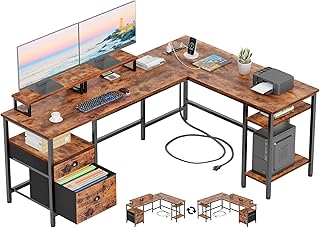
Furologee 66-Inch Reversible L-Shaped Desk
This corner-friendly Furologee desk makes a strong case for rooms where wall space is limited but vertical storage is welcome. Its reversible layout, two monitor stands, file drawer, shelves, and built-in power outlet create a practical command center without requiring a separate filing unit.
55-Inch U-Shaped Electric Standing Desk
For users who want both screen capacity and sit-stand flexibility, this U-shaped model offers an unusually feature-rich setup. The dual-monitor stand, keyboard tray, three outlets, USB ports, programmable presets, and broad height range help organize a busy workstation while keeping frequently used equipment within reach.
Grandder 55 x 32 Extra-Deep Electric Standing Desk
The Grandder is particularly appealing for a 49-inch ultrawide paired with two additional screens. Its 32-inch depth gives monitors and accessories breathing room, while the electric lift, memory presets, anti-collision function, and substantial weight capacity support a more ergonomic multi-monitor arrangement.
LVB 70.8-Inch Extra-Long Computer Desk
When the priority is maximum horizontal workspace, the LVB provides a generous, straightforward surface that can accommodate multiple monitors or even two people sharing one workstation. Its industrial wood-and-metal design suits home offices that need a durable writing, study, or computer table without corner-desk geometry.
Korfile 59-Inch Reversible L-Shaped Desk
The Korfile balances a moderate footprint with useful organization for a bedroom or compact office. Four adjustable storage drawers, two monitor stands, integrated outlets, and a reversible L-shaped configuration make it versatile, especially for anyone who wants to separate paperwork from peripherals.
Frequently Asked Questions
How much desk space do two monitors need?
Two standard monitors can fit on a 48- to 55-inch desk, but usable depth matters just as much as width. A monitor stand or arm can reclaim surface area, while a 60-inch-plus desk provides more room for speakers, notebooks, and a comfortable mouse position.
Are L-shaped desks good for multiple monitors?
Yes. An L-shaped desk can place screens on one section and paperwork or a laptop on the other, making it efficient in a corner. Choose a reversible design if your room layout may change, and verify that the return does not obstruct a doorway or chair.
Is a standing desk stable with several monitors?
It can be, provided the frame and desktop are designed for the total load. Include monitor stands, arms, speakers, computers, and accessories when estimating weight, and keep heavier equipment centered rather than concentrated at one edge.
Do built-in monitor stands work with every screen?
Not necessarily. Check the stand’s width, height, and stated capacity before buying. Large ultrawide displays may need a separate heavy-duty arm or a desk with a wide, unobstructed surface instead of a fixed riser.
Final Thoughts
The Furologee 66-Inch L-Shaped Desk is a smart choice for corner offices that need storage, while the Grandder stands out for deep ultrawide-and-dual-monitor setups. If maximum shared workspace matters most, the LVB 70.8-Inch desk offers the cleanest wide-surface solution; for flexibility throughout the day, the electric standing desks are compelling alternatives.