
Key takeaways
- No, you do not automatically need to buy a chair marketed as ergonomic to work comfortably at a desk. A stable chair that fits you and your work may already be adequate. The useful question is do you need an…
No, you do not automatically need to buy a chair marketed as ergonomic to work comfortably at a desk. A stable chair that fits you and your work may already be adequate. The useful question is do you need an ergonomic chair for a specific limitation in your current setup, or would changing your desk, equipment, or work habits solve it first?
As an Amazon Associate we earn from qualifying purchases.
By KK Home Furnishings Editorial Team
How to Tell Whether You Actually Need Ergonomic Seating
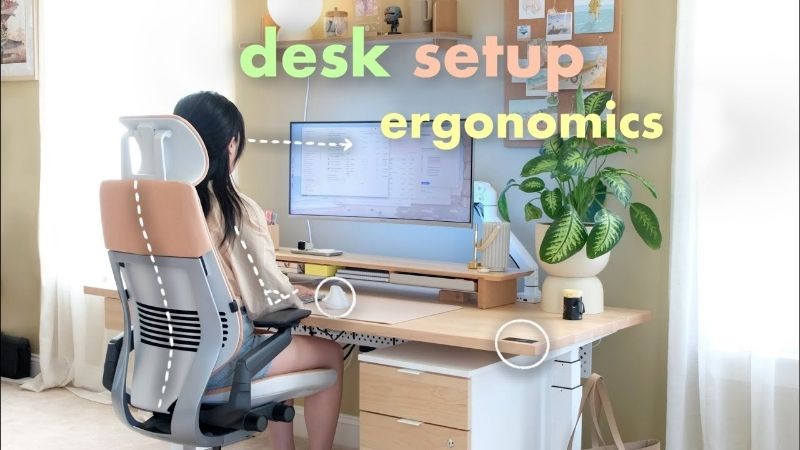
Judge the need for a different chair by three things: the tasks you do, the fit of the chair you already have, and the parts of your workstation that restrict your position. OSHA’s computer-workstation guidance recommends adjusting the whole setup and trying chairs for fit rather than assuming one design suits everyone [OSHA, accessed October 2026].
| Your situation | Need for a different chair | Try this first | Reason to reconsider |
|---|---|---|---|
| Short, occasional computer sessions | Not automatically | Check stability, screen position, and foot support | Repeated problems despite reasonable setup |
| Extended, focused seated computer work | More likely to benefit from adjustable seating | Check seat, backrest, and armrest fit during real tasks | Chair cannot accommodate changing positions |
| Current task chair already fits | Often unnecessary | Keep it maintained and vary posture | Controls fail or circumstances change |
| Dining chair used for regular desk work | Worth evaluating | Check back support, seat height, and desk clearance | Improvised changes cannot create an acceptable fit |
| Laptop used around the house | Not the first upgrade | Consider external keyboard and suitable screen placement | A dedicated seated workstation is still uncomfortable |
| Alternating sitting and standing | Depends on seated portion of work | Fit the chair and desk at their seated position | Chair cannot support seated tasks |
| Ongoing pain or other symptoms | Not a medical decision by itself | Review workstation and consult a clinician if appropriate | A fit problem remains after broader assessment |
Match Seating to the Tasks You Perform
Typing, reading, video calls, drawing, and frequent trips away from the desk do not put identical demands on seating. A person who works at a fixed screen for much of the day has more reason to value easy adjustments than someone who sits briefly between standing tasks. No universal daily-hour cutoff determines when an ergonomic chair becomes mandatory.
Look at what actually happens during a normal workday: how frequently you reach, twist, scoot forward, or abandon the backrest to use the keyboard. When a task repeatedly requires an awkward position, it deserves attention even if you do not work a long shift. The goal is a workable arrangement, not an arbitrary seating-time target [CDC/NIOSH, July 2026].
Check the Fit of the Chair You Already Own
A chair can be adequate without an ergonomic label if your feet have stable support, your seat does not press behind your knees, and you can use its backrest while reaching the keyboard. OSHA also points to seat-depth fit, suitable armrest positioning, and a stable base as practical checks [OSHA, accessed October 2026].
Try your normal typing and reading positions, not a staged pose taken for a photograph. If your chair keeps your shoulders raised or prevents you from approaching the desk, adjustments may not be sufficient. Conversely, if the chair accommodates several comfortable positions without effort, there is little reason to replace it purely for an ergonomic badge.
Separate Chair Problems From Workstation Problems
Changing chairs cannot lower an overly high desk, bring a distant monitor closer, or turn a laptop screen into an independently positioned display. OSHA evaluates chairs alongside work surfaces, keyboards, monitors, and footrests because those components determine whether seating can function properly [OSHA, accessed October 2026].
Before ordering, identify one observable limitation and decide which item actually causes it. For example, a chair may offer suitable seat height while the keyboard remains too high. Lowering the keyboard surface or redesigning the workstation may then be the better first step. Avoid attributing every uncomfortable working position to the chair itself.
Adjust for Your Situation
The scenarios below turn those checks into a decision about whether to keep, modify, or replace your seating. They are practical judgments, not medical diagnoses or universal ergonomic rules. Start with the least disruptive change that addresses a confirmed problem, then evaluate the setup while doing your real work.
1. You Work at a Computer Only Occasionally
If you handle short bursts of email or paperwork between other activities, a dependable ordinary chair may be entirely adequate. The priority is a seat that remains stable, permits straightforward access to your work surface, and does not force a strained position during those sessions. A specialized chair is optional rather than a basic requirement.
Check whether the chair’s seat height and back support suit the space you use, even for occasional work. An old dining chair that shifts or tips is not an acceptable substitute merely because you sit briefly. If the equipment remains stable and your position is comfortable, focus on suitable screen placement and movement instead of shopping for extra chair controls.
2. You Spend Long Periods on Detailed Desk Tasks
Extended typing, editing, design, or other screen-focused work makes the ability to shift position more valuable. An adjustable chair can make it easier to vary back support, seat position, or arm placement without interrupting each task. OSHA recommends a chair with suitable support and adjustments that accommodate changing postures [OSHA, accessed October 2026].
That does not mean you need the most complicated model. Try the controls relevant to your actual tasks and see whether they can be used conveniently. A chair with many adjustment knobs but the wrong seat dimensions may fit worse than a simpler model. Compare your current limitations against specific adjustable features, not the number of features printed on the box.
3. Your Existing Task Chair Is Stable and Fits Well
Keep using a sound chair if it supports the way you work. A functioning, appropriately sized task chair does not become inadequate just because another product is sold as ergonomic. Pay attention to whether its seat, backrest, and armrests interfere with normal movement, and whether it can be positioned correctly relative to your desk.
Inspect the chair occasionally for loosened joints, worn casters, weakened padding, or adjustments that no longer hold. Maintenance and sensible workstation changes may extend its useful life, depending on the model and manufacturer. Replacement becomes relevant when a real functional limitation develops, not at a fixed age that applies to every chair.
4. You Use a Dining Chair for Regular Home-Office Work
A dining chair is designed primarily for its dining use, so fixed seat height and back geometry may be awkward at a computer desk. If your feet dangle after you raise the seat with a cushion, or you must lean forward to reach the keyboard, the setup needs attention. A proper task chair may give you adjustments the dining chair lacks.
Before buying, confirm whether changing the desk height, keyboard position, or using a stable footrest could solve the problem. Improvised cushions must not make the seat unstable or too shallow. If several fit problems remain and you regularly use this station, consider an adjustable task chair rather than continually stacking accessories onto unsuitable furniture.
5. You Work on a Laptop in Different Rooms
If your main problem is looking down at a laptop on a sofa, dining table, or kitchen counter, buying a new office chair may not address the screen and keyboard arrangement. Moving locations changes surface height and available legroom. Fixing those limits may require choosing a consistent work surface or adding external input devices first.
For a regular desk setup, consider an external keyboard and mouse so the laptop display can be positioned separately without raising your hands to an awkward level. Evaluate the chair only after deciding where you will do focused computer work. A portable routine may call for multiple modest changes rather than one expensive seating purchase.
6. You Alternate Sitting and Standing at Your Desk
A height-adjustable desk does not eliminate the need for a suitable chair during seated work. It also does not mean every user needs a premium ergonomic model. At the desk’s seated height, check keyboard reach, foot support, and backrest contact exactly as you would with a fixed-height desk. Fit still matters whenever you sit.
Avoid assuming that more standing compensates for a poorly fitting seat. CDC/NIOSH encourages avoiding prolonged sitting or standing and building variation into tasks [CDC/NIOSH, July 2026]. Choose a chair that works for the seated portion of your day, and set the desk independently for standing work rather than accepting a compromise height for both.
7. You Are Shopping Because of Persistent Discomfort
Discomfort can prompt a workstation review, but it cannot identify a particular chair as a treatment. Sitting position, repetitive work, lack of breaks, equipment placement, and medical conditions may all be relevant. No chair can be promised to prevent pain, correct posture permanently, or treat a diagnosed condition merely because it is described as ergonomic.
Review the physical setup, task schedule, and range of positions available to you. If symptoms persist, worsen, or involve numbness, weakness, or other concerning changes, consult an appropriate healthcare professional. A better-fitting chair may form part of a practical adjustment plan, but it should not delay medical evaluation when that is needed.
Frequently Asked Questions
These questions cover less obvious decisions about accessories, nonstandard seating, children, and office-provided furniture. They are separate from the basic need test above and can help you avoid buying a solution that creates a different fit problem.
Can a Seat Cushion Make an Ordinary Chair Ergonomic?
Sometimes a cushion can improve a specific mismatch, but it cannot create missing height adjustment, repair an unstable base, or change fixed armrests. Extra padding also changes your effective seat height and may reduce usable seat depth. An accessory is worth trying only when it improves the particular aspect of support you need.
After adding a cushion, repeat the complete seated-work check rather than evaluating softness alone. Make sure you can reach the desk, support your feet, and contact the backrest without sliding forward. Stop using an accessory if it introduces pressure, instability, or an awkward keyboard position; the combination matters more than the cushion’s marketing label.
Should Children Use Adult Ergonomic Office Chairs?
Not automatically. An adult chair may have a seat too deep or high for a child to use with proper foot and back support. The right question is whether the dimensions fit the individual user and the desk. Adjustable features help only when their actual ranges are appropriate for that person’s size.
Check stability, controls, and the manufacturer’s intended user and age guidance before selecting a chair for a child. Avoid assuming that a highly adjustable adult model will fit every student. A smaller, correctly sized chair and desk may be more practical than attempting to compensate for a large seat with several improvised accessories.
Is a Kneeling Chair a Full Replacement for an Office Chair?
Not necessarily. A kneeling-style chair changes how weight is supported and often lacks the backrest, easy swiveling, or range of seated positions found on a standard task chair. Some people use one for particular activities, but it should not be treated as a universal full-day replacement for an adjustable chair.
Assess the chair for the tasks you actually perform, including entering and leaving the seat, reaching equipment, and changing position. Check the manufacturer’s size and use instructions. If you cannot comfortably perform essential tasks or vary posture, retain a conventional chair as an option rather than forcing all activities onto a specialty seat.
What if Your Workplace Chair Cannot Be Adjusted?
Report the specific limitation to your employer, facilities team, or workstation coordinator instead of assuming you must purchase furniture yourself. A chair that is the wrong size, has broken controls, or interferes with keyboard access may need repair, reassignment, or an assessment of the workstation as a whole.
Describe the problem in observable terms: a backrest that will not hold its setting, a seat that is too deep, or armrests that prevent you from approaching the desk. Ask about available seating or equipment adjustments. The appropriate solution and any workplace obligations depend on the setting and applicable policies or laws.
Final Thoughts
Do you need an ergonomic chair? Only when your existing seating fails a real fit or task requirement that simpler workstation changes cannot resolve. Before replacing anything, write down the problem you want the new chair to solve and test that feature during normal work. A well-fitting basic chair is still a valid choice; the label alone is not a need.









