Key takeaways
- Choose a TV stand by checking your television’s actual width, the spread of its feet, its weight, and the furniture’s rated support before considering color or storage. Knowing how to choose a tv stand also means planning for ventilation and…
Choose a TV stand by checking your television’s actual width, the spread of its feet, its weight, and the furniture’s rated support before considering color or storage. Knowing how to choose a tv stand also means planning for ventilation and securing both the television and furniture against tipping.
As an Amazon Associate we earn from qualifying purchases.
By KK Home Furnishings Editorial Team
How to Choose a TV Stand by Fit, Load, and Layout
Use the TV manufacturer’s dimension and weight specifications, the furniture’s assembly instructions, and safety guidance from the U.S. Consumer Product Safety Commission. The checks here reflect published documentation available as of October 2026, not hands-on product testing. A good-looking cabinet is not a safe match unless its measurements and intended use agree with your particular television.
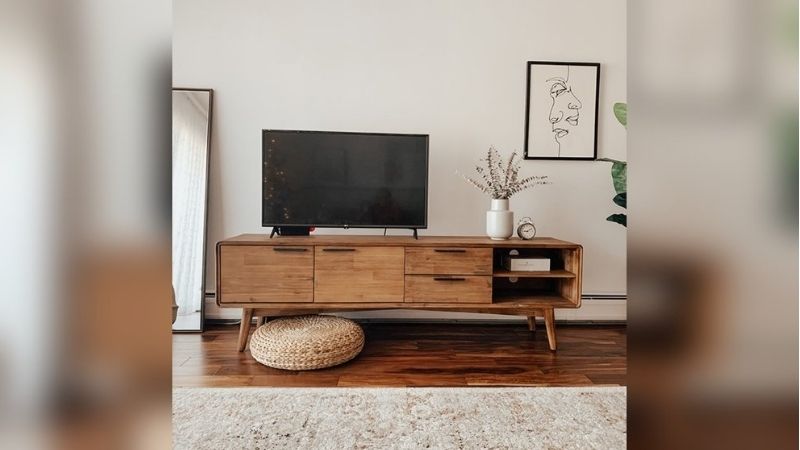
Measure the Screen, Feet, and Available Floor Space
A television’s advertised screen size describes its diagonal, not the width of its cabinet or the spacing between its feet. Write down three dimensions from your model’s specifications: the TV’s outer width, the distance between the outer edges of its support feet, and the depth of those feet. A center-pedestal design and a wide-leg design can need very different furniture even at the same screen size.
Check the stand’s usable top surface rather than its nominal overall width, especially if it has raised trim or rounded corners. Both TV feet should rest fully inside that surface, without projecting over an edge. A console that is somewhat wider than the TV can give the arrangement a balanced look, but there is no universal extra-width allowance that overrides an actual foot measurement.
Check the Top’s TV Weight Limit and Every Shelf’s Rating
Read the weight of your complete TV with its original stand attached, then find the furniture maker’s stated maximum TV weight. Do not mistake an individual shelf rating for the load limit of the top. For example, IKEA lists its 47 1/4-inch BESTÅ TV unit at a maximum TV weight of 35 lb, while a different 70 7/8-inch BESTÅ configuration lists 66 lb. Those are configuration-specific figures, not a rating for every BESTÅ cabinet.
Also account for devices you plan to place on the top, such as a soundbar or game console, but do not assume they share a single published load rating with the television. A unit without a clear TV load specification needs further manufacturer confirmation before carrying a heavy screen. A wall-mounted television changes the cabinet’s job, yet it does not remove the need to check shelf loads for electronics.
Prioritize Stability, Materials, and Accessible Storage
TVs and furniture can tip even when everything seems stable during normal use. The CPSC recommends using furniture designed to hold a television and anchoring TVs and furniture securely, especially where children may climb or pull on them [CPSC, 2025]. Check the exact anchoring instructions before purchase; an anti-tip strap is not a substitute for the manufacturer’s permitted installation method.
For a composite-wood cabinet, a TSCA Title VI compliance label addresses regulated formaldehyde emissions from relevant wood products; it does not establish the cabinet’s structural strength [EPA, 2019]. Compare the actual construction, hardware, finish, and replacement-part availability instead. Closed doors hide clutter, while ventilated or open shelves make cooling and remote-control access easier for some devices.
| Your situation | Measure or verify | Better-fitting direction | Reject when |
|---|---|---|---|
| TV with widely spaced legs | Outside-to-outside foot width and foot depth | Usable top supports both feet completely | Either foot overhangs the top |
| Large or heavy screen | TV weight with stand; stated maximum TV weight | TV-specific furniture rating above the screen’s actual weight | The top’s TV rating is missing or too low |
| Narrow room or busy walkway | Furniture width, depth, and door swing | Low, shallow console within the room’s clear circulation area | The cabinet obstructs a door or walking route |
| Several connected devices | Usable shelf openings, cable exits, ventilation needs | Accessible shelves with the device maker’s required clearance | Ports or vents become blocked |
| Children or pets in the home | Approved anchors and wall attachment method | TV furniture and set secured as instructed | Required anchoring cannot be completed |
| Wall-mounted television | Equipment shelf loads, cord paths, cabinet placement | Storage sized to equipment rather than TV feet | Media equipment cannot be used or cooled safely |
Adjust Your TV Stand Choice for Daily Life
After the basic fit and safety checks, narrow the style by how you actually use the room. The same cabinet can be convenient for a wall-mounted screen and unsuitable for a television resting on widely spaced feet. Use the following situations to identify which trade-off deserves attention first, rather than buying from a photograph of a staged living room.
If Your Television Has Wide-Set Feet
Start with the distance between the television’s outermost foot edges. Samsung’s published specifications illustrate why this matters: a 65-inch S90F model lists a compact stand width of 14.4 inches, while a 65-inch The Frame Pro model lists 41 inches between the ends of its basic stand. That difference can change the minimum usable top width substantially, despite the same marketed screen diagonal.
Make a simple paper or painter’s-tape outline of the actual stand footprint on the candidate console. Confirm both feet fit on a flat, continuous surface, and check the back edge if a cabinet has a cable recess. Do not treat the TV’s screen width as its support footprint, or use the wider television’s dimensions as a rule for every model in a size class.
If the Screen Is Large or Heavy
Some newer televisions use substantial support assemblies, and a stand that looks wide enough can still lack adequate load capacity. Samsung specifies the 2026 65-inch Micro RGB R95H at 52.47 lb with its stand. That exceeds the 35 lb maximum TV weight published for the smaller 47 1/4-inch IKEA BESTÅ unit. The larger 70 7/8-inch BESTÅ unit lists 66 lb, but the fit and mounting requirements still need checking.
Use exact model numbers and specific cabinet configurations when comparing load ratings; revised legs, doors, and wall-mounted installations can change requirements. Heavier electronics placed elsewhere on a cabinet also need shelf-specific checks. Do not improvise reinforcement, stack one cabinet on another, or assume thicker-looking particleboard means a higher rated load than the maker actually publishes.
If the Living Room Is Narrow
A compact TV stand should keep doors, drawers, and walkways usable after installation. Measure the clear wall width, the distance to the sofa or coffee table, and the full swing of a nearby room door. In a rented apartment, check whether the placement still permits the anchoring required by the furniture and TV makers. A shallow console may help floor circulation, but its top must still support the TV feet completely.
Low cabinetry can make an oversized screen feel less top-heavy visually, while taller furniture may create an uncomfortable viewing position in some seating arrangements. Try the actual screen height from your regular seat before committing. A cabinet that saves a few inches in depth is not an improvement if console plugs, a soundbar, or cable connectors are crushed against the wall behind it.
If You Use Gaming Consoles and Other Devices
Count the items that will live in the stand: streaming box, game console, receiver, router, and soundbar. For each one, compare its physical dimensions with the clear interior opening after doors and shelves are installed. Leave the ventilation clearance required in that device’s manual, and check whether a closed door interferes with a remote or wireless connection. A large-looking compartment may still have too little usable depth.
Think about maintenance as well as storage capacity. Reachable cable exits make it easier to replace an HDMI lead, clean dust from a vent, or unplug one component without dismantling the setup. An open-backed design can simplify access but reveal wiring; a closed-back unit looks tidier but needs planned cable routes. Never block vents to achieve a perfectly concealed appearance.
If Children or Pets Share the Room
Treat securing the television and furniture as a purchase requirement, not an optional final accessory. The CPSC’s 2025 Anchor It guidance specifically recommends anchoring TVs and furniture to the wall and keeping attractive objects such as toys or remotes out of climbing reach [CPSC, 2025]. A low profile may reduce the visual bulk of the setup, but height alone does not protect against a tip-over.
Check the furniture manual for its approved anchor points, fasteners, wall substrate requirements, and restrictions. IKEA, for example, says its BESTÅ TV unit must be attached to the wall even when floor-standing, and specifies the supporting-leg configuration for wider versions. If your wall or rental arrangement prevents the required installation, select a solution whose manufacturer-approved anchoring can actually be carried out.
If the TV Is Already Wall-Mounted
With the screen supported by a separate, properly installed wall mount, a media console can be selected around storage and proportion rather than the spread of TV feet. Measure from the finished floor to the lower edge of the TV, then allow enough room to operate the cabinet and any soundbar without obscuring the picture. Keep power cables and signal leads accessible and avoid pinching them behind the furniture.
Do not confuse a floating console’s wall fasteners with a television mount: each installation has its own load and wall-material requirements. Some cabinets can be wall-hung; others are intended to stand on the floor while still being restrained against tipping. Confirm the intended installation mode in the exact cabinet manual, especially if the wall is drywall without a readily identified structural attachment point.
Frequently Asked Questions
These questions address compatibility and shopping situations that a standard cabinet specification sheet may not explain. They are particularly important when reusing older furniture, replacing lost TV accessories, or shopping for a secondhand entertainment center. For safety-critical questions, the exact product manual takes precedence over general decorating advice.
Can I Put a Television on a Dresser Instead of a TV Stand?
Not as a default. The CPSC recommends placing televisions on sturdy furniture specifically designed to support a TV, such as a media center or TV stand [CPSC, 2025]. A dresser’s top may look spacious, but its intended loads, center of gravity, and behavior with drawers open are different from those of purpose-built TV furniture.
If the original furniture maker explicitly approves television placement, check the relevant limits and all anchoring instructions for that exact model. Otherwise, choose appropriate TV furniture or a properly installed television wall mount rather than assuming a wide bedroom chest will hold a screen safely. This distinction becomes especially important in homes where small children visit.
Does My TV Stand Need a VESA Mounting Pattern?
No, not if the television rests on its own manufacturer-approved feet and the stand is a conventional media cabinet. VESA hole spacing matters when a TV stand includes a mounting bracket or post that holds the screen above the top. In that case, the bracket must match the television’s mounting pattern, approved screen dimensions, weight range, and required hardware.
Check both manuals before mixing a universal mount with furniture from another maker. Some screens require a particular screw length, spacer arrangement, or adapter; guessing can damage the television or produce an unsafe connection. A cabinet’s ability to support the TV’s weight does not establish the compatibility of an unrelated mounting arm.
What If My Television Is Missing Its Original Feet?
Do not balance the television directly on its bottom bezel or improvise blocks as replacement feet. Look up the exact model number and see whether the manufacturer offers the original support assembly. If not, a compatible, appropriately rated universal tabletop mount may be an alternative when the TV maker permits that type of mounting.
A replacement support changes the load path and may change the required cabinet depth, so repeat the footprint and weight checks using the installed support. Confirm its VESA compatibility and attachment hardware before purchase. If you cannot establish a complete, approved support arrangement, use a professional installer or the TV manufacturer’s support channel.
How Can I Judge a Secondhand TV Stand?
First identify its manufacturer and exact model if possible, then look for the original load and anchoring documentation. Examine shelf sagging, swollen particleboard, loosened fasteners, cracked glass, missing legs, and stripped hinge holes. Cosmetic wear is negotiable; structural damage or unavailable safety hardware is a reason to decline a cabinet intended to carry a television.
Make sure the seller’s measurements include the usable top area and any separate shelf load limits, not simply an approximate width. Ask whether the original support legs, wall fasteners, and assembly instructions are included. If you cannot verify the TV’s allowed weight or restore the intended anchoring, consider that piece only for non-TV storage.
Final Thoughts
The last step in how to choose a tv stand is to test the entire setup on paper before ordering: match the exact TV model to its support footprint and rated load, then confirm a usable cable route, access to equipment, and a manufacturer-approved anchoring plan. Keep those measurements on hand if you later replace the television, because the next screen may have a different base and weight.