Key takeaways
- A supportive office chair is generally the more practical starting point for extended computer work, while a stool can suit a tall counter or brief tasks that involve frequent standing. The office chair vs stool decision depends on back support,…
A supportive office chair is generally the more practical starting point for extended computer work, while a stool can suit a tall counter or brief tasks that involve frequent standing. The office chair vs stool decision depends on back support, workable seat height, secure foot placement, and the movements your job requires.
As an Amazon Associate we earn from qualifying purchases.
By KK Home Furnishings Editorial Team
Office Chair vs Stool: Differences That Matter
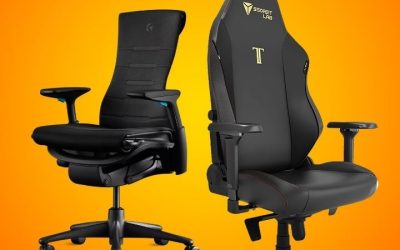
An office chair usually combines a wider seat with a backrest and multiple adjustments. A basic stool has a smaller seat and may omit both backrest and arms; specialized perching or drafting stools can be more elaborate. Neither name guarantees good ergonomics, so compare the features that affect a real workstation.
| Factor | Office Chair | Stool | Best Starting Point |
|---|---|---|---|
| Back support | Typically has a backrest, sometimes with adjustable lumbar support | Often backless; some drafting stools add a back | Office chair for work requiring sustained back support |
| Seat design | Usually offers a larger seat and more thigh support | Often compact, round or saddle shaped | Test seat-edge pressure and reach to the work surface |
| Height options | Designed primarily around seated desk heights, depending on model | May be standard height, counter height, or adjustable for perching | Match actual seat range to elbow height at the desk |
| Foot support | Feet can often reach the floor; footrest may still be needed | Taller stools may require a stable footrest or foot platform | Choose only when the feet can be supported reliably |
| Mobility | Often has casters and a swivel base | May have fixed feet, casters or a moving base | Check stability in the movements the job requires |
| Space and clearance | Backrest and arms can need extra room | Backless stools may tuck beneath a counter | Measure footprint and under-desk space |
| Typical task match | Long typing, mouse use, calls and mixed seated work | Quick seated tasks, high benches or occasional perching | Let the length and height of the task decide |
Backrests Change What You Can Support While Working
The clearest practical difference is not the look of the seat but whether you can rest against a backrest when the task allows it. OSHA’s computer-workstation guidance identifies adjustable back support as a useful chair feature and recommends matching the backrest to the user [OSHA, accessed October 2026]. Most plain stools do not offer that option.
A backless stool is not automatically unsuitable. It may be convenient when you repeatedly turn toward tools or move between standing and sitting. But it asks you to manage your unsupported sitting position, particularly during extended screen work. A drafting stool with a back can narrow this difference; inspect the actual backrest rather than the product label.
Seat Height and Foot Support Must Work as a Pair
Seat height is useful only when it matches the work surface without leaving your feet hanging. At a regular desk, an adjustable office chair can often align your forearms with the keyboard while keeping your feet supported. A tall stool may place the seat too high, or force your feet onto a narrow ring that is not comfortable for prolonged use.
OSHA recommends stable foot support and explains that higher chairs need suitable means of getting on and off; for extended tasks, a footrest should support more than the edge of a foot [OSHA, OSHA 3213, accessed October 2026]. Check the seat’s adjustment range, the height of the worktop, and whether the stool has a dedicated foot platform.
Stability, Movement and Desk Clearance Are Different Tests
Rolling office chairs are useful when work involves shifting between keyboard, drawers and nearby equipment. A fixed stool may occupy less space and avoid unwanted rolling, but that advantage disappears if the base rocks unexpectedly or the seat requires frequent repositioning. A wobble stool intentionally moves; that feature is neither a universal safety benefit nor a health treatment.
Before buying either style, check the manufacturer’s intended floor surface, base design, load rating and any caster restrictions. Try sitting down, standing up, turning and reaching within your normal work area. OSHA’s guidance cautions against awkward reaching and trunk twisting, which a stool’s compact footprint does not automatically prevent [OSHA, OSHA 3213, accessed October 2026].
Choose Seating for Six Common Work Situations
The right choice changes with your desk height, time spent seated, and how often your hands leave the keyboard. These examples prioritize the job over a fashionable seating category. If a specific model cannot put your feet, arms and work surface in a workable relationship, choose a different size or type.
For a Full Day of Keyboard and Mouse Work
Start with an office chair that fits your seat depth, offers a usable backrest and lets you bring your elbows near the keyboard. A stool with no back can work for short stretches, but using it as your only all-day seat removes an option for supported sitting. A chair is often easier to adjust when the job alternates among typing, calls and reading.
Set the chair height with your shoulders relaxed, then check that your feet reach the floor or a footrest. Mayo Clinic’s workstation guide links chair selection with keyboard placement and monitor position rather than treating the seat as a standalone fix [Mayo Clinic, 2023]. If your current chair cannot be adjusted to the desk, check desk height before replacing the chair.
For a Tall Drafting Table or Elevated Workbench
A drafting stool or tall chair can be the more suitable starting point when the work surface is deliberately above regular desk height. Look for a seat adjustment range that reaches the task, a stable method of mounting the seat and a foot platform. A conventional low office chair might leave you reaching upward and lifting your shoulders.
A tall seat does not have to be backless. Drafting chairs with supportive backs exist, and they are worth considering if you stay at the worktop for extended periods. Verify the precise work-surface and seat-height measurements instead of relying on labels such as drafting or counter height. A narrow foot ring should not be mistaken for a full footrest during long sessions.
For a Sit-Stand Desk With Frequent Position Changes
A height-adjustable perching stool may suit people who raise the desk and want occasional support without fully sitting. Its purpose is to make brief transitions between standing and leaning convenient, not to substitute for a well-fitted desk chair during every computer task. Check whether the product is actually intended for leaning and whether its base is steady at the selected height.
Do not buy a high perch assuming it will improve posture on its own. Lowering the desk for normal seated work, changing tasks and taking walking breaks remain options. OSHA recommends varying position during the day, including standing and short walks [OSHA, accessed October 2026]. If you need sustained back support between standing periods, keep an adjustable chair available.
For a Very Small Home Office or Under-Desk Storage
A compact stool can make sense where you need to store the seat completely beneath a counter between uses. Without a back or arms, some models have a smaller footprint than a full office chair. Yet a space-saving purchase fails if its seat is the wrong height or if the user has nowhere comfortable to place their feet while working.
Measure the clear distance between desk legs, the underside of the worktop and the space needed to move your knees. Check the stool’s complete base width, not only its seat diameter; a broad base may remain outside the desk. For regular computer work, a narrow office chair with a backrest can be a better compromise than a stool selected only for easy storage.
For a Shared Desk Used by People of Different Heights
Choose the seat whose controls suit the actual range of users. A height-adjustable office chair with an accommodating seat and backrest may be easier to share than a fixed stool. Conversely, an adjustable drafting stool can be practical at a tall station when each user can reach both the worktop and a secure foot support without improvised platforms.
Run a fit check for the shortest and tallest users before selecting either seat. OSHA notes that greater adjustability improves chair fit, particularly when several people use one workstation [OSHA, accessed October 2026]. Confirm that each person knows how to reset the controls and that every intended user falls within the manufacturer’s published load and height ranges.
For Short Creative, Packing or Hands-On Tasks
A stool may be more convenient at a craft table or packing station where seated periods are brief and the person needs to turn toward materials. An unobstructed seat can make mounting and leaving the workstation simple. Select a stable base and avoid any setup that encourages long reaches or twisting while seated just because the stool seems easy to move.
For precise drawing or assembly that lasts much longer, reassess whether a backed drafting chair offers better support. Place commonly used tools within a comfortable reach zone and ensure the worktop does not force raised shoulders. A stool is a task-specific tool rather than a universal upgrade; the decision changes as soon as the job becomes mostly sustained screen work.
Frequently Asked Questions
Is a Drafting Chair the Same Thing as a Stool?
Not necessarily. Drafting chair generally describes seating intended for elevated work surfaces, often with a taller gas lift and a place to support the feet. Some drafting chairs have full backs and armrests, while many drafting stools are compact or backless. Retailers may use the terms loosely, so the name alone does not identify the adjustment range.
Compare manufacturer drawings for minimum and maximum seat height, seat shape, backrest movement and footring position. A product sold as a drafting stool may function much like a tall chair, while another may provide only a small perch. What matters is whether the complete seat works at your measured table height without sacrificing stability.
Do Wobble Stools Automatically Strengthen Core Muscles?
No dependable buying conclusion follows from the word active. A wobble or balance stool permits some movement, but the amount and pattern depend on the design, task and user. A small laboratory study of backless active seating did not establish that those products provide broad health benefits for office workers [Grooten and colleagues, 2013].
Do not buy one on the promise that it will replace exercise or prevent back problems. Instead, decide whether controlled seat movement feels stable while you type, reach and get up. If you have persistent pain, balance concerns or a diagnosed condition, ask a qualified clinician about your own seating needs rather than relying on product marketing.
Can a Tall Stool With Wheels Be Used at a Desk?
Sometimes, if the stool is designed for the floor and task and its height range fits the desk. Wheels can make movement easier, but an elevated seat also raises the importance of stable mounting, a suitable base and secure foot support. Not every rolling stool has the same caster design or locking behavior, so do not assume universal compatibility.
Read the exact product instructions and compare them with your flooring before choosing wheels over stationary feet. If the manufacturer supplies a foot ring, check whether it is designed for entry and exit or for sustained foot support. Avoid adding improvised casters, risers or modifications to a seat that was not designed for those components.
Can I Use a Stool as a Footrest Instead of Sitting on It?
A small, stable stool may sometimes serve as temporary foot support, but a purpose-built footrest is usually easier to position for desk work. Mayo Clinic notes that a stool can be a practical substitute when a footrest is unavailable [Mayo Clinic, 2023]. This is a different use from sitting on a tall stool at a counter.
Choose a platform that lets both feet rest securely and does not slide when you change position. Check that its height does not push your knees uncomfortably upward or block leg clearance. A stool used as a footrest must not become a tripping obstacle, especially beneath a shared desk or near chair casters.
Final Thoughts
The office chair vs stool decision should follow the work, not the trend. Choose a properly fitted chair for sustained computer use; consider a stool for a tall station, short task or occasional perch. Measure the work surface, confirm foot support and test stability before buying, especially if the seating will be shared.