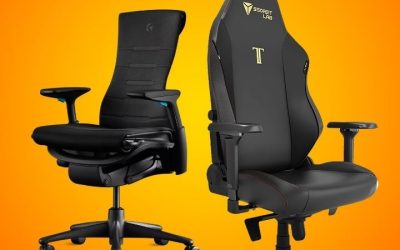
Key takeaways
- An ergonomic chair is usually the stronger starting point for lengthy computer work, while an executive chair may appeal more to buyers who want a substantial, upholstered look. The ergonomic chair vs executive chair choice is not absolute: a well-adjustable…
An ergonomic chair is usually the stronger starting point for lengthy computer work, while an executive chair may appeal more to buyers who want a substantial, upholstered look. The ergonomic chair vs executive chair choice is not absolute: a well-adjustable executive chair can fit better than a poorly sized ergonomic model. Fit comes first.
As an Amazon Associate we earn from qualifying purchases.
By KK Home Furnishings Editorial Team
Ergonomic Chair vs Executive Chair: Core Differences
The distinction is mainly about what each label emphasizes. Ergonomic is a design goal centered on fitting a chair to a person and a task. Executive often describes a taller, more upholstered office-chair style. Neither term guarantees a particular feature, so compare the actual adjustments, dimensions and sitting experience.
| Factor | Ergonomic Chair | Executive Chair | What to Check |
|---|---|---|---|
| Main emphasis | Fit, support and adjustability | Appearance, cushioning and a commanding silhouette | Judge the individual model rather than the category name |
| Seat depth | Often adjustable on task-focused models | May be fixed, including on deeply padded designs | Back supported without the seat edge pressing behind the knees |
| Lower-back support | May offer adjustable lumbar height or depth | May use a shaped, integrated cushion | Support should meet your lower back at the correct location |
| Armrests | Frequently adjustable in height and position | Often broad or heavily padded; adjustment varies | Arms relaxed, chair able to approach the desk |
| Upholstery | Mesh, fabric, foam or mixed constructions | Frequently leather-look, leather or upholstered surfaces | Heat, cleaning instructions and how the material feels to you |
| Recline | Task-oriented tilt or recline with varying controls | May prioritize a relaxed, lounge-like lean | Controlled movement and support during actual desk tasks |
| Best starting point | Frequent typing, mousing and adjustable workstations | Presentation-focused office or mixed desk and meeting use | Try the chair with your own desk and body proportions |
Adjustability Matters More Than a Premium-Looking Back
Seat-height adjustment is common across both styles, but the useful difference is what you can change after setting the height. Seat depth, backrest position, lumbar placement and armrest width allow a chair to serve a particular body rather than asking that person to conform to a fixed shape. An oversized executive chair may feel inviting at first yet put its back support too far behind a shorter user.
The OSHA computer-workstation purchasing guide describes adjustable seat depth and back support as important selection criteria, and recommends trying a chair before buying [OSHA, accessed October 2026]. In a showroom, sit all the way back and put your feet on the floor. If you must perch forward to reach the keyboard, the backrest’s impressive size is not helping you perform the task.
Lower-Back Support and Movement Are Separate Questions
A chair can have a noticeable lumbar bulge yet fail to put that support where you need it. Some ergonomic models let you move lumbar support vertically or change its prominence; some executive models rely on a fixed padded curve. Either design can feel comfortable for a particular person. What matters is whether the chair supports you without forcing you into one rigid position.
Movement is a second test. Lean back gently, return to a typing position, and check whether the mechanism feels controlled and the support remains usable. OSHA recommends varying working postures rather than remaining stationary all day [OSHA, accessed October 2026]. Neither a reclining back nor an elaborate lumbar dial can replace periodic movement, and a chair should not be marketed as a treatment for back pain.
Upholstery, Armrests and Desk Clearance Change Daily Use
Executive styling often brings thicker upholstery, broad armrests and a taller back, while task-focused ergonomic designs may use exposed frames and breathable mesh. These are tendencies, not universal specifications. A padded executive seat can be pleasant during conversation; a mesh-back chair may feel less enclosing at a warm desk. Materials also differ in cleaning needs, surface wear and how easily they show marks.
Do not overlook the path from the chair to the keyboard. Fixed arms that strike the desk edge can leave you reaching forward, regardless of upholstery quality. Mayo Clinic recommends keeping shoulders relaxed, elbows close to the body and feet supported when setting up a workstation [Mayo Clinic, 2023]. Test armrest clearance and work-surface height together; either chair style can fail that simple fit check.
Adjust for Your Situation
The better purchase depends on the tasks performed, the room and the person using the chair. Treat the following situations as a decision guide, not a ranking of materials or brands. A style recommendation changes when a specific chair’s adjustment range does not fit your measurements or when its arms prevent comfortable access to the work surface.
For a Full Workday of Typing and Mouse Use
Choose an ergonomic task chair first if you spend much of your workday using a keyboard and mouse. Look for seat-height control, a seat pan that supports your thighs without pressure behind the knees, and arms that can stay low enough for relaxed shoulders. These adjustments can matter more to sustained desk work than a high back or an unusually thick cushion.
That does not disqualify executive seating. An executive chair with effective depth adjustment, a supportive backrest and arms that fit under the desk may do the same job. Before ordering, compare the published adjustment list rather than assuming that words such as luxury or ergonomic mean the same thing across sellers. The ability to return a poor-fitting chair is especially valuable when an in-person trial is impossible.
For a Client-Facing Office or Formal Study
An executive chair may be a better design match when your workspace also hosts visitors or video meetings and you prefer a substantial upholstered silhouette. Higher backs, stitched panels and padded arms can create the formal appearance some offices are built around. This is an aesthetic reason to choose the chair, not evidence that it gives better support or lasts longer.
Check whether the seat places you close enough to a laptop or keyboard when necessary. An executive model with a fixed deep seat could suit a tall owner but make a smaller user lean forward. If the room’s look matters and typing is frequent, seek a model that combines the executive finish with adjustable arms, usable recline control and a backrest that fits your torso.
For a Compact Desk or a Narrow Home Office
Start with a physically compact ergonomic task chair rather than a wide executive model when clearance is limited. Overall chair width, armrest height and the space needed to recline can matter as much as seat comfort. A chair that cannot slide close to a small desk may move the keyboard farther away and make you stretch your arms even when its backrest feels good.
Measure the clear space between desk legs, the underside height where the armrests enter and the room behind your normal sitting position. Compare those measurements with the exact chair drawing, not a broad marketing description such as compact. An executive chair remains viable if its actual footprint and arm profile fit, but do not choose by the height of the chair back alone.
For Warm Rooms or People Who Dislike Enclosing Upholstery
A chair with a ventilated back may be worth trying first if you find thick upholstery uncomfortable in a warm room. Mesh can allow more air movement around parts of the back, whereas a large padded back may feel warmer against clothing. However, a mesh surface is not automatically softer, more supportive or more durable; weave tension, frame edges and personal preference still shape comfort.
If you prefer a cushioned seat and the appearance of an executive chair, consider a hybrid design with an upholstered seat and a more breathable back. Also check what the manufacturer permits for cleaning: leather, bonded leather, mesh and woven fabrics can require different care. Neither style has a universal advantage for hot offices, and ventilation should not override a poor seat fit.
For Shorter, Taller or Hard-to-Fit Users
Choose by seat-height range, effective seat depth, backrest geometry and arm spacing rather than by the words executive or ergonomic. A fixed deep executive seat can leave a shorter user’s back unsupported. A compact task chair can create the opposite problem for a taller user by giving too little thigh support. Nominal seat width by itself does not resolve either mismatch.
Washington State University’s office-ergonomics guidance suggests adjusting the chair so the feet are supported and there is a small clearance behind the knees [Washington State University, accessed October 2026]. Use this as a fit check, not a universal measurement rule. If the seat must be raised to match a high desk, a stable footrest may be more useful than replacing an otherwise comfortable chair.
For a Shared Workspace With Different Users
Favor a chair with intuitive, repeatable adjustments when several people use the same workstation. Seat height, seat depth, lumbar placement and arm position may need to change between shifts or family members. An executive chair with only a height lever may suit one person exceptionally well yet be difficult to share with someone whose legs, torso or shoulders are differently proportioned.
Make the decision practical: identify which controls each user will actually reset and whether those controls can be reached while seated. A highly adjustable chair is less helpful if nobody understands its mechanism. Also verify each model’s published load limit and its intended use; office-chair certification and appearance are not substitutes for a manufacturer-stated capacity suited to the users.
Frequently Asked Questions
Can an Executive Chair Be Ergonomic?
Yes. Executive describes a common office-chair style, not a prohibition on ergonomic design. An executive chair can provide adjustable lumbar support, seat height, arm position and controlled recline. Equally, a chair sold as ergonomic can fit badly if its usable dimensions are wrong for the person sitting in it.
Instead of accepting either label, request the manufacturer dimensions and adjustment details. Focus on the controls you can reach and use, the posture available at your desk and the ability to sit with your back supported. A trial period offers stronger evidence of personal comfort than the wording on a product page.
Does ANSI/BIFMA Certification Prove a Chair Is Ergonomic?
No. ANSI/BIFMA X5.1 concerns safety, durability and structural adequacy testing for general-purpose office chairs; it is not a guarantee of personalized ergonomic fit [BIFMA, X5.1-2017(R2022)]. It includes office seating styles such as executive and task chairs. A seller’s vague reference to BIFMA should prompt a request for the exact applicable standard and test claim.
BIFMA separately identifies X10.1-2024 as ergonomics requirements for furniture designed for computer use, with a 2025 companion fit-assessment resource [BIFMA, 2025]. A standard reference still does not demonstrate that a particular person will fit a particular chair. Check the model’s published dimensions, adjustments and stated load limit before drawing a buying conclusion.
Is a Headrest Necessary on an Office Chair?
Not necessarily. For upright typing, the important fit questions concern support for the back, seat, arms and feet. A headrest may be useful when you regularly recline or take calls in a leaned-back position, but it should not push your head forward when you are using the keyboard. Its usefulness depends on the person’s height and the chair’s recline geometry.
If a chair has a headrest, check whether it can be repositioned or removed and whether it is comfortable in the positions you actually use. A fixed, oversized head cushion may look luxurious without improving the tasks that fill your day. Try the chair without relying on the headrest first, then assess it during a natural recline.
Should I Replace My Chair Before Adjusting My Desk?
No. First check whether the current chair provides reasonable back and thigh support, whether your feet can rest securely, and whether you can reach the keyboard without lifting your shoulders. A desk that is too high, a poorly placed monitor or armrests that block the work surface can create an awkward setup even with an expensive new chair.
Mayo Clinic’s office-ergonomics guide addresses the chair, desk, keyboard and monitor as a connected arrangement [Mayo Clinic, 2023]. Adjust those components before spending on a replacement. If the chair remains unstable, damaged or unable to accommodate your body and task after reasonable adjustments, compare replacement candidates using the same fit checks.
Final Thoughts
The ergonomic chair vs executive chair comparison comes down to fit. Start with task-focused adjustments for extended computer work, or consider executive styling when presentation also matters. Before ordering, measure desk clearance, try your actual working posture and confirm the return policy: a label alone cannot tell you what fits.