The best rated standing desk is not simply the one with the most stars — it is the one whose ratings come from a credible source and whose height range, load and warranty actually fit you. This guide compares four current desks by what makes a rating trustworthy and by the specs that decide daily use.
As an Amazon Associate we earn from qualifying purchases.
By KK Home Furnishings Editorial Team
How to Read a Standing Desk’s Rating
A rating is only useful if you know where it comes from and what the desk’s specs deliver. Weigh four things: what a credible rating actually means, the height range and travel for your body, the load capacity against your gear, and the motor and warranty, since the lift mechanism is what fails first on a desk used daily.
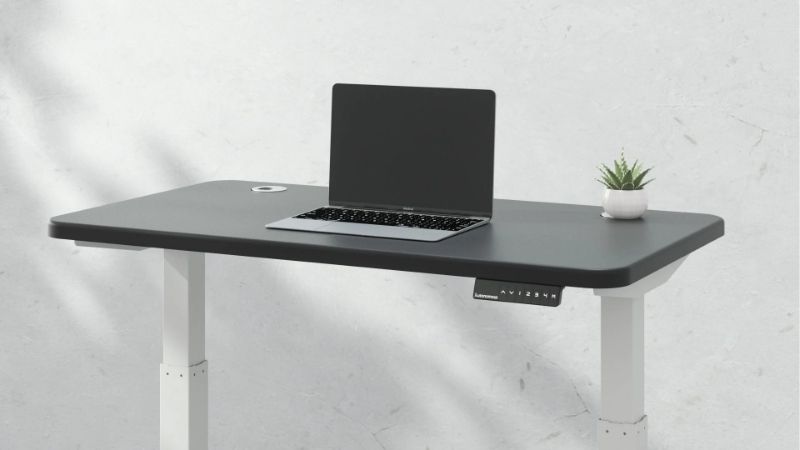
What ‘best rated’ should mean
A rating is only as good as its source, so best rated should mean credible ratings, not just a high number. Look for a large sample of verified buyers and, where possible, independent testing rather than a handful of seller-posted reviews, since a desk with thousands of verified ratings tells you more than one with a perfect score from a few.
Match the rating to what you care about: durability, wobble at full height, and motor reliability are what long-term owners report on, so read recent reviews for those rather than first-impression stars. A desk rated highly for looks but flagged for wobble or motor failures is not best rated for daily standing work over years.
Be wary of ratings with no context: a score without a sample size or source is hard to trust, and seller pages can curate reviews. Treat manufacturer claims as manufacturer-stated and weigh them against independent owner feedback over time, since the rating that matters is the one from people using the desk the way you will.
Height range and travel
Height range decides whether the desk suits you standing and sitting, and travel measures how much it moves. The UPLIFT V3 offers 26.1 inches of travel and the FlexiSpot E7 25.6 inches — within about 1.95 percent, so effectively the same — while the Autonomous Desk Pro’s 19.0 inches is notably less and may not suit very tall users.
Match the range to your height for both sitting and standing. A tall user needs a high maximum to stand with elbows level, and a short user a low minimum to sit flat-footed; the wide-travel desks suit a broader range and shared use. Check your standing and seated elbow heights against the published range before choosing a shorter-travel desk.
Because the UPLIFT and FlexiSpot near-tie on travel, that spec alone cannot rank them — the choice there comes down to load, warranty and stability instead. For the Autonomous, the shorter 19-inch travel is the real limitation, so confirm it reaches your standing height, since a desk that cannot rise high enough forces a compromise posture.
Load capacity
Load capacity covers your monitors, computer and accessories, and the figures are manufacturer claims to read carefully. The FlexiSpot E7 lists a 355-pound static claim and the Autonomous Desk Pro a 330-pound load claim, but static ratings differ from what a desk lifts smoothly in motion, so treat them as stated limits rather than lifting guarantees.
Estimate your real load — monitors, arms, a laptop, a dock and anything mounted — and stay well under the rating, since a desk near its limit lifts slower and strains the motor. A dual-monitor setup with a heavy arm adds up faster than people expect, so match the stated capacity to your actual gear rather than assuming any desk clears it.
Capacity pairs with motor and frame quality: a higher rating on a dual-motor desk usually means smoother, more even lifting under load. Confirm whether the figure is static or lifting capacity, and favor headroom over the edge of a rating, since the motor and lift mechanism are what wear first on a desk run heavy day after day.
Motor and warranty
The motor and warranty signal how long a standing desk lasts, since the lift mechanism is the part that fails. The UPLIFT V3 and FlexiSpot E7 both carry 15-year warranties, long terms that cover the frame and motor, while shorter warranties elsewhere suggest less confidence in the mechanism over years of daily raising and lowering.
Match the warranty to use: a long term matters most for a desk you raise and lower several times a day, where the motor cycles add up. A dual-motor desk, like the Autonomous, generally lifts more evenly under load than a single motor, which reduces strain, so weigh motor type alongside the warranty for a desk that will see heavy use.
Confirm what the warranty covers and whether parts are available, since a long term is only useful if the control box or motor can be replaced. Over years, a desk with a long warranty and available parts stays in service, while a cheaper desk with a short term is often binned when the motor or controller eventually fails on you.
Top Picks
These four cover the range for a best rated standing desk, judged by fit specs and the credibility of their ratings rather than stars alone. Two near-tie on height travel, so compare them on load, warranty and stability, and treat all capacity figures as manufacturer claims to weigh against independent owner feedback over time.
| Product | Best For | Key Spec | Watch Out For |
|---|---|---|---|
| UPLIFT V3 | Best overall range | 26.1-in height travel (22.6-48.7 in); 15-year warranty | Premium tier; confirm current price |
| FlexiSpot E7 | Best for heavy loads | 25.6-in travel; 355-lb static claim; 15-year warranty | Near-ties the UPLIFT on travel |
| Autonomous Desk Pro | Best for in-stock value | Dual motor; 330-lb load claim; in-stock with free-return terms | Shorter 19-in travel — check tall-user fit |
| Oakywood Standing Desk Pro | Best design-led | About 25.6-in travel (frame page differs) | Maker pages disagree on travel — confirm |
UPLIFT V3 — Best Overall Range
The UPLIFT V3 is the overall pick for fit: it offers the widest height travel here at 26.1 inches (22.6 to 48.7 inches) and a 15-year warranty, a combination that suits a wide range of heights and signals long-term confidence in the frame and motor. It is widely and credibly reviewed. It sits in the premium tier for standing desks.
The wide travel suits tall and short users and shared desks, letting each reach a flat-footed seated and an elbow-level standing position, and the long warranty covers the parts that wear. Its large, credible review base makes it a defensible best rated pick, so confirm the configuration and current price for the size and top you want.
The honest drawbacks are price and the near-tie on travel: it sits in the premium tier, and its 26.1-inch travel is within about 2 percent of the FlexiSpot’s, so that spec does not set it decisively apart. Weigh it against the FlexiSpot on load, stability and price rather than travel, since the two are effectively matched there.
FlexiSpot E7 — Best for Heavy Loads
The FlexiSpot E7 is the pick for heavier setups: it lists a 355-pound static capacity claim and 25.6 inches of height travel, with a 15-year warranty. That capacity claim leads this group, though it is a static figure to weigh against lifting use. It is widely reviewed and sits in the premium tier alongside the UPLIFT, often a little below it.
The high stated capacity suits a dual-monitor setup with heavy arms and a loaded desktop, and the 15-year warranty matches the UPLIFT’s long coverage. Its travel near-ties the UPLIFT’s, so the choice between them comes down to the capacity claim, stability and price rather than range, with the E7 often the value of the two.
The drawbacks are the static-capacity caveat and the near-tie: a 355-pound static claim is not the same as smooth lifting capacity, so stay well under it, and the travel difference with the UPLIFT is negligible. Confirm the current price and whether the figure is static or lifting, and judge its rating against recent owner feedback on the motor.
Autonomous Desk Pro — Best for In-Stock Value
The Autonomous Desk Pro is the in-stock value pick: its current page lists it in stock with free-return terms and a dual motor plus a 330-pound load claim, which lowers the risk of trying it. But its 19-inch height travel is notably shorter than the others, so confirm it reaches your standing height. It sits in the mid-to-premium tier.
The dual motor helps it lift evenly under load, and the in-stock, free-return terms make it the lower-risk pick for buyers who want to try a desk without a long wait or a restocking hassle. Its 330-pound claim covers most setups, so for an average-height user with standard gear it can be a sensible, available choice.
The drawback is the shorter 19-inch travel: a very tall or very short user may find it cannot reach a proper standing or seated height, so measure your elbow heights against its range first. Its load claim is also manufacturer-stated, so weigh it against owner feedback, and confirm the current in-stock and return terms before buying.
Oakywood Standing Desk Pro — Best Design-Led
The Oakywood Standing Desk Pro is the design-led pick for buyers who want a premium look: it lists about 25.6 inches of travel on the full desk, in line with the UPLIFT and FlexiSpot. Note the maker’s frame page shows a slightly different 26-inch travel, so confirm the figure for the exact configuration. It sits in the premium tier.
Its appeal is a refined, wood-forward design for buyers who care about how the desk looks as much as how it performs, with travel competitive with the leaders. Confirm the load capacity and warranty against your gear and use, since the design is the draw and the functional specs should still match what a daily standing desk needs.
The drawbacks are the specification mismatch and the need to verify performance: the full-desk and frame pages disagree on travel, so lock the figure for your configuration, and confirm the load rating and warranty. As a design-led pick it may price above purely functional desks, so weigh the look against the specs and the rating from real owners.
Frequently Asked Questions
A few questions come up about standing desks, usually about what best rated really means, how high they go, and how much they hold. The answers below weigh rating credibility and the published specs, and treat capacity figures as manufacturer claims rather than guarantees, since the rating that matters is from real long-term use.
What does ‘best rated’ actually mean for a standing desk?
It should mean credible ratings from many verified buyers, ideally backed by independent testing, not just a high star count from a few reviews. A desk with a large, verified review base tells you more than one with a perfect score from a handful, so weigh the sample size and source, not only the headline number on the page.
What matters in those ratings is long-term performance: wobble at full height, motor reliability and durability are what owners report over time, so read recent reviews for those rather than first-impression stars. A desk rated highly on looks but flagged for wobble or motor failure is not best rated for daily standing work.
Treat seller-posted reviews and manufacturer claims cautiously, and favor desks whose ratings come with context you can judge. The best-rated desk for you is the one real owners with similar setups rate well over time, so match the feedback to how you will use it rather than chasing the highest number across different sources.
How high should a standing desk go?
High enough that your elbows are roughly level when standing and low enough to sit flat-footed, which depends on your height. Travel measures the range: the UPLIFT V3 offers 26.1 inches and the FlexiSpot E7 25.6, effectively the same, while the Autonomous Desk Pro’s 19 inches is shorter and may not suit very tall users.
Measure your standing and seated elbow heights and check them against each desk’s published range, since a desk that maxes out too low forces a stooped standing posture and one that bottoms out too high leaves short users perched. A keyboard tray can help at the margins, but the desk’s own range should cover your two working heights.
For shared desks or households with very different heights, favor the wider-travel options so each person can reach both positions. If you are at the tall or short extreme, confirm the exact minimum and maximum rather than trusting the travel number alone, since two desks with similar travel can start and end at different heights.
How much weight can a standing desk hold?
It varies, and the figures are manufacturer claims to read carefully. The FlexiSpot E7 lists a 355-pound static claim and the Autonomous Desk Pro a 330-pound load claim, but a static rating is not the same as what a desk lifts smoothly in motion, so treat these as stated limits and stay comfortably under them in practice.
Estimate your real load — monitors, arms, a dock, a laptop and anything mounted — and leave headroom, since a desk near its limit lifts slower and strains the motor. A dual-monitor setup with heavy arms adds up faster than expected, so match the stated capacity to your actual gear rather than assuming any desk clears a typical load.
Favor a dual-motor desk and some margin for a heavy setup, since smoother lifting under load means less strain over years. Confirm whether a figure is static or lifting capacity before relying on it, and weigh it against owner feedback, since the motor and lift mechanism are what fail first on a desk routinely run near its limit.
Are expensive standing desks worth it?
Often, for daily use, because the price buys travel range, motor quality and long warranties. The UPLIFT V3 and FlexiSpot E7 carry 15-year warranties, which cover the motor and frame that wear, while cheaper desks with short warranties are more likely to be binned when the mechanism fails. The value is in longevity, not the sticker alone.
What changes the answer is how much you raise and lower it and how heavy your setup is. A desk cycled several times a day with a heavy load benefits from a better motor and long warranty, while light use may be served by a cheaper desk. Match the spend to your use, and weigh the rating from real owners into the decision.
Where premium reliably pays off is the mechanism and support: a long warranty with available parts keeps a desk in service rather than replaced. Confirm the warranty covers the motor and control box and that parts exist, since those are the components that decide whether an expensive desk lasts long enough to justify its price.
Final Thoughts
The best rated standing desk is the one whose ratings come from credible, long-term owners and whose height range, capacity and warranty fit your body and gear — not simply the highest star count. Weigh rating sources, measure your standing and seated elbow heights, treat capacity claims as stated limits, and favor a long warranty with available parts.