Start on the lowest comfortable heat level permitted by your product’s manual, then make small adjustments rather than assuming a numbered dial represents degrees Fahrenheit. The right heated mattress pad temperature settings depend on your controller, bedding and intended use, not a universal temperature chart.
As an Amazon Associate we earn from qualifying purchases.
By KK Home Furnishings Editorial Team
How Heated Mattress Pad Temperature Settings Work
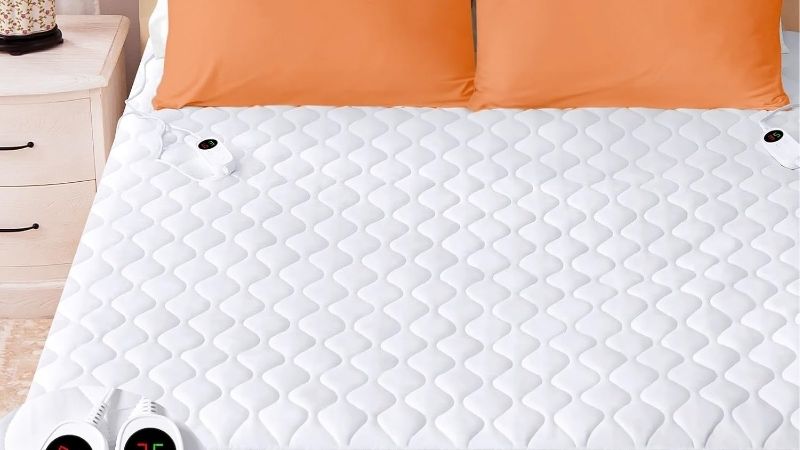
The first job is to identify what the display is actually showing. Some controllers use numbers, some say Low or High, and some switch between a heat level and a shutoff time. The digits are usually relative settings rather than a promise about the fabric’s surface temperature. Read the sewn-in model label and the matching U.S. instructions before choosing a level.
| Controller Example | Documented Heat Choices | How to Change Heat | Scope of Evidence |
|---|---|---|---|
| Sunbeam OneSet, Y85 family | Five warming levels | Press repeatedly to advance through levels | Sunbeam U.S. Heated Bedding guide, P.N. 195611E2; model-specific |
| Sunbeam Easy Set Pro, S85 family | Ten warming levels | Rotate its dial | Sunbeam P.N. 195611E2; check controller label |
| Sunbeam SleekSet, Z85 family | Ten warming levels | Use the up and down buttons | Sunbeam P.N. 195611E2; not every Sunbeam controller |
| Sunbeam SelectTouch, P85 family | Twenty warming levels | Use the plus and minus controls | Sunbeam P.N. 195611E2; model-specific |
| Serta waterproof pad, ST55-0072 | Ten heat levels; separate timer mode | Select Heat mode, then adjust its level | U.S. ST55-0072 instruction sheet; verify exact unit |
A Heat Level Is Not a Fahrenheit Reading
For the documented Serta ST55-0072 controller, 1 is the lowest heat setting and 10 is the highest. Sunbeam’s controller chart lists devices with five, ten and twenty levels. That difference alone makes it misleading to translate a particular number into a universal pad temperature or to compare a 5 on one control with a 5 on another.
The selected level controls how the product is instructed to warm; the warmth you feel also depends on the bed’s covers, room conditions and contact with the pad. Neither cited manufacturer instruction provides a reliable one-number-to-degrees conversion for every model. Avoid charts that assign an exact surface temperature to each setting without a model-specific measured source.
Confirm Whether You Are Changing Heat or Time
A pad can appear to have one numeric display while using it for two different controls. On the Serta ST55-0072, the Time/Heat button switches modes. In Heat mode, the available levels are 1 through 10. In Timer mode, the selectable durations are 1 through 12 hours. A 6 on the screen can mean something different depending on the active mode [Serta ST55-0072 instruction sheet, U.S. model].
Before changing a number, check the screen indicator or mode symbol. Adjust only the heat setting if you want less warmth; shortening the shutoff timer serves a different purpose. The ST55-0072 sheet describes an eight-hour default shutoff when its time function is not customized, but that timing must not be assumed for other Serta products or other brands.
Distinguish Regular Heating From Preheat
Preheat is a temporary operating feature on selected controls, not the name of a universally safe high setting. Sunbeam’s U.S. guide describes a 30-minute preheat period on certain controllers, after which the unit returns to its previously selected warming level. That example explains why a bed may initially feel warmer without its normal numbered setting having changed.
Use a preheat feature only as the manual for your exact unit instructs. Confirm whether it ends automatically, returns to an earlier level or requires an additional action. Other controllers may not include preheat at all. A preheat label does not override limitations on the mattress beneath the pad or provide permission for overnight use [Sunbeam, P.N. 195611E2, control features].
Choose Settings for Six Common Bedroom Situations
There is no verified setting that suits every person or room. Work from the low end of your own controller’s scale, make only the adjustments your manual permits, and stop if the pad or cords show damage, unusual localized heat or an error. The following situations explain how to make a decision without inventing a universal degrees-to-number chart.
You Are Using a Heated Pad for the First Time
Step 1: identify the model printed on the pad and controller. Step 2: make sure the pad is flat and the specified connectors are fully seated before plugging it in. Step 3: choose the lowest available warmth level and check whether the unit is in Heat mode rather than Timer mode. These are operating checks, not a substitute for the setup order in the owner’s manual.
Remain attentive to how the bedding feels while you learn the controls. If the lowest setting already feels too warm, turn the product off instead of searching for a hidden extra-low mode. Some designs display their most recent selection after being turned back on, so verify what is shown rather than assuming each startup begins at level 1.
You Want a Warm Bed Before Getting In
Choose the manufacturer’s designated preheat feature if your unit actually provides one, and follow its published timing and normal operating limits. A Sunbeam control covered by P.N. 195611E2 may show PH during its selected 30-minute preheat cycle. This is an example of a documented behavior, not a recommended duration for every heated mattress pad.
If your controller lacks a preheat function, do not improvise by selecting its highest setting and forgetting about it. A warm-up routine should end with checking the current heat level and shutoff status before you use the bed. This article focuses on choosing a level; the precise procedure for preheat belongs to your model’s instructions.
You Keep Waking Up Too Warm
Reduce the heat level or turn the pad off rather than treating the current number as a target you must maintain. A thick comforter can retain warmth after a controller changes, so the bedding may not feel cooler immediately. Pay attention to your actual comfort and do not compensate by covering the control with blankets or trapping the heated fabric in folds.
If uncomfortable heat persists even on the lowest setting, stop using the pad and assess whether it is appropriate for your situation. The correct adjustment might be removing an ordinary insulating layer, but only if that arrangement remains consistent with the pad manufacturer’s placement instructions. Do not remove required protective layers or add unapproved layers to force a particular temperature result.
You Share a Bed With Different Warmth Preferences
On dual-control designs, each controller may operate its own side. Sunbeam’s U.S. guide documents independently operated controls and independent shutoff timing on the covered dual-control products. That means one person can select a different heat level without necessarily matching the other side, provided the pad is designed and connected for that use.
Check the label on the primary control and place each controller as the manual instructs; some units have specific right-side and left-side connections. If only one side seems to respond, avoid swapping electrical connectors casually while powered. Turn the unit off, unplug it, and consult the troubleshooting section or the manufacturer for the exact model.
Your Bedroom Cools Down During the Night
A changing room temperature can make the same controller level feel different at bedtime and early morning. Instead of choosing a fixed high number based on the coldest moment, start with your usual low, comfortable setting and check that the bedding arrangement and timer meet your needs. A thermostat in the bedroom is not the same device as the pad’s heat control.
Some Sunbeam controls described in the U.S. manual have an ambient-temperature-compensation feature, but that feature is not listed for every control. It also does not make a numbered setting equivalent to room degrees. Check your specific controller’s feature list before relying on it to react to changes in the bedroom [Sunbeam, P.N. 195611E2, control chart].
Your Bed Has Memory Foam or Several Thick Layers
The chosen number cannot settle whether the electric pad is approved for a particular mattress. Tempur-Pedic’s U.S. product-care guidance discourages electric heating with TEMPUR material, whereas Sealy’s help guidance discusses limited medium-setting use for certain mattresses. Those different policies are about material compatibility, not a shared temperature scale.
Follow the mattress manufacturer’s limits and the pad maker’s instructions together. If either prohibits the setup, do not assume that setting 1 makes it acceptable. Keeping the fitted sheet and other layers in the arrangement required by the pad manual is more important than chasing a particular sensation of warmth. Compatibility warrants its own check before operation.
Frequently Asked Questions
These answers address display behavior and decisions that a numbered heat chart cannot resolve. The governing instruction is always the manual that belongs to the particular U.S. mattress pad and controller, including any warnings about users who may not reliably sense heat or operate the controls.
Can I Convert a Heat Setting Into Degrees Fahrenheit?
No reliable universal conversion is available. A dial number is a controller selection, and the cited Sunbeam and Serta guides do not present a single Fahrenheit temperature for each level across all their products. An online chart without a named tested model, measurement conditions and source should not be used as an operating rule.
If a product actually displays degrees, confirm whether those are a target, a measured reading or another value in its own documentation. The distinction matters because air temperature, contact temperature and a controller’s numbered scale are not interchangeable. Avoid placing a thermometer inside powered bedding unless its manufacturer specifically authorizes that testing method.
Will a Smart Plug or Room Thermostat Choose the Correct Setting?
No. An external switch does not establish which internal heat level the pad will select, whether it restarts after an outage, or whether the manufacturer’s safety instructions permit remote energizing. The Sunbeam guide specifically advises against operating its covered products from inverters or other nonapproved power arrangements, so external control should not be treated as a standard feature.
Use only the controls and accessories permitted by the product maker. If smart scheduling is important, look for a model with a manufacturer-supported function and verify it in that model’s documentation before purchase. Do not assume that cutting and restoring power reproduces the last safe temperature choice.
What If the Display Shows F, F1 or a Flashing Light?
Stop using the pad until the meaning is checked. Sunbeam’s U.S. guide specifically directs owners of covered models showing a flashing F, F1 or F2 to its troubleshooting section. The letters do not form a universal error-code dictionary, and an unfamiliar light pattern should not be interpreted as a normal temperature setting.
Turn off and disconnect the unit before examining the accessible, unpowered connector as instructed by its manual. Do not open the controller, modify the wiring or repeatedly force operation after an unresolved fault. Contact the manufacturer’s support team with the controller and pad model numbers if the indication persists.
Does Auto Shutoff Guarantee That a High Setting Is Safe?
No. An automatic timer controls how long a product remains powered under specified conditions; it is not a blanket guarantee that any heat level, sleeping arrangement or user is safe. Sunbeam’s guide includes a ten-hour auto-off example and states that a selectable StayOn mode exists on certain covered controllers, illustrating how model-specific this feature can be.
Review the exact manual’s user exclusions and inspect the product before operation. The cited Sunbeam safety instructions exclude people unable to sense heat or independently operate the control, among others. When an individual may have reduced heat sensitivity, seek professional guidance rather than solving the concern by choosing a lower number.
Final Thoughts
For heated mattress pad temperature settings, the useful starting point is the lowest comfortable level your specific manual permits, not a chart that equates numbers with degrees. Identify whether the screen shows heat or timer, check any temporary preheat behavior, and stop using the pad when the setup or safety guidance is unclear.